


Picking the wrong DME software costs you more than money. It costs you staff hours, clean claims, and patients who fall through the cracks during intake. Most suppliers do not realize how much their current platform is holding them back until they are deep into a denial backlog or manually chasing prior auth status across five different payer portals.
The DME billing environment in 2026 is not forgiving. Payers are tightening documentation requirements. Medicare Advantage denial rates have climbed year over year. And the gap between suppliers running modern, automated workflows and those still patching together legacy systems is getting wider every quarter.
This guide gives you a clear framework for evaluating DME software in 2026. You will get a breakdown of the core features that separate good platforms from average ones, a side-by-side comparison of the leading systems, the questions that cut through vendor demos, and a checklist to use before you sign anything.
It does not matter if you run a single-location supplier or a regional operation with multiple referral sources. The decision framework here applies either way. What matters is that you go into the evaluation knowing exactly what to look for and exactly what to walk away from.
What Is DME Software, and Who Actually Needs It?
DME software is the operational backbone of a durable medical equipment supplier. It handles the end-to-end workflow: patient intake, physician order management, insurance eligibility verification, prior authorization, billing, claims submission, denial management, inventory, and resupply scheduling.
If you are billing Medicare, Medicaid, or commercial payers for equipment, you need a purpose-built platform. Generic practice management systems were not designed for HCPCS coding, DME-specific documentation requirements, or the prior auth workflows that payers demand.
The operations leaders and owners who get the most out of these platforms are the ones who go in knowing exactly which workflows they are trying to fix.
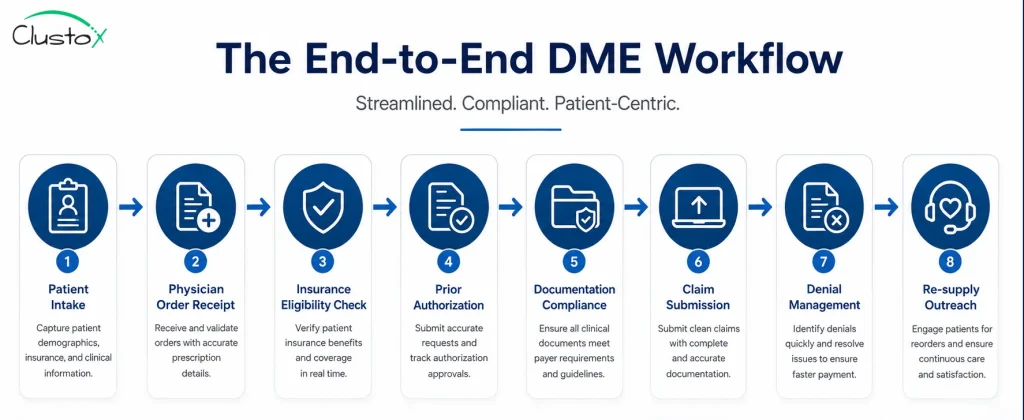
Table of Contents
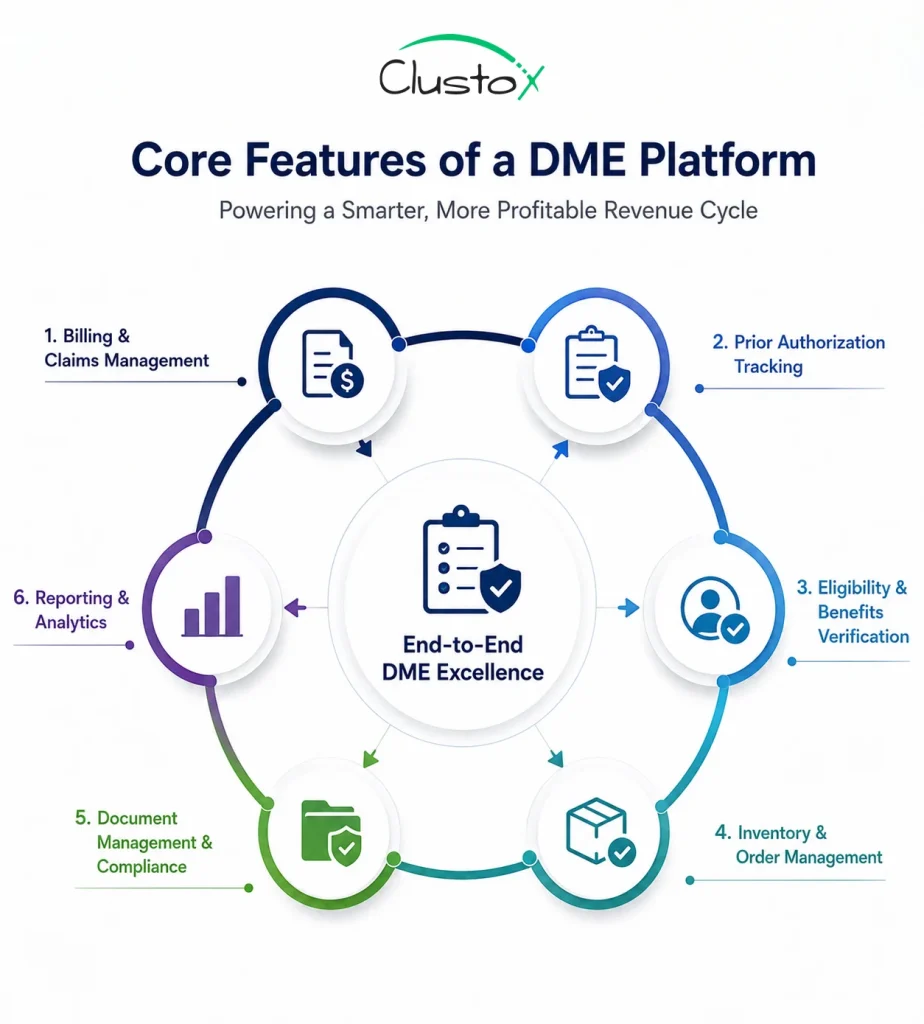
What Are the Core Features Every DME Platform Should Have?
Not every platform covers every workflow at the same depth. Before you evaluate vendors, know which features are non-negotiable for your operation.
Billing and claims management
This is the revenue engine. Look for automated HCPCS code assignment, CMS-1500 and UB-04 form support, electronic claim submission to Medicare and commercial payers, and real-time claim status tracking. ERA (Electronic Remittance Advice) posting and EOB management should be built in, not bolted on.
Prior authorization tracking
Prior auth is where revenue goes to die without a system. A good DME platform gives you a centralized PA queue, auto-alerts for expiring authorizations, documentation checklists tied to payer requirements, and status tracking by order. Medicare Advantage plans denied 7.7% of all prior authorization requests in 2024, according to KFF. That number has climbed year over year. You need a system that catches denials before they become write-offs.
Eligibility and benefits verification
Real-time eligibility checks against payer databases are standard. What separates strong platforms is automated benefits breakdowns by equipment category, so your intake staff knows co-pay and deductible status before the order ships.
Inventory and order management
For suppliers managing physical stock, inventory tracking tied to patient orders is essential. You want lot tracking, serial number management, and low-stock alerts. Rental-versus-purchase tracking should be automatic, not manual.
Document management and compliance
Medicare compliance requires specific documentation for every order: a valid prescription, a completed Detailed Written Order (DWO), and supporting clinical notes. The platform should store, version, and flag incomplete documentation before a claim goes out.
Reporting and analytics
You cannot manage what you cannot measure. Look for denial trend reports by payer and code, days-in-AR aging, clean claim rate, and referral source performance. Custom dashboards matter if you have a VP of Revenue Cycle who tracks different metrics than your Director of Operations.
How Do the Leading DME Software Platforms Compare in 2026?
The table below gives you a side-by-side view of the platforms that operations leaders evaluate most often. Use it as a starting point, not a final verdict. Your workflow complexity, payer mix, and team size should drive the final decision.
| Platform | Best Fit | Billing Depth | PA Workflow | Inventory | Pricing Model |
|---|---|---|---|---|---|
| Brightree | Mid-to-large suppliers | Strong | Strong | Strong | Per-user / module |
| NikoHealth | Growth-stage suppliers | Strong | Strong | Moderate | Per-user SaaS |
| TIMS Software | Independent HME/DME | Moderate | Moderate | Strong | Perpetual + support |
| Universal Software Solutions (USS) | Small-to-mid suppliers | Moderate | Moderate | Moderate | Custom quote |
| Bonafide Management Systems | Complex payer mix | Strong | Strong | Moderate | Per-user SaaS |
| Fastrack Healthcare Systems | High-volume suppliers | Strong | Moderate | Strong | Custom quote |
Note: Pricing models and feature depth change. Confirm all details directly with each vendor before shortlisting.
What Should You Ask a DME Software Vendor Before You Commit?
Most demos are built to impress, not to reveal. Here are the questions that cut through the polish and tell you what you actually need to know.
- How does your platform handle payer-specific prior auth documentation requirements? Can it adapt when a payer changes its criteria?
- What is your average customer support response time, and what does escalation look like for billing-critical issues?
- What is your ERA posting accuracy rate, and how do you handle partial payments and secondary payer billing?
- How does your denial management workflow work, end to end? Can you show me a live denial queue?
- What EHR integrations do you support natively, and how do referral orders flow in from referring providers?
- What does your implementation timeline look like, and what does staff training include?
- Who owns the data if we leave? How do we export it, and in what format?
- What does your product roadmap look like for AI-assisted prior auth and documentation review?
Push for live workflow demonstrations, not slide decks. Ask to speak with two or three customers who run a similar operation to yours.
Cloud-Based vs. On-Premise DME Software: Which One Is Right for You?
Most new implementations in 2026 are cloud-based. The reasons are practical: lower upfront cost, automatic updates, remote access for multi-site operations, and no server maintenance burden on your IT team.
On-premise systems still make sense in specific situations: organizations with strict data residency requirements, operations with unreliable internet connectivity, or providers who made a large capital investment in a perpetual license within the last few years.
| Factor | Cloud-Based | On-Premise |
|---|---|---|
| Upfront cost | Low (subscription) | High (license + hardware) |
| Update frequency | Automatic | Manual / vendor-scheduled |
| Remote access | Yes, anywhere | Requires VPN or local network |
| IT overhead | Minimal | Significant |
| Data control | Vendor-managed | Full internal control |
| Scalability | Easy to add users | Requires hardware planning |
| Typical contract | Annual or multi-year SaaS | Perpetual + annual support |
If you are evaluating both, ask cloud vendors how they handle HIPAA Business Associate Agreements, disaster recovery, and uptime SLAs. These are non-negotiable for any platform handling protected health information.
How Is AI Changing DME Software in 2026?
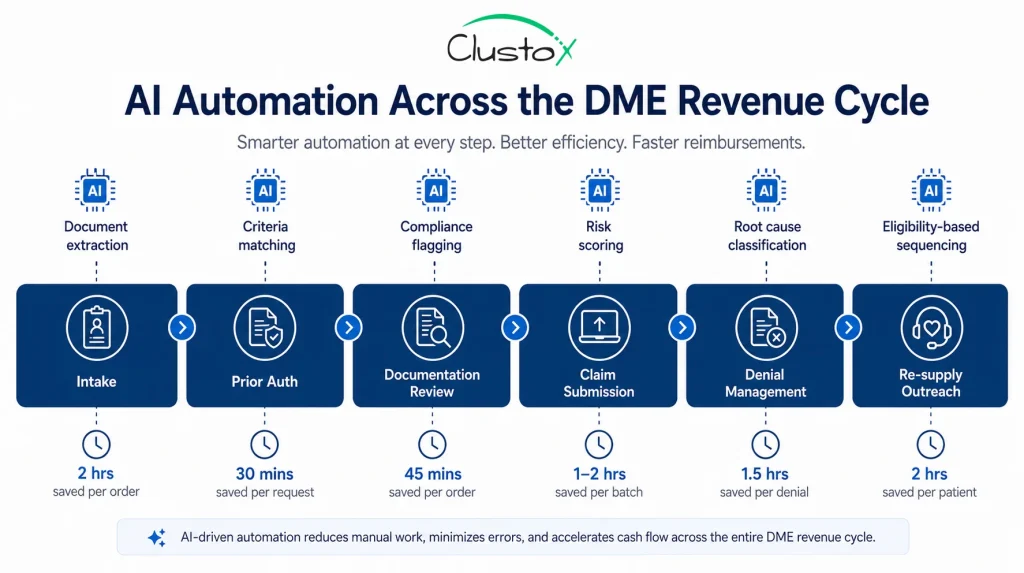
Artificial intelligence is now embedded in the core workflows of modern DME platforms, not positioned as a future roadmap item.
Here is where it is making a measurable difference today.
Prior authorization automation
AI-assisted prior auth tools extract clinical documentation, match it to payer criteria, and flag documentation gaps before submission. The goal is reducing the 3-to-10-day manual PA cycle to 24-48 hours. Not every vendor has this at production quality. Ask for proof of outcome data, not just a product pitch.
Eligibility and benefits verification
Automated real-time eligibility checks have been available for years. AI adds a layer of benefits interpretation, flagging likely coverage gaps and co-pay structures based on payer and plan data.
Denial prediction and prevention
Some platforms now score claims before submission, flagging high-denial-risk orders based on historical payer behavior, code combinations, and documentation completeness. This is where AI has the highest ROI for revenue cycle teams.
Re-supply outreach automation
Automated outreach for eligible resupply patients, via SMS, email, or automated calls, is now table stakes for CPAP and incontinence supply businesses. AI layered on top can prioritize outreach by likelihood to convert or by coverage eligibility status.
AI does not eliminate the need for trained billing and operations staff. It reduces repetitive manual tasks so your team focuses on the exceptions that require judgment.
What Are the Most Common DME Software Implementation Mistakes?
A platform that is configured poorly performs worse than a spreadsheet. These are the mistakes that show up most often during go-live and the first 90 days after.
- Skipping payer-specific setup. Each major payer has different claim format requirements, PA documentation needs, and EDI rules. Build these configurations before go-live, not after the first denial batch.
- Underestimating training time. Billing and intake staff need hands-on workflow training, not just a tour of the interface. Budget at least two weeks of structured training for core users.
- Not cleaning data before migration. Migrating a backlog of incomplete or duplicate patient records creates compliance and billing problems that take months to resolve. Clean your data before you move it.
- Going live without a parallel run. Run your old system and new system side by side for at least two weeks. Catch configuration errors before they affect a live claim.
- Ignoring the reporting setup. Default reports rarely match what your revenue cycle team actually needs to track. Configure custom dashboards and denial trend reports during implementation, not six months later.
What Red Flags Should You Watch for During a DME Software Evaluation?
The demo will always look clean. These are the signals that suggest a harder experience down the road.
- The vendor cannot give you direct customer references who run a similar operation. This is a hard stop.
- Support is only available via a ticketing portal with no phone escalation path for urgent billing issues.
- The platform does not have a production-ready integration with your existing EHR or referral intake system.
- Pricing is quoted per module rather than a clear per-user or per-location model. Module-based pricing typically costs more than the initial quote once you add the features you actually need.
- The vendor is vague about uptime SLAs and does not provide a Business Associate Agreement upfront.
- The implementation timeline is under four weeks for a complex, multi-location operation. Rushed implementations create configuration problems that take quarters to unwind.
What Compliance and Regulatory Factors Should Shape Your Platform Decision?
DME billing operates under CMS rules, HIPAA requirements, and payer-specific policies that change regularly. Your platform has to keep up.
Key compliance considerations to evaluate:
- HIPAA-compliant data storage and transmission, including signed Business Associate Agreements
- CMS-compatible claim formats and regular updates when CMS changes billing rules
- HCPCS code library updates: the platform should update codes on the CMS schedule, not on a quarterly lag
- Audit trail and documentation retention: CMS requires DME suppliers to retain documentation for seven years. Confirm the platform supports this and provides export options
- ACHC and BOC accreditation support: if you are accredited or pursuing accreditation, the platform should support the documentation requirements those bodies require.
What Does a Strong DME Software Vendor Partnership Look Like?
Software is only part of the equation. The vendor relationship determines how quickly you recover when something breaks.
Look for vendors who assign a dedicated account manager, not a shared support queue. You want someone who knows your operation and can escalate internally when needed.
Ask about product update communication. How much notice do you get before a billing engine change or a payer rules update? Will those changes break your existing workflows?
Your DME operation will change. You will add referral sources, expand into new equipment categories, or bring on new payers. The platform and the team behind it need to scale with you.
The right partner helps you identify where automation can replace manual work entirely. That means building custom Agentic AI workflows on top of your existing platform, whether that is automating prior auth documentation, running eligibility checks without staff intervention, or triaging denial queues before a human ever touches them.
Off-the-shelf platforms give you the foundation. A partner who understands Agentic AI architecture helps you build the layer on top that actually moves your numbers. That is the difference between a vendor who keeps the lights on and one who helps you grow.
Buyer Checklist: Before You Sign a DME Software Contract
Use this checklist during your final evaluation phase.
| Status | Checklist Item |
|---|---|
| Confirmed HIPAA BAA will be provided | |
| Reviewed uptime SLA and disaster recovery policy | |
| Spoke with at least two existing customer references | |
| Requested a live prior auth workflow demonstration | |
| Confirmed HCPCS code update frequency | |
| Reviewed denial management workflow end to end | |
| Confirmed EHR and referral source integration | |
| Reviewed data export policy and data ownership terms | |
| Confirmed implementation timeline and training scope | |
| Reviewed contract term, renewal terms, and exit clause | |
| Confirmed support escalation path for billing-critical issues | |
| Reviewed CMS claim format compatibility |
Conclusion
The right DME software does not just keep the lights on. It tightens your prior auth process, reduces your denial rate, and gives your billing team the visibility to catch problems before they compound.
The platforms reviewed in this guide are the most commonly evaluated in 2026. None of them is a universal right answer. Your payer mix, operation size, referral volume, and growth plans should drive the decision.
Take the checklist above into your final vendor conversations. Push for live workflow demonstrations, talk to existing customers, and do not sign a contract until you have seen how the platform handles your most painful workflow, not just the one that looks best in a demo.
If you want a second set of eyes on your platform evaluation or need help mapping your workflows before you go to market, the Clustox DME operations team works directly with suppliers at this stage.
Fix Your DME Workflows Before the Next Denial Batch.
Clustox DME experts will review your platform, map your denial triggers, and hand you a prioritized fix list before your next claims run.
Frequently Asked Questions About DME Software
What is the difference between DME software and general medical billing software?
General medical billing software is designed for physician practices and clinics. DME software is built specifically for equipment suppliers, with HCPCS code support, rental-versus-purchase tracking, inventory management, CMS-specific documentation requirements, and prior authorization workflows tied to equipment categories. Using a general billing platform for DME operations typically results in manual workarounds and a higher denial rate.
How much does DME software cost?
Pricing varies significantly by platform, operation size, and feature set. Cloud-based platforms typically charge on a per-user per-month basis, with costs ranging from a few hundred to several thousand dollars per month depending on user count and modules. On-premise systems often involve a larger upfront license fee plus an annual support contract. Always request a full cost-of-ownership breakdown, including implementation, training, and integration fees.
Which DME software is best for small suppliers?
There is no single best option for small suppliers. Platforms like NikoHealth and Universal Software Solutions are frequently evaluated by smaller operations because of their onboarding support and pricing structures. The right choice depends on your payer mix, billing volume, and whether you need inventory management alongside billing. Get demos from at least three vendors before deciding.
Does DME software integrate with EHR systems?
Most leading DME platforms offer integrations with common EHR systems, though the depth and reliability of those integrations vary. Native integrations with systems like Epic, Cerner, or Allscripts are more reliable than third-party middleware solutions. During your evaluation, test the referral order workflow end to end with a live demonstration, not just a diagram.
How long does DME software implementation take?
Implementation timelines range from four to twelve weeks depending on operation complexity, data migration scope, and the number of payer EDI connections to configure. Multi-location operations or those with large historical data migrations typically need more time. Be cautious of vendors who quote timelines under four weeks for anything other than a small, single-location setup.
Can DME software help reduce claim denials?
Yes, and this is one of the strongest ROI arguments for upgrading a legacy system. Modern DME platforms reduce denials through automated documentation checklists, payer-specific prior auth criteria matching, pre-submission claim scrubbing, and denial trend reporting by payer and code. The degree of improvement depends on your current denial rate, your workflow configuration, and how thoroughly your team uses the denial management tools the platform provides.