

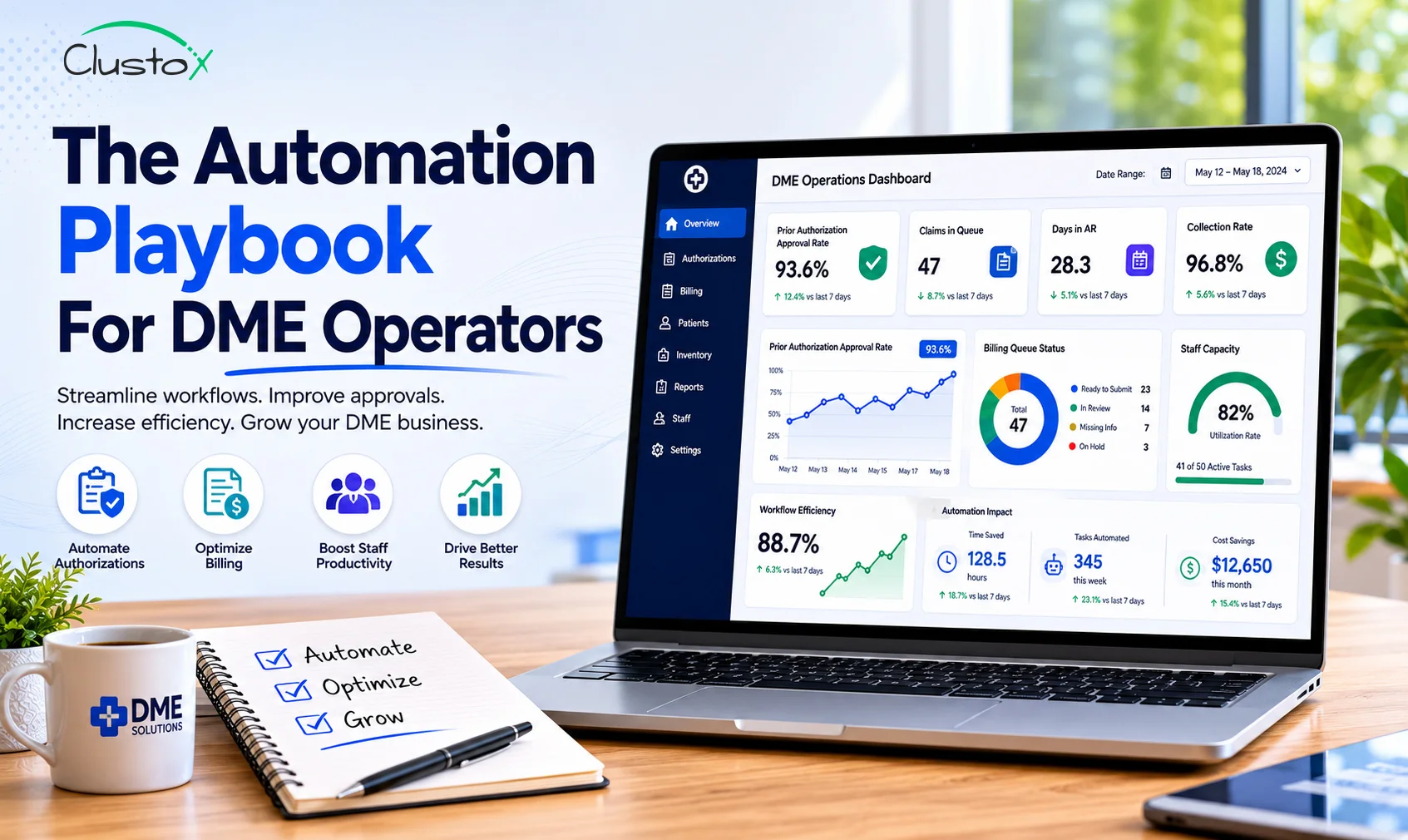
DME operators can scale order volume, reduce billing backlogs, and cut prior authorization turnaround times without hiring additional staff. The approach centers on deploying DME management software with targeted automation across intake, eligibility verification, prior auth, and denial management. This guide breaks down exactly where to automate, what to expect, and how to build the case internally.
Headcount is one of the largest cost drivers in DME operations. Every new referral source, every new payer contract, and every new product line brings more paperwork, more follow-up calls, and more coordination. The natural response is to hire. But hiring is slow, expensive, and adds management overhead you may not have capacity for.
The DME operators growing fastest right now are not doing it by adding people. They are doing it by redesigning how work moves through their systems. They use DME management software not just as a record-keeping tool but as the backbone of an automated workflow, where documentation gets verified, authorizations get tracked, and denials get flagged without someone manually checking on each one.
This playbook shows you the specific workflows to target, the order to tackle them, and the numbers you should expect when automation is working correctly.
Why Does Headcount Keep Growing Even When Revenue Stays Flat?
Most DME businesses have a staffing problem that looks like a volume problem. Order intake goes up, so billing staff gets stretched. Denials pile up, so you add a denial specialist. Prior auth takes too long, so you hire another coordinator. Each hire makes sense in isolation, but collectively they erode your margin without fixing the underlying issue.
The underlying issue is process inefficiency. Work is touching too many hands, waiting too long between steps, and requiring manual re-entry across systems that do not talk to each other. The result is a staffing model that scales linearly with volume, which is not sustainable.
DME management software addresses this by creating structured, automated handoffs between workflow stages. Instead of a coordinator manually checking eligibility before every order, the system runs that check automatically and flags exceptions. Instead of a biller following up on auth status daily, the system tracks it and surfaces items that need attention.
The goal is not to replace your team. It is to stop your team from spending 60% of their day on work that software can do more consistently.
Table of Contents
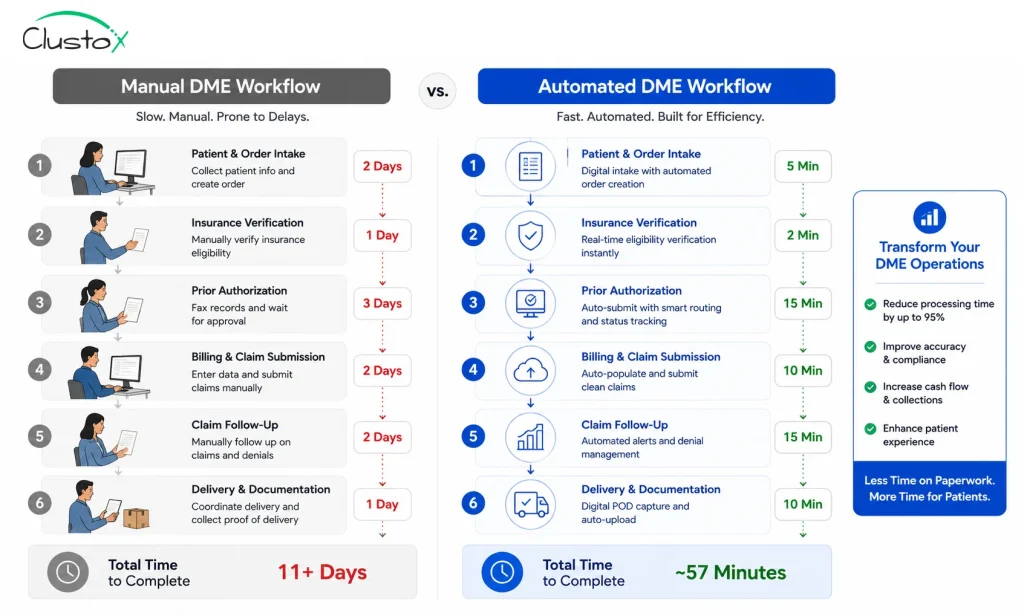
What Workflows in DME Operations Are the Best Candidates for Automation?
Not every workflow is worth automating first. The highest-value targets share two characteristics: they are high-frequency (happening dozens or hundreds of times per week), and they follow a predictable set of rules that a system can apply consistently.
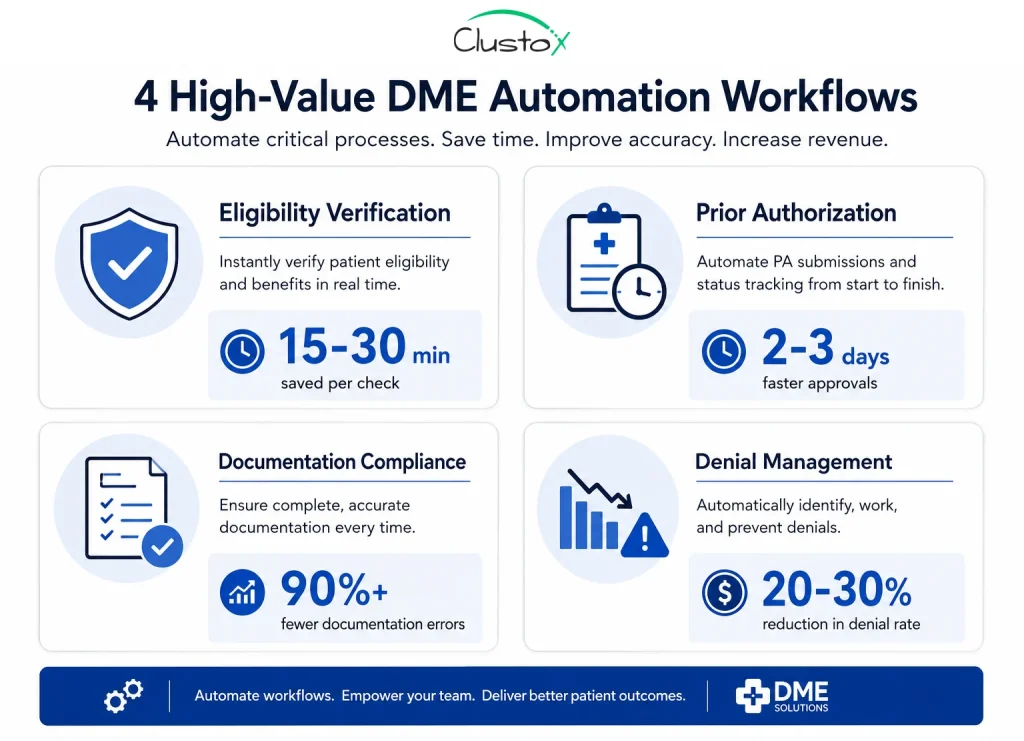
Here are the four workflows that return the most value when automated:
Eligibility and benefits verification
Manual eligibility checks are one of the biggest hidden time costs in DME. A coordinator pulling benefits from multiple payer portals, cross-referencing coverage rules, and documenting results can take 15 to 30 minutes per order. At scale, this adds up to dozens of staff hours per week on a task that a connected DME management software platform can run in minutes.
Automated eligibility checks run against payer APIs or clearinghouses, pull active coverage details, and populate the patient file without staff involvement. Exceptions (coverage gaps, coordination of benefits issues, inactive plans) get flagged for human review rather than pulling someone in on every single order.
Prior authorization tracking and follow-up
Prior authorization is the most manual, most time-consuming, and most delay-prone step in the DME intake process. Staff submit requests, then spend days following up by phone or checking payer portals. The process is inconsistent, and delays translate directly to delayed deliveries and held cash.
Automation in this area does not replace the submission itself in most cases, but it does eliminate the manual follow-up cycle. Modern workflows reduce the administrative burden associated with prior authorization by automating status tracking and escalation management. Teams stop spending time on auths they already submitted and start spending time only on auths that need intervention.
Documentation completeness checks
Incomplete documentation is one of the top reasons for DME claim denials. Letters of Medical Necessity that are missing required elements, unsigned forms, expired certificates, and missing HCPCS code documentation all create denial risk that is entirely preventable.
A well-configured DME management software platform runs documentation checks against payer-specific requirements before a claim goes out. If a required field is missing or a document has expired, it gets flagged at intake or pre-billing rather than after the denial comes back 30 days later.
Denial management and appeal queuing
Denial management is often reactive: a denial arrives, gets logged, gets reviewed, and maybe gets appealed, depending on the dollar amount and how busy the billing team is. Automation changes the queue. Denials get categorized by reason code automatically, high-value items get prioritized, and appeal timelines get tracked so deadlines do not get missed.
This does not require replacing your billing team. It requires giving them a system that organizes their work so the highest-priority items surface at the top of the queue every morning.
How Does DME Management Software Actually Reduce Manual Workload?
The mechanics of automation in DME are not complicated, but they require a system that is properly configured for your payer mix, your product lines, and your documentation requirements. Generic software that is not set up for DME-specific rules will not deliver the same results.
Here is how a reduction in manual workload actually happens across a typical DME operation:
- Rules-based routing: incoming orders get automatically categorized, assigned to the right workflow queue, and flagged if required information is missing. No one has to read every order and decide what to do with it.
- Automated status updates: patients, referral sources, and internal staff get status notifications triggered by workflow events rather than by someone manually sending an email or making a phone call.
- Payer-specific documentation templates: the system knows what each payer requires for each HCPCS code and pre-populates forms with the right fields, reducing documentation errors at the source.
- Exception-based management: staff only see items that need a decision. Everything that follows the standard path moves through without interruption.
- Dashboard visibility: managers see real-time status across the entire order pipeline so they can identify bottlenecks before they become backlogs.
Emerging technologies like Agentic AI are also changing how DME workflows operate. Instead of relying only on static automation rules, AI-driven systems can proactively identify bottlenecks, prioritize high-risk claims, and recommend next actions based on payer behavior and operational trends.
Note: The platforms most commonly used in mid-market DME operations include Brightree, NikoHealth, and TIMS. Each has different native automation capabilities. The level of workflow automation you can achieve depends heavily on which platform you are running and how it is configured, not just on what the software vendor says it can do.
What Results Should You Expect When You Automate DME Workflows?
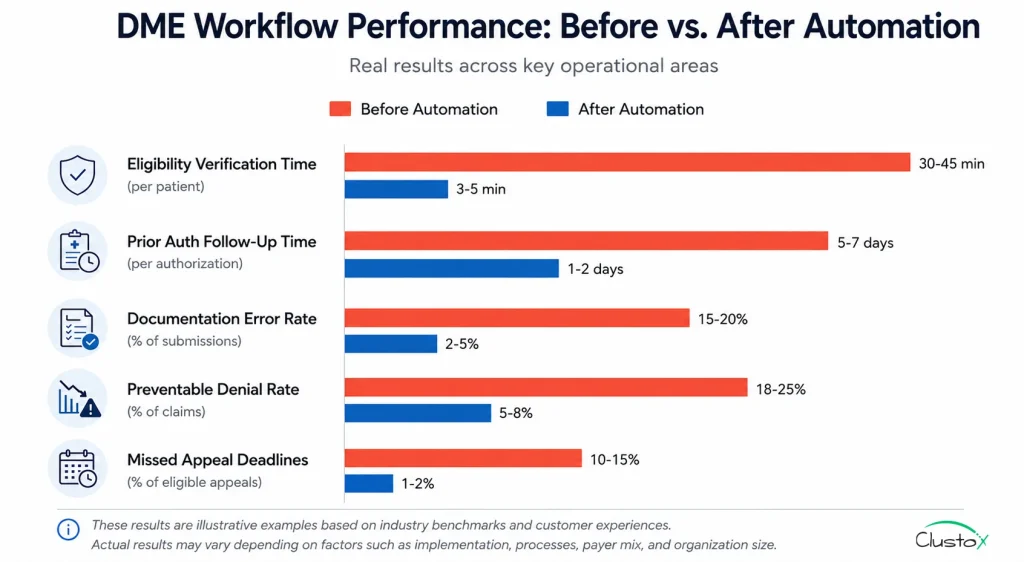
Results vary based on your current state, your software configuration, and which workflows you automate first. That said, there are reasonable benchmarks you can use to evaluate whether your automation is performing:
| Workflow Area | Manual Baseline | With Automation |
|---|---|---|
| Eligibility verification | 15-30 min per order | 1-3 min per order (exception review only) |
| Prior auth follow-up | 30-60 min per auth daily follow-up | System-tracked; staff intervene on exceptions only |
| Documentation error rate | High without structured templates | Reduced when payer-specific templates enforced |
| Denial rate (preventable) | Higher without pre-billing checks | Lower with documentation compliance workflows |
| Denial appeal rate | Inconsistent; deadline misses common | Prioritized queue; deadlines tracked automatically |
Important:
These ranges are illustrative operational outcomes reported across DME businesses that have implemented structured automation. Your specific results will depend on your current processes, your payer mix, and how well your software is configured.
How Do You Build the Business Case for DME Management Software Investment?
The decision to invest in better DME management software, or to invest in configuring the software you already have more effectively, is a financial one. You need to show the math before you get buy-in. Strong automation directly improves overall DME Revenue Cycle Management performance by reducing delays, preventing revenue leakage, and accelerating reimbursements.
Here is how to build that case:
Start with your cost-per-auth and cost-per-claim
Take your total billing and authorization staff cost (salary, benefits, and overhead) and divide it by the number of orders processed per month. That is your fully loaded cost per order. If your automation investment reduces the average handling time per order by 40%, that number drops proportionally.
Calculate your denial cost
Every denied claim has a direct cost: the dollar amount of the claim itself, the staff time to work the denial, and the cost of any appeals. Track your denial rate by payer, calculate average revenue at risk per denial, and then model what a 20% to 30% reduction in preventable denials would return. For most mid-market DME operators, this number is significant.
Factor in growth capacity
If your current team can handle X orders per month at capacity, automation effectively increases that number without a proportional increase in headcount. Model what revenue would look like at 120% or 140% of current volume with the same team. That gap is the growth value of automation.
What Are the Most Common Reasons DME Automation Projects Fail?
Automation does not fail because the technology does not work. It fails for operational reasons that you can avoid if you know where to look.
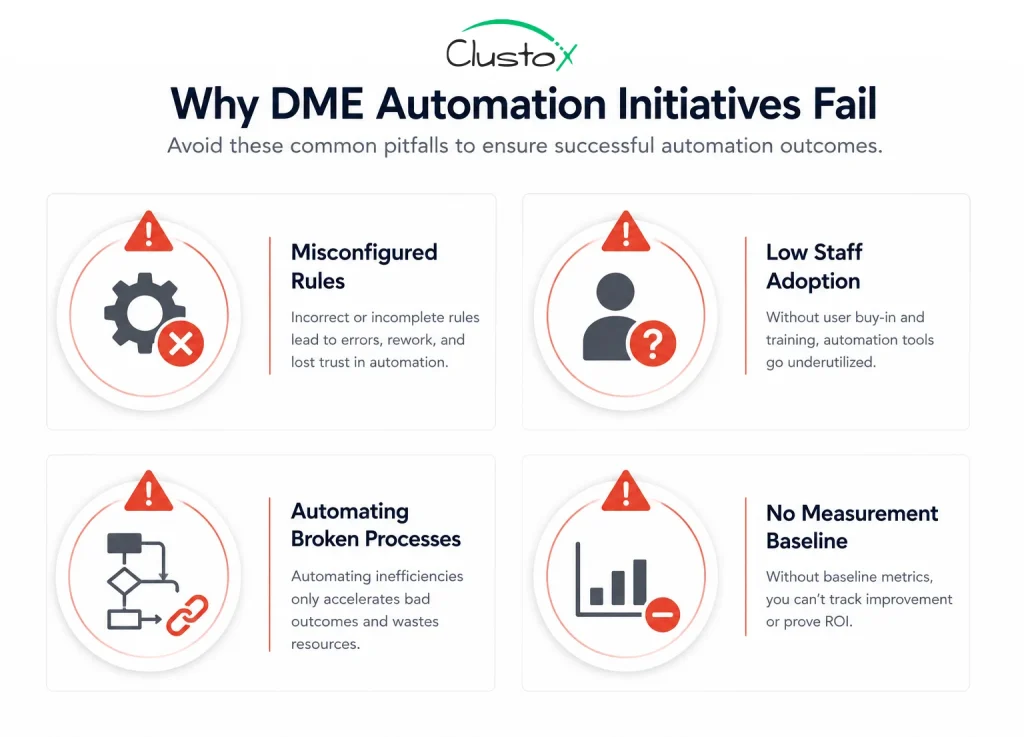
Poorly configured rules
Most DME management software platforms are configurable, but they are not pre-configured for your payer mix. If you implement software and leave it on default settings, you will not get the results the vendor promised. Someone on your team, or a partner who knows DME workflows, needs to configure payer-specific rules, documentation requirements, and escalation logic.
Staff adoption problems
Automation only works if your team uses the system as designed. If staff continue working outside the system, creating shadow processes in spreadsheets or email, the workflow data becomes unreliable and the system’s exception management does not function correctly. Adoption is a training and change management problem, not a technology problem.
Automating a broken process
If your intake process has fundamental gaps, for example, referrals coming in without required clinical documentation, automating on top of that process just makes the broken parts faster. Before you automate, map your current workflow and identify where failures actually originate. Automation should fix the flow, not just speed it up.
No measurement baseline
If you do not measure your current performance before implementing automation, you cannot demonstrate improvement after. Track your authorization turnaround time, your claim denial rate, your cost per claim, and your average order processing time before you go live. Those are your baseline numbers.
How Should You Sequence DME Automation Implementation?
Trying to automate everything at once is a reliable way to create chaos. A phased approach gives your team time to adapt and gives you clean data on what is working.
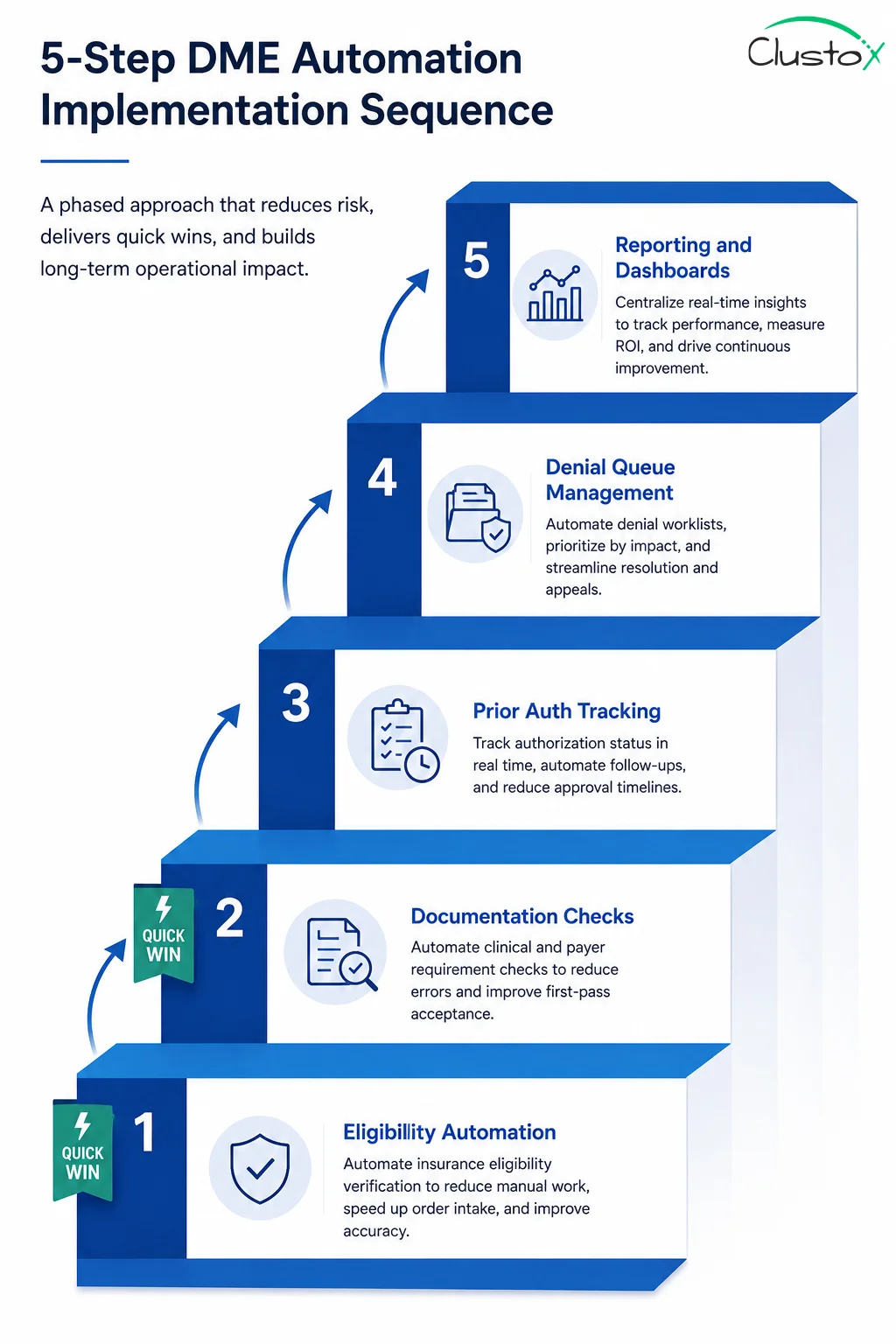
- Start with eligibility verification. It is high-frequency, low-risk, and delivers fast, visible results. Your team will see the time savings immediately, which builds confidence in the broader initiative.
- Add documentation compliance checks before claims go out. This reduces denial volume within the first billing cycle after go-live, which is a fast financial win.
- Configure prior auth tracking and automated follow-up logic. This takes more configuration time because payer rules vary, but the reduction in coordinator time is substantial.
- Build out denial management queuing and appeal tracking. This is often the most impactful for revenue recovery, but it works best after your upstream processes are cleaner.
- Add reporting and dashboard visibility last. Once your workflows are running cleanly, surfacing the data for management review becomes the final layer.
What Should You Look for When Evaluating DME Management Software?
Not all platforms are equal, and the right fit depends on your size, your payer mix, and your product categories.
Here are the criteria that matter most for operators focused on scaling without adding staff:
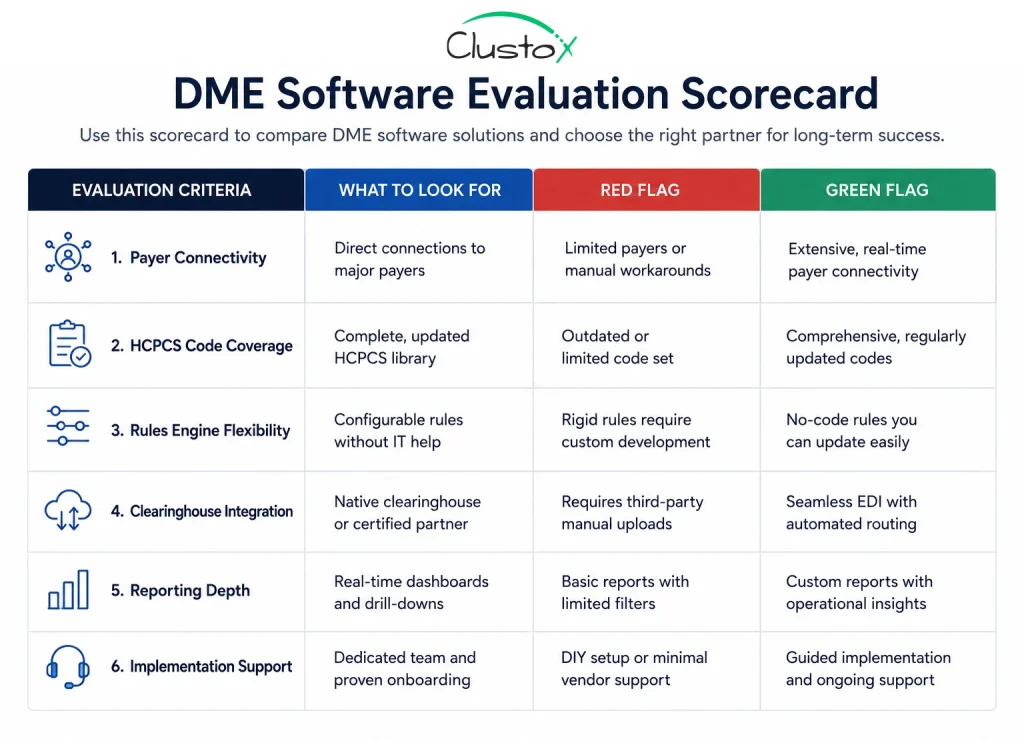
- Payer connectivity: Does the platform have direct API connections to your top payers, or does it rely on manual portal checks? Direct connectivity is the foundation of automated eligibility and auth tracking.
- HCPCS code coverage: does the documentation engine cover the product categories you bill? A platform built for CPAP suppliers may not have the right templates for complex rehab or orthotics.
- Rules engine flexibility: can you configure payer-specific documentation requirements and escalation rules without a developer? If not, your automation ceiling is low.
- Clearinghouse integration: clean claim submission and real-time eligibility checks depend on a clearinghouse connection. Understand which clearinghouses the platform supports and whether those cover your payers.
- Reporting depth: can you see authorization turnaround time by payer, denial rate by HCPCS code, and order pipeline status in real time? If the reporting is superficial, you cannot manage the operation effectively.
- Implementation support: does the vendor provide configuration support that is specific to DME workflows, or do they hand you a generic onboarding checklist? The difference in outcomes is significant.
Owner’s Checklist: Are You Ready to Scale With DME Management Software?
Use this checklist before you invest in new software or expand your automation setup. If you are checking fewer than six of these boxes, start there before adding more technology.
| # | Checklist Item |
|---|---|
| You know your current cost per order (fully loaded, including staff time and overhead). | |
| You have tracked your prior authorization turnaround time by payer in the last 90 days. | |
| You know your claim denial rate and can break it down by denial reason code. | |
| Your DME management software is configured with payer-specific documentation rules, not generic defaults. | |
| Your eligibility verification process runs before every order, not only when a coordinator remembers to check. | |
| Your team has a defined escalation path for orders stuck in auth, not just a group email thread. | |
| You have a denial appeal process with tracked deadlines, not a spreadsheet someone updates when they have time. | |
| New staff can follow your intake and billing workflows without relying on institutional knowledge from one person. | |
| You can see your full order pipeline status in real time without calling your billing team for an update. | |
| You have measured your current workflow performance and have a baseline to compare against after any change. |
If several of these items are not in place, adding more software is unlikely to solve your scaling problem. The checklist items that are missing are the workflow gaps. Fix those first, then automate on top of a clean foundation.
Frequently Asked Questions (FAQs)
Can DME management software really reduce staff hours?
Yes, when it is properly configured. The reduction comes from eliminating manual tasks that software can handle consistently, such as eligibility checks, document completeness reviews, and auth status tracking. Staff time shifts from routine processing to exception management and higher-value tasks. The actual reduction depends on your current workflow and how well the system is set up.
How long does it take to see results from DME workflow automation?
Most operators see measurable results within 60 to 90 days of a properly configured go-live. Eligibility verification and documentation compliance tend to show improvement in the first billing cycle. Prior auth and denial management improvements take slightly longer because they require payer-specific configuration and a few cycles of data to validate.
Do I need to replace my current DME software to automate?
Not necessarily. Many operators are already running platforms like Brightree or TIMS but are using only a fraction of the available automation features. A workflow audit often reveals significant automation capacity that is already licensed but not configured. Replacement is sometimes the right answer, but it is not always the starting point.
What is the biggest mistake DME operators make with automation?
Automating a process that has not been reviewed first. If your intake workflow has gaps where referrals come in without required documentation, adding automation on top of that just speeds up the problem. Map the current workflow, identify failure points, fix those first, and then automate the clean version of the process.
Is DME management software HIPAA-compliant?
All major DME-specific platforms are designed with HIPAA compliance in mind and include features like access controls, audit logging, and data encryption. However, compliance is not just about the software. Your configuration, your staff training, and your internal policies also determine your actual compliance posture. Always verify with the vendor and consult qualified counsel for your specific situation.
How does automation affect DME denial rates?
Automation reduces preventable denials primarily by catching documentation errors before claims go out. When payer-specific documentation requirements are enforced at the time of intake or pre-billing, claims that would have been denied for missing information are caught and corrected first. The degree of improvement depends on what percentage of your current denials are documentation-related versus clinical or coverage-related.
The Bottom Line: Growth Does Not Always Require More People
The DME operators who are scaling efficiently right now are not doing it by running larger teams. They are doing it by building systems where routine work moves through automatically and staff time is reserved for the work that actually requires human judgment.
DME management software is the platform that makes this possible, but the platform alone is not enough. Configuration, workflow design, and staff adoption all determine whether you get the results you are looking for.
If you are looking at your team’s capacity and wondering how you are going to absorb more volume without another round of hiring, the answer is usually not a new hire. It is a workflow audit.
Ready to Scale Without Adding Headcount?
See exactly where your DME operation leaks hours and money. Book a workflow audit with our team and get a prioritized automation roadmap built for your setup.
Disclaimer
This article is intended for DME providers, operations leaders, and technology decision-makers. It is not medical advice and does not constitute guidance on patient care, equipment selection, or clinical decisions. Regulatory references (CMS, HIPAA, accreditation standards) are accurate as of the review date; regulations change frequently, and providers should consult primary sources or qualified counsel for current requirements.