

Most DME operators know their denial rate is too high, intake takes too long, and billing teams spend too many hours on tasks that should not require manual effort. What most operators do not know is exactly which workflows are creating those problems and where automation can generate the fastest operational return.
A workflow automation audit solves that problem by giving you a structured view across intake, eligibility verification, prior authorization, claims, denial management, inventory, and compliance workflows.
According to AAHomecare’s 2023 Operational Survey, DME providers that systematically identify and automate workflow gaps reduce operating cost per order by 25% to 40% within 12 months. The goal is not to automate everything at once. It is to identify where manual processes are creating the highest cost, delay, and denial risk inside your operation.
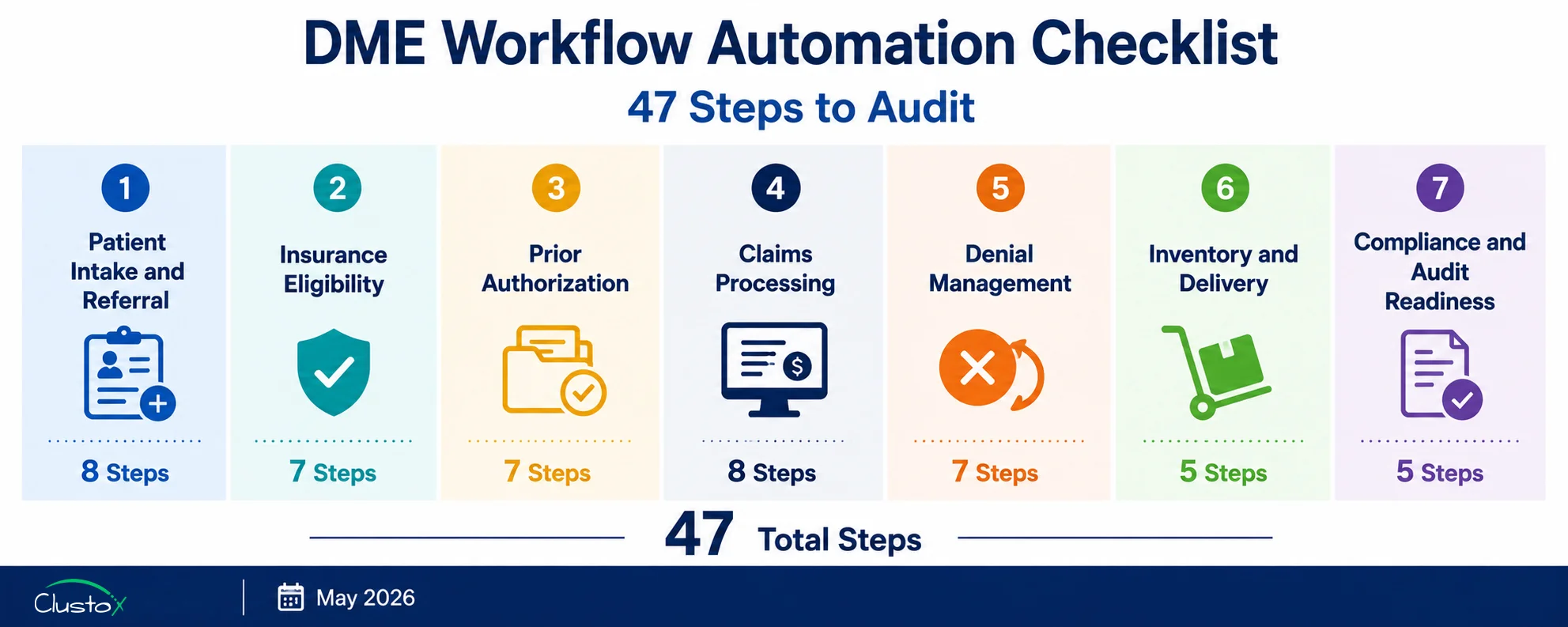
The 47-step checklist in this guide is designed for DME operators who want to audit their workflows internally, without a consultant, in under a day. Each step should be scored as Automated, Partial, or Manual. The sections with the highest number of Partial and Manual scores represent the workflows most likely to benefit from automation investment first.
What Does This Checklist Cover?
- Section 1 Patient Intake and Referral Processing (Steps 1 to 8)
- Section 2 Insurance Eligibility Verification (Steps 9 to 15)
- Section 3: Prior Authorization Management (Steps 16 to 22)
- Section 4 Claims Processing and Submission (Steps 23 to 30)
- Section 5 Denial Management and Appeals (Steps 31 to 37)
- Section 6 Inventory and Delivery Workflow (Steps 38 to 42)
- Section 7 Compliance Documentation and Audit Readiness (Steps 43 to 47)
How Should You Use This Checklist?
Score each step using three categories. “Automated” means the step runs without manual intervention in the normal case, with exceptions handled in a defined queue. “Partial” means the step is partly automated but still requires regular manual input, correction, or workaround. “Manual” means the step is performed entirely by a staff member each time it occurs.
A Partial score is often more expensive than a Manual score. Partial automation creates the illusion of efficiency while hiding the cost of the manual steps still embedded in the workflow. Identify your Partial scores carefully; they represent automation investments that are already underway but not yet generating full value.
At the end of each section, note your score pattern. Three or more Manual or Partial scores in a single section indicate a workflow area that is likely generating measurable revenue loss or staff cost above industry benchmarks. The HFMA Revenue Cycle Benchmarking Report 2023 provides payer-mix-adjusted benchmarks for each of the seven workflow areas covered in this checklist.
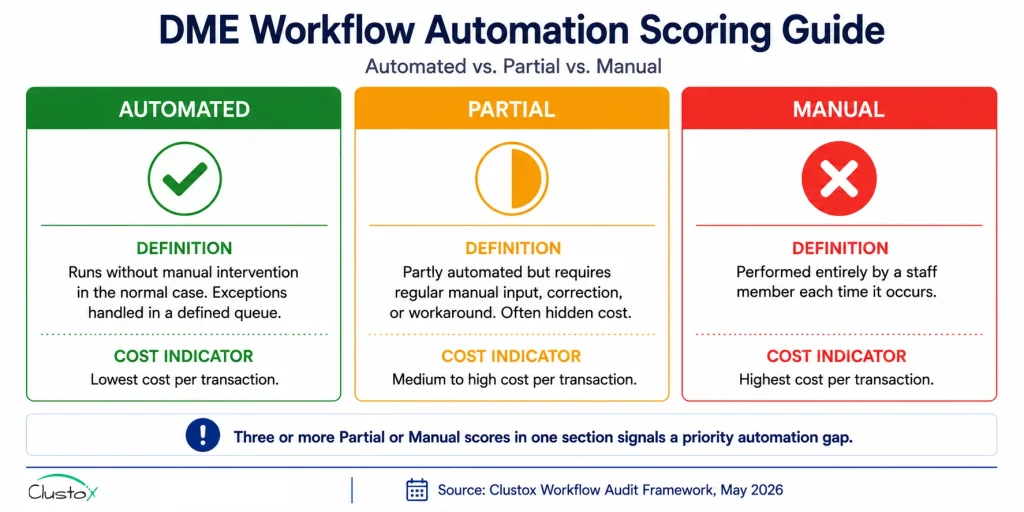
Table of Contents
Section 1 Patient Intake and Referral Processing (Steps 1 to 8)
Patient intake is where most DME workflow failures originate. Manual intake adds 48 to 72 hours to order-to-fulfillment time, per AAHomecare’s 2023 Operational Survey. The eight steps below cover the complete intake workflow from referral receipt to order creation in Brightree, NikoHealth, or TIMS Medical.
Step 1: Referral Receipt and Queue Management
Inbound referrals from all sources (fax, EHR portal, phone, direct API) route automatically into a single monitored intake queue rather than arriving in separate inboxes or fax machines that staff check manually. Score: Automated / Partial / Manual.
Step 2: Fax-to-Digital Conversion
Inbound faxes are converted to machine-readable digital documents automatically using a fax digitization tool such as eFax or Kno2 and routed to the intake queue without a staff member manually scanning or uploading paper documents. Score: Automated / Partial / Manual.
Step 3: Referral Document Parsing and Data Extraction
An LLM-based document parser reads the inbound referral (whether fax, PDF, or HL7 FHIR from an EHR) and automatically extracts patient demographics, referring physician NPI, diagnosis codes (ICD-10), and requested equipment. Fields that the parser cannot extract with sufficient confidence route to a human review queue rather than halting the full intake workflow. Score: Automated / Partial / Manual.
Step 4: Patient Record Creation in Core Platform
Parsed referral data populates the patient record in Brightree, NikoHealth, or TIMS Medical automatically, without manual re-keying of information that was already present in the referral document. Score: Automated / Partial / Manual.
Step 5:: Duplicate Patient Record Detection
The intake system checks for an existing patient record before creating a new one and flags potential duplicates for review rather than creating a second record that splits the patient’s order history. Score: Automated / Partial / Manual.
Step 6:: Referring Physician NPI Validation
The referring physician’s NPI is validated against the NPPES NPI Registry at intake to confirm the physician is active and enrolled to refer for the equipment category requested. Invalid or inactive NPIs are flagged before the order progresses. Score: Automated / Partial / Manual.
Step 7 HCPCS Code Assignment at Intake
The correct HCPCS Level II code and required modifiers are assigned at the intake stage based on the equipment requested and the referring diagnosis, rather than being assigned later at the billing stage, where coding errors are harder to catch before claim submission. Score: Automated / Partial / Manual.
Step 8: Patient Outreach for Missing Information
When required patient information (insurance card details, patient consent, secondary insurance) is missing from the referral, an automated outreach agent contacts the patient via SMS or email with a HIPAA-compliant digital intake link rather than requiring a staff member to call the patient manually. Score: Automated / Partial / Manual.
Section 2 Insurance Eligibility Verification (Steps 9 to 15)
Eligibility errors are the second-leading cause of DME claim denials, generating approximately 22 percent of all denials per HFMA DME benchmark cohort data. The CMS 2023 Medicare Fee-for-Service Improper Payment Data attributes more than 1.2 billion dollars in annual DME improper payments to eligibility and coverage errors. Manual eligibility checks average 18 to 22 minutes per order, per AAHomecare 2023.
Step 9: Real-Time 270/271 EDI Eligibility Query
An eligibility agent submits a 270 EDI transaction to the payer and receives a 271 response automatically at the point of intake, without a staff member initiating the check or calling a payer phone line. The response is received in real time or within minutes, not processed overnight as part of a batch. Score: Automated / Partial / Manual.
Step 10: HCPCS-Level Benefit Parsing
The 271 EDI response is parsed to extract HCPCS-level benefit information,, not just active or inactive coverage status. That includes rental versus purchase rules, deductible remaining, copay and coinsurance rates, and whether the specific HCPCS code requested is covered under the patient’s plan. Score: Automated / Partial / Manual.
Step 11: Medicare Advantage Plan-Specific Coverage Check
For Medicare Advantage patients, the eligibility agent checks the specific MA plan’s HCPCS coverage policy rather than assuming Medicare Part B rules apply. MA plans maintain their own coverage rules separate from Medicare Part B, and these are updated annually. Refer to CMS Medicare Advantage plan lookup resources for current plan directories.
Step 12: Coordination of Benefits Detection
When a patient has secondary insurance, the eligibility workflow identifies the primary and secondary payers automatically and documents the coordination of benefits order in the patient record before the order progresses to claims. Score: Automated / Partial / Manual.
Step 13: Patient Financial Responsibility Estimate
A patient financial responsibility estimate is generated automatically from the eligibility results, showing the patient’s share based on deductible remaining, copay or coinsurance, and rental versus purchase classification, and is documented in the order record before delivery.
Step 14: Eligibility Re-Check at Delivery
A second eligibility check runs automatically within 24 to 48 hours of the scheduled delivery date to confirm that coverage has not lapsed between intake and delivery. For CPAP resupply programs, eligibility is re-verified automatically at each resupply trigger.
Step 15: Eligibility Verification Audit Trail
Every eligibility check is logged with a timestamp, the payer response, and the staff member or agent that initiated it, and this audit trail is stored per order in a format that can be exported for TPE, RAC, or ZPIC audit review.
Section 3: Prior Authorization Management (Steps 16 to 22)
Prior authorization failures cause approximately 19 percent of DME claim denials per HFMA benchmark data. CMS has expanded prior authorization requirements for DME categories, including power mobility devices and certain orthotics. A missing or expired PA is an automatic denial with no appeal path. The seven steps below audit the end-to-end PA workflow from requirement detection through approval tracking.
Step 16: PA Requirement Detection at Intake
The intake workflow checks the CMS prior authorization program list and payer-specific PA requirements for the HCPCS code and payer combination on the order, and flags whether a PA is required before the order progresses rather than discovering the requirement at the claim submission stage. Score: Automated / Partial / Manual.
Step 17: PA Request Assembly
When a PA is required, the system assembles the PA request package automatically from the documentation already on file in the order record, including the DWO, LMN, and relevant clinical notes, rather than requiring a staff member to gather and organise these documents manually for each PA submission. Score: Automated / Partial / Manual.
Step 18 PA Submission Routing
The completed PA request is submitted to the payer through the appropriate channel payer portal, electronic PA platform such as CoverMyMeds or Surescripts, or fax automatically, without a staff member logging into each payer portal individually to submit each PA request. Score: Automated / Partial / Manual.
Step 19 PA Status Tracking and Follow-Up
Once a PA request is submitted, the system tracks its status automatically and sends follow-up reminders at defined intervals when a response has not been received within the payer’s stated SLA. Staff are notified when PA status changes rather than checking each payer portal manually. Score: Automated / Partial / Manual.
Step 20 PA Approval Stored Against Order Record
When a PA is approved, the approval number, effective date, and expiration date are stored in the patient’s order record in Brightree or NikoHealth automatically, linked to the specific HCPCS code and equipment category covered. Score: Automated / Partial / Manual.
Step 21 PA Expiration Alert Before Delivery
The system alerts the relevant staff member automatically when a PA is approaching its expiration date and delivery has not yet occurred, providing time to request a PA extension before the approval window closes and a new PA is required. Score: Automated / Partial / Manual.
Step 22 PA Coverage Confirmation at Claim Creation
At the point of claim creation, the system confirms that an active PA is on file for the relevant HCPCS code and delivery date, and blocks claim submission if a required PA is missing or expired rather than submitting the claim and receiving an automatic denial.
Section 4: Claims Processing and Submission (Steps 23 to 30)
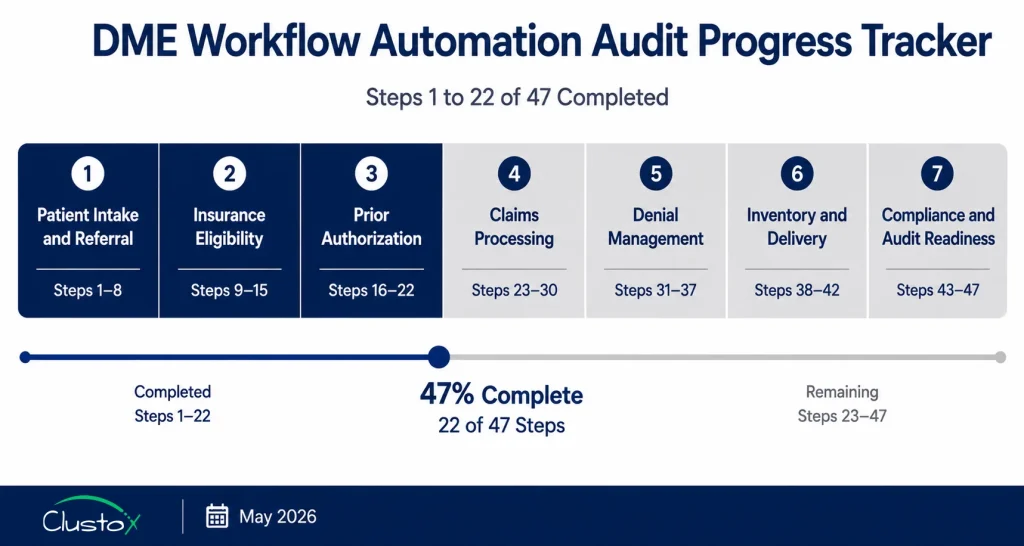
DME claim denial rates average 15 to 18 percent industry-wide, compared to 9 to 10 percent for healthcare overall, per the HFMA Revenue Cycle Benchmarking Report 2023. The eight steps below audit the end-to-end claims workflow from HCPCS code validation through electronic remittance posting.
Step 23: HCPCS Code and Modifier Validation Before Claim Creation
The HCPCS code assigned at intake is validated against the CMS Local Coverage Determination (LCD) database and payer-specific coverage policies before a claim is created. Required modifiers (KX, GA, GY, GZ, NU, RR, UE) are confirmed and applied based on the specific payer, equipment category, and rental month rather than applied generically. Score: Automated / Partial / Manual.
Step 24: Rental Month Tracking for Capped Rental Equipment
For capped rental equipment categories (oxygen, CPAP, power wheelchairs), the system tracks the rental month count automatically and applies the correct billing code and modifier for each month of rental, including the transition from rental to title transfer at the appropriate month, per CMS capped rental billing guidance. Score: Automated / Partial / Manual.
Step 25: Pre-Submission Claim Scrubbing
Claims pass through a DME-specific claim scrubber before submission that checks for formatting errors, missing required fields, invalid modifier combinations, timely filing risk, and HCPCS code and diagnosis code pairing requirements. Claims that fail scrubbing route to a specific correction queue rather than submitting with known errors. Score: Automated / Partial / Manual.
Step 26: Denial Prediction Scoring Before Submission
An AI-based scoring agent evaluates each claim for denial risk based on historical denial patterns for the payer, HCPCS code, and documentation set before the claim is submitted. High-risk claims route to a pre-submission review queue rather than submitting and generating a denial that requires rework. Score: Automated / Partial / Manual.
Step 27: Electronic Claim Submission via Clearinghouse
Clean claims are submitted electronically via clearinghouses Availity, Waystar, or Change Healthcare without manual resubmission steps for standard claim types. The clearinghouse provides a 277CA acknowledgment that is captured and logged automatically in the order record. Score: Automated / Partial / Manual.
Step 28: 277CA Acknowledgment Monitoring
277CA claim acknowledgments from the clearinghouse are monitored automatically,, and any rejected claims are flagged in a correction queue within the same business day, rather than discovered during a manual batch review at the end of the week. Score: Automated / Partial / Manual.
Step 29: 835 ERA Auto-Posting
Electronic Remittance Advice (835 ERA) is posted automatically to the correct patient account and order record in Brightree or NikoHealth without manual posting steps. Unmatched payments, where the ERA cannot be automatically reconciled to a specific claim, route to a clearly labelled exception queue showing the ERA detail alongside the original claim.
Step 30: Timely Filing Monitoring
The system tracks timely filing deadlines for all outstanding claims and automatically alerts staff when a claim is approaching its filing window before the window closes. Medicare Part B DME has a 12-month timely filing limit from the date of service, per CMS.
Section 5 Denial Management and Appeals (Steps 31 to 37)
Each denied DME claim costs an average of 118 dollars to rework when accounting for staff time, appeals, and write-offs, per HFMA. Standard appeal win rates across DME billing sit at 40 to 55 percent. Operators with structured appeal workflows consistently reach 60 to 75 percent, per Clustox client composite data (2024 to 2025, anonymized). The seven steps below audit the denial management workflow from initial denial receipt through appeal resolution.
Step 31: Denial Reason Code Routing
Denied claims route to specific staff queues based on denial reason code automatically. A CO-4 (procedure code inconsistent with modifier) goes to a different queue than a CO-96 (non-covered charge) or a CO-197 (precertification absent). Staff are not presented with a single undifferentiated denial list.
Step 32: Denial Root Cause Classification
Each denial is automatically classified by root cause category (eligibility error, documentation gap, coding error, timely filing, PA missing, duplicate claim) at the point it enters the denial queue, providing the data needed to identify recurring patterns rather than treating each denial as an isolated event.
Step 33: Appeal Eligibility Screening
The system automatically identifies which denials are eligible for appeal based on denial reason code and payer appeal rules and which are write-offs or should be billed to the patient or secondary payer so staff can prioritize appealable denials rather than working all denials in the same queue.
Step 34: Appeal Letter Drafting
Appeal letters for standard denial types are drafted automatically with the relevant CMS LCD and NCD policy citations, the specific documentation on file for the order, and the payer’s appeal address and submission requirements pre-populated. Staff review and submit rather than writing each letter from scratch.
Step 35: Appeal Submission Tracking
Appeal submissions are logged with a submission date, appeal deadline, and expected response date, and the system alerts staff automatically when an appeal response is overdue based on the payer’s published appeal response SLA.
Step 36: Denial Pattern Reporting
The denial management system produces regular reports showing denial patterns by payer, HCPCS code, referring provider, and denial root cause category, surfacing the operational fix rather than requiring manual analysis of individual denial records.
Step 37: Write-Off Approval Workflow
Claims that cannot be appealed or recovered go through a defined write-off approval workflow with manager sign-off rather than being written off unilaterally by billing staff, providing a documented record of each write-off decision for audit purposes.
Section 6: Inventory and Delivery Workflow (Steps 38 to 42)
Inventory and delivery errors generate both direct costs (lost or untracked equipment) and revenue cycle consequences (missing proof of delivery documentation that triggers claim denials). The five steps below audit the inventory and delivery workflow for automation gaps.
Step 38: Real-Time Inventory Availability Check at Order Creation
When an order is created in the core platform (Brightree, NikoHealth, or TIMS Medical), the system checks real-time inventory availability for the requested equipment automatically rather than requiring a staff member to check a separate inventory system or spreadsheet.
Step 39: Serialized Asset Tracking
Equipment assets with serial numbers (power wheelchairs, oxygen concentrators, CPAP machines) are tracked by serial number through the full equipment lifecycle receipt, assignment to patient order, delivery, and return or title transfer, so the audit trail required for accreditation and CMS audit purposes is maintained without manual tracking steps.
Step 40: Delivery Schedule Optimisation
Delivery routes are scheduled and optimised automatically based on patient location, equipment availability, and delivery staff capacity, rather than being scheduled manually by a dispatcher working from a spreadsheet or paper list.
Step 41: Electronic Proof of Delivery Capture
Proof of delivery is captured electronically at the patient’s location using a mobile application or electronic signature tool at the time of delivery, and the signed POD document is uploaded to the patient’s order record in the core platform automatically without a paper scan-and-upload step.
Step 42: Delivery Exception Notification
When a delivery cannot be completed due to a patient being unavailable, an address error, or equipment damage, the system notifies the relevant operations and billing staff automatically with the reason, the rescheduling options, and the impact on the claim’s timely filing window, rather than relying on the delivery driver to communicate the exception manually.
Section 7: Compliance Documentation and Audit Readiness (Steps 43 to 47)
DME providers face multiple audit programs simultaneously: Targeted Probe and Educate (TPE), Recovery Audit Contractor (RAC), Zone Program Integrity Contractor (ZPIC), and Unified Program Integrity Contractor (UPIC) reviews. CMS publishes current audit program guidance on its website.
Accreditation bodies, including ACHC and BOC, conduct separate compliance reviews. The five steps below audit whether your compliance documentation workflow supports audit response without requiring emergency document reconstruction.
Step 43: Complete Document Set Verification Before Claim Submission
Before a claim is submitted, the system verifies that the complete required document set is on file for the order: Detailed Written Order (DWO), Proof of Delivery (POD), Letter of Medical Necessity (LMN) where required, face-to-face encounter notes where applicable, and PA approval where required.
Claims with incomplete document sets are held in a documentation queue rather than being submitted and generating a denial or audit flag. Refer to CMS documentation requirements for DME for current requirements by equipment category. Score: Automated / Partial / Manual.
Step 44 Order-Level Audit Trail Export
Every action on every order referral receipt, eligibility check, PA submission, document receipt, claim submission, ERA posting, denial routing, and and appeal submission is logged with a timestamp, the initiating user or agent, and the outcome.
This audit trail can be exported in a format suitable for submission to a CMS audit program within one business day of receiving an ADR (Additional Documentation Request).
Step 45 DWO Validity and Expiration Tracking
Detailed Written Orders are tracked for the validity period. A DWO that is more than 12 months old, unsigned, or missing required elements is flagged automatically before it is used as documentation support for a new claim, rather than discovered during an audit review after the claim has been submitted.
Step 46 Accreditation Documentation Currency
The system tracks accreditation documentation expiry dates for ACHC and BOC (Board of Certification/Accreditation) and alerts the compliance team automatically when accreditation documentation is approaching renewal, so accreditation lapses that affect billing eligibility are caught before they occur.
Step 47 HIPAA Breach Incident Logging
Any incident involving unauthorised access to or disclosure of protected health information (PHI) is logged automatically in a defined incident register with the date, nature of the incident, affected records, and response actions taken, supporting the 60-day breach notification timeline required under the HIPAA Breach Notification Rule (HHS). Score: Automated / Partial / Manual.
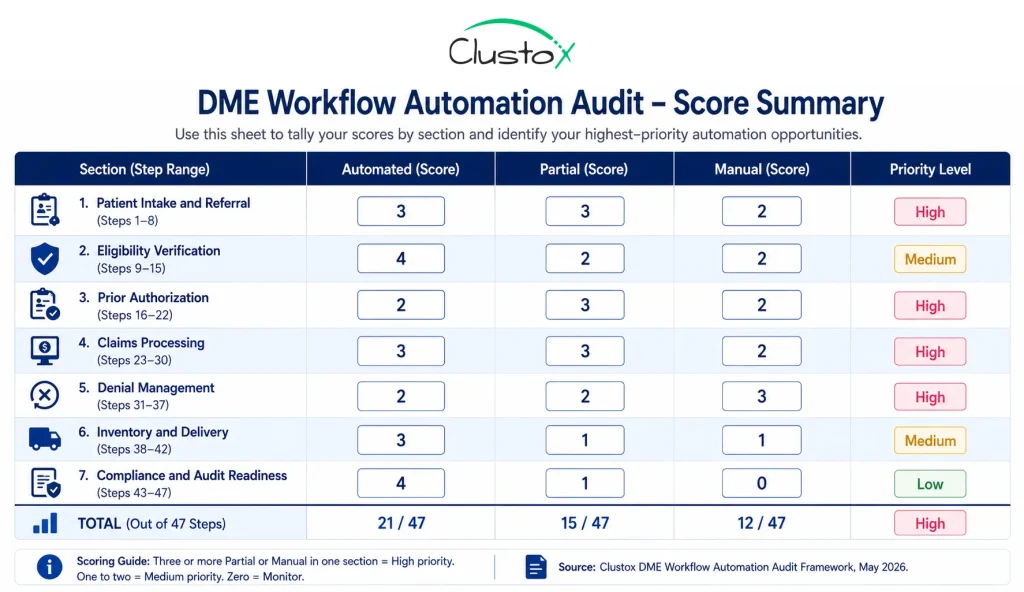
How Should You Interpret Your Checklist Score?
After scoring all 47 steps, total your Automated, Partial, and Manual counts across all seven sections. The pattern tells you more than the total.
What Does a High Manual Count Mean for Your Operation?
Thirty or more Manual scores across 47 steps indicate an operation running primarily on staff effort rather than automated workflow. This is the most common profile for DME operators who have not made a structured automation investment. The financial exposure is real: at 18 to 22 minutes per manual eligibility check, 45 to 90 minutes per manual intake order, and 45 to 60 minutes per manual appeal letter, the staff cost of running 300 orders per month entirely manually exceeds 300 staff hours per month on tasks that automation handles in minutes.
What Does a High Partial Count Mean for Your Operation?
Twenty or more Partial scores indicates an operation that has made automation investments but has not completed them. Partial automation is often more expensive than full manual because it combines the cost of the automation tool with the cost of the manual steps still embedded in the workflow. The most common Partial profile is a DME operation that has implemented Brightree or NikoHealth but has not connected an AI automation layer for intake, eligibility, PA routing, or appeal drafting. The platform is doing some of the work. The staff are doing the rest.
What Does a Strong Automated Score Mean?
Forty or more Automated scores across 47 steps is achievable for a mid-to-large DME operation running Brightree or NikoHealth with a connected AI automation layer. Operators at this level consistently report first-pass claim denial rates below 10 percent, intake-to-fulfillment times under 4 hours, and orders-per-FTE ratios above 200 per month, per Clustox client composite data.
If your score pattern shows three or more Manual or Partial scores in Sections 1 (intake) and 2 (eligibility), those are your highest-priority automation targets. Intake and eligibility automation together typically account for 60 to 70 percent of the total time savings available in a DME automation program, per AAHomecare’s 2023 Operational Survey.
What Should You Do After Completing the Audit?
Completing the audit gives you the diagnosis. The next step is prioritizing which gaps to address first, in what order, and through which tools or workflow changes.
How Should You Prioritise Automation Gaps?
Prioritise by the combination of frequency and unit cost. A Manual score on a step that occurs once per order, 300 times per month, at 20 minutes per occurrence, represents 100 staff hours per month. A Manual score on a step that occurs once per year for 10 orders represents essentially no operational cost. The highest-value automation targets are high-frequency, high-time-per-occurrence, and high-error-rate steps.
The three highest-value automation targets for most DME operators in the order they should be addressed:
- Real-time eligibility verification (Step 9): Eliminates 18 to 22 minutes per order of manual call time and reduces eligibility-driven denials from 8 to 12 percent of claims to 2 to 4 percent. Fastest implementation. Highest frequency. Highest ROI.
- Automated referral parsing and patient record creation (Steps 3 and 4): Eliminates manual data entry at intake, the step most likely to introduce errors that propagate into claims. Reduces intake-to-fulfillment time by 60 to 80 percent for straight-through eligible referrals.
- Appeal letter drafting (Step 34): Reduces appeal drafting time from 45 to 60 minutes per appeal to under 10 minutes. Increases appeal win rates from 40 to 55 percent to 60 to 75 percent. Directly recoverable revenue with measurable ROI within 30 to 60 days.
Frequently Asked Questions
Which DME Workflows Generate the Most Value When Automated?
The three highest-value automation targets for most DME operators are eligibility verification, referral parsing and intake, and appeal letter drafting. Together these three areas account for the majority of avoidable staff time and preventable denials in a typical DME revenue cycle. Eligibility automation alone can reduce denial rates from eligibility errors by 60 to 75 percent, per HFMA DME benchmark cohort data.
How Long Does DME Workflow Automation Implementation Take?
Implementation timelines vary by scope. Standalone eligibility automation can be implemented in 4 to 6 weeks from clearinghouse enrollment to live deployment. Full intake automation including referral parsing, eligibility, and PA routing typically takes 10 to 14 weeks. A complete automation program covering all seven workflow areas in this checklist typically runs 16 to 24 weeks from discovery through full rollout. These timelines assume an existing Brightree or NikoHealth instance with API access enabled.
What Is the ROI of DME Workflow Automation?
ROI varies by operation size, starting denial rate, and which workflows are automated. For a mid-size DME operation processing 300 orders per month with a 17 percent denial rate and manual intake, eliminating eligibility-driven denials saves approximately 100 denied claims per month at 118 dollars in rework cost each, totalling 11,800 dollars per month in rework cost reduction. Reducing intake time from 45 to 90 minutes per order to 10 to 15 minutes recovers 150 to 250 staff hours per month. At a fully loaded billing coordinator cost of 25 dollars per hour, that is 3,750 to 6,250 dollars in recovered staff capacity monthly. Combined, the revenue and cost benefit typically exceeds the implementation cost within 6 to 12 months. AAHomecare's 2023 Operational Survey provides payer-mix-adjusted benchmarks for DME operations at various scale points.
Does DME Workflow Automation Work With My Current Platform?
AI automation layers connect to Brightree, NikoHealth, and TIMS Medical via API and integrate with clearinghouses, including Availity, Waystar, and Change Healthcare. The prerequisite is that your platform has API access enabled and your clearinghouse enrollment is current for 270/271 EDI. If your platform has a limited or undocumented API, automation options are constrained. Evaluating your platform's API quality is the first step before any automation investment.
Is DME Workflow Automation HIPAA Compliant?
Automation tools that handle PHI require a HIPAA-compliant infrastructure. That means signed Business Associate Agreements (BAAs) with all vendors in the workflow, SOC 2 Type II certification from infrastructure providers, data encrypted at rest and in transit, and US-only data residency for PHI storage. AWS Bedrock, used by many DME automation vendors, supports HIPAA-eligible configurations when a BAA is in place with Amazon. HHS provides HIPAA compliance guidance for healthcare technology vendors on its website.
What Is the Difference Between a Partial and a Manual Score on This Checklist?
A Partial score means the step has some automation in place but still requires regular manual input, correction, or workaround to complete. For example, eligibility verification that submits a 270 transaction but requires a staff member to read and interpret the 271 response manually is a Partial, not an Automated score. A Manual score means the step is performed entirely by a staff member with no automation involved. Partial automation is often more expensive than full manual because it carries both the tool cost and the embedded manual cost without delivering the full efficiency benefit.
How Often Should I Run This Checklist?
Run the full 47-step audit annually and after any major platform change, payer contract change, or significant volume shift. Run a targeted review of Sections 2 (eligibility) and 4 (claims) quarterly, since CMS coverage policies, Medicare Advantage plan rules, and clearinghouse connectivity can change in ways that affect workflow automation effectiveness without triggering an obvious operational failure.
Bottom Line: What Should You Do Next After Completing This Checklist?
The 47-step checklist gives you the diagnosis. It tells you which workflows are automated, which are partially automated and leaking value, and which are running entirely on manual effort. What it does not do is tell you which gaps to prioritise, given your specific order volume, payer mix, and platform configuration, and what the revenue recovery looks like if those gaps are closed.
For most DME operators, the highest-value next step after completing the audit is not a full platform replacement or a 12-month automation roadmap. It is fixing the two or three workflow steps that are generating the most preventable cost. Eligibility verification and intake parsing fix 60 to 70 percent of the available automation value for most operations. Appeal drafting fixes another 15 to 20 percent. The remaining 47 steps contribute incremental improvements that compound over time.
The operators who improve fastest are the ones who run the audit, identify the three highest-scoring Manual or Partial sections, and address those sections in sequence rather than trying to automate everything at once. A 10 to 14 week focused automation program targeting intake and eligibility consistently outperforms a 24-month full-stack automation initiative that loses momentum before delivering results.