


Most DME intake workflows have the same structural problem. Referrals arrive through multiple channels, fax being the dominant one, and they enter a process that was never built to handle the volume or complexity that modern DME operations require. Documents get logged manually. Eligibility checks happen out of sequence. Prior authorization tasks live in spreadsheets that no one updates consistently. And the referral source hears nothing back until your team has already fallen behind.
The consequences are measurable. Referrals that stall at intake convert at lower rates. Unacknowledged referrals push physicians toward competitors who respond faster. And intake coordinators who spend their day re-keying data from fax cover sheets into Brightree or TIMS are not spending that time on work that actually requires human judgment.
Referral management software is designed to close these gaps. It replaces fax machines, shared inboxes, and verbal handoffs with a structured, trackable intake pipeline. Every referral is logged at receipt. Every stage has a named owner. Every delay triggers an action. And when a referral converts, the data flows directly into your core DME platform without your team touching it twice.
This guide gives Directors of Intake and Directors of Sales the operational clarity to evaluate whether the right software can improve their referral conversion rates, intake cycle times, and referral source relationships and whether their current process is leaving revenue on the table.
What Is Referral Management Software for DME Providers?
Referral management software is a purpose-built platform that captures, routes, tracks, and advances incoming patient referrals from first receipt through equipment delivery and billing setup. In the DME context, it connects your intake queue to eligibility verification, documentation collection, prior authorization, and your core software system, whether that is Brightree, NikoHealth, TIMS, or another platform your operations run on.
It is worth clarifying what referral management software is not, because the category gets confused with adjacent tools.
- It is not a CRM. A CRM tracks relationships at the referral source level. Referral management software tracks the operational status of each individual referral through your intake process.
- It is not a replacement for your core DME platform. Brightree, NikoHealth, and TIMS handle order management, billing, and patient records. Referral management software sits upstream of those systems and handles the intake stages that determine whether a referral reaches your core platform at all.
- It is not a document storage tool. Its function is workflow management, not archiving.
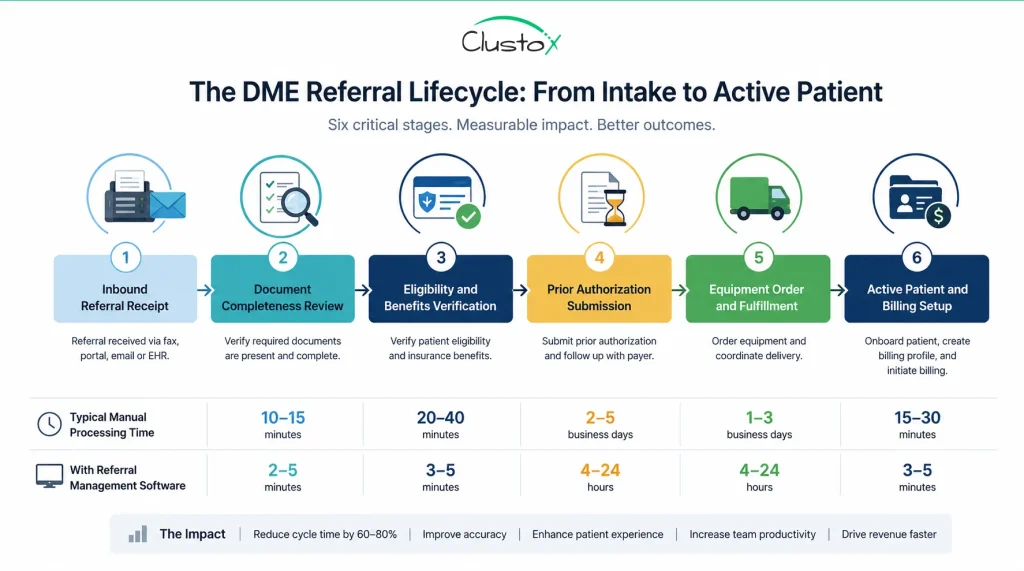
When implemented correctly, it gives both of your key stakeholders what they need.
Table of Contents
- Your Director of Intake gets a real-time view of every referral, its current stage, outstanding tasks, and how long each record has been sitting.
- Your Director of Sales gets referral source volume, conversion rates by sender, and the data needed to prioritize relationship outreach.
Both teams work from the same system. Nothing falls through the cracks because no one owned it.
Why Does Referral Leakage Cost DME Providers So Much Revenue?
Referral leakage is the gap between the referrals your team receives and the referrals that convert to active, delivered orders. It is not a single failure point. It accumulates across stages, and in most DME operations that rely on manual intake processes, the true extent of referral leakage is often difficult to quantify because failed, delayed, or abandoned referrals are not always tracked consistently. A fax that never made it into the system has no record. A referral that sat unclaimed for six days and prompted the patient to call a competitor leaves no trace in your conversion data.
The financial exposure is direct. Every uncaptured referral is lost revenue. The financial impact depends on equipment mix, payer mix, and reimbursement rates. At higher order values or greater referral volumes, that figure scales accordingly.
Referral leakage affects more than intake performance; it creates downstream challenges across the entire revenue management cycle, from authorization and order fulfillment to claims submission and reimbursement.
Beyond the revenue math, referral leakage damages your referral source relationships in ways that compound over time. Physicians, hospital discharge planners, and case managers track which DME providers respond quickly and keep them informed on referral status. When your intake team is slow to acknowledge a referral or fails to notify the ordering provider when an authorization is approved or an order is delivered, those sources begin routing future referrals to competitors who communicate better. The relationship damage is harder to quantify than the immediate revenue loss, but it is often more costly over a 12-month period.
Referral management software attacks leakage at every stage. Inbound documents are captured and logged automatically. Every referral is assigned an owner. Incomplete records trigger automated follow-up requests. Aging referrals surface in real-time dashboards before they are lost. And the referral source receives status notifications that reinforce your organization’s reliability as an intake partner.
How Does Referral Management Software Handle Inbound Faxes and Documents?
Despite the growth of electronic referral feeds and direct EHR integrations, many DME providers continue to receive a significant portion of referrals by fax. Any referral management platform you evaluate must handle fax intake as a primary use case, not as an afterthought. Platforms that treat fax as a legacy edge case rather than a core input channel will create friction for your intake team from day one.
There are two main approaches to fax handling in referral management software, and understanding the difference between them is important when you compare platforms.
Here is how each approach works in practice and where the operational distinction matters for your intake team.
Direct Fax Integration
The software connects to your existing fax infrastructure or provides a dedicated inbound fax number. Incoming documents are automatically ingested into a digital intake queue. Each fax is time-stamped, assigned a unique record ID, and queued for review. No document sits unread in a physical tray, and no document requires manual scanning or file upload by your intake coordinator. The system handles receipt. Your team handles review.
Intelligent Document Capture and Parsing
More advanced platforms layer optical character recognition (OCR) and structured data extraction on top of fax ingestion. The system reads the inbound document and automatically parses key fields: patient name, date of birth, diagnosis code, ordering physician, NPI, equipment requested, and insurance information. It pre-populates a referral record in your intake workflow. Your intake coordinator reviews and confirms the extracted data rather than manually transcribing it from a paper fax.
This distinction has a direct impact on intake labor cost. If your team is re-keying referral data from fax cover sheets into Brightree or TIMS field by field, they are spending time on transcription that document parsing software can handle in seconds. At high referral volumes, that time adds up to meaningful coordinator hours per week.
The table below provides illustrative examples of how processing times may differ across intake methods. Actual processing times vary by workflow design, staffing, referral complexity, and system configuration
| Intake Method | Estimated Processing Time | Error Exposure |
|---|---|---|
| Manual fax + re-keying | 15 to 30 min per referral | Higher (manual entry) |
| Fax integration + OCR parsing | 2 to 5 min per referral | Lower (system-assisted) |
| EHR/HL7 direct feed | Under 1 minute | Lowest (structured data) |
What Features Should You Look for in DME Referral Management Software?
Not every referral management platform is built for DME. Many tools in this category are designed for general healthcare intake workflows and lack the specific depth that DME providers need, particularly around prior authorization, Medicare documentation requirements, and integration with DME-specific core platforms. When you evaluate options, you need to assess capabilities against your actual workflow, not a generic healthcare intake checklist.
The eight capabilities below are the ones that matter most for DME intake operations. Each one addresses a specific failure point in the manual referral process.
Review each capability against your current intake workflow. Where you see gaps, those are the areas where the right platform will deliver the most immediate impact.
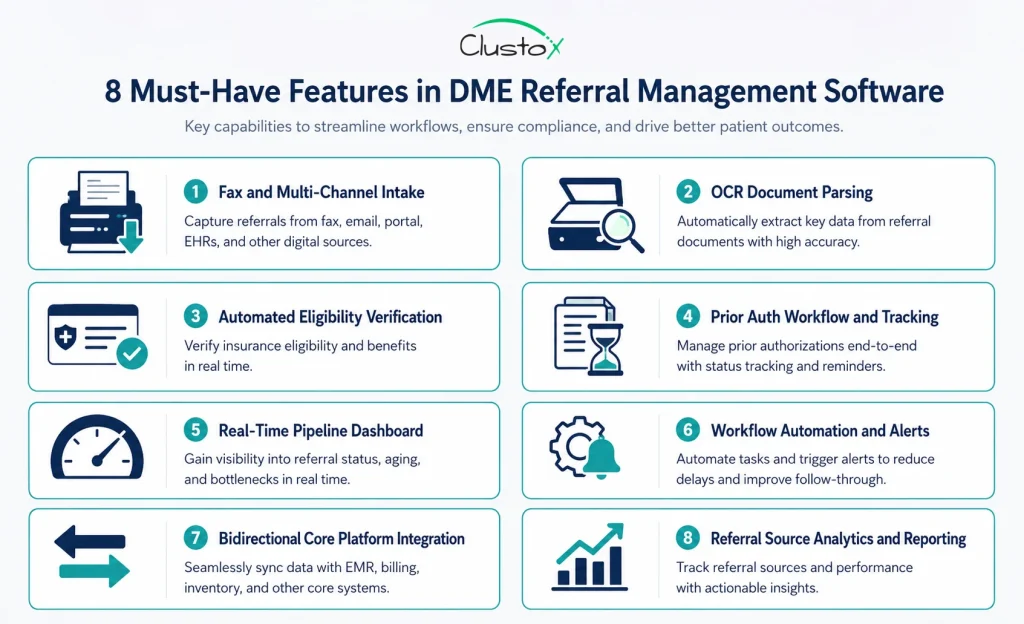
1. Fax and Multi-Channel Intake
The platform must capture referrals from every channel your ordering providers use: inbound fax, EHR direct feeds via HL7 or FHIR, web-based referral portals, and manual phone intake forms. All incoming referrals, regardless of source, should land in a single unified queue. Intake teams that manage separate queues for each channel spend time routing rather than processing.
2. Automated Eligibility and Benefits Verification
Before your intake coordinator spends time on a referral, the system should verify the patient’s active insurance coverage automatically. Automated eligibility checks at intake catch inactive policies, incorrect payer information, and benefit category mismatches early, before your team invests time in documentation collection and prior auth submissions that will ultimately fail. Manual payer portal lookups are time-consuming and inconsistent. It also helps ensure that required documentation, including physician orders and the certificate of medical necessity, is identified and collected before processing delays occur.
3. Prior Authorization Tracking and Workflow
For many DME providers, prior authorization is one of the most common sources of referral delays and administrative workload. Without structured prior auth management inside your referral tool, your team is tracking auth status in spreadsheets, calendars, or memory, all of which fail at volume.
4. Real-Time Referral Pipeline Dashboard
Keep your team focused on the status of every referral by utilizing a centralized dashboard that tracks progress in real-time, reduces bottlenecks, and provides visibility into every stage of the intake lifecycle. Your Director of Intake and Director of Sales need a live view of every referral in the pipeline at any given moment. The dashboard should surface each referral’s current stage, its age in days, the assigned owner, outstanding tasks, and any flags or exceptions. If you cannot see where referrals are stalling in real time, you cannot intervene before they age into lost opportunities.
5. Workflow Automation and Task Routing
Automation handles the steps that are repetitive, time-sensitive, and easy to forget when a team is managing high volumes. This includes sending acknowledgment notifications to referral sources at receipt, routing new referrals to the appropriate intake specialist based on equipment type or payer, triggering follow-up reminders when a referral sits idle past a defined threshold, and escalating high-priority or aging referrals to a supervisor automatically.
Teams looking to standardize and improve these processes can use a DME workflow automation checklist to identify repetitive tasks, reduce manual effort, and prioritize automation opportunities.
6. Integration With Your Core DME Platform
Bidirectional integration with Brightree, NikoHealth, TIMS, or your core platform is not optional. It is the capability that determines whether referral management software actually reduces your team’s workload or simply adds another system to manage.
When a referral converts to an order, the record should push directly into your core platform. When patient or payer data changes in your core system, it should reflect in your referral tool. This becomes even more important when referral data must flow into medical billing software and other downstream systems that support reimbursement operations.
7. Referral Source Relationship Management
Tracking which physicians, hospitals, and discharge planners are sending you referrals, at what volume, and at what conversion rate gives your sales team the data it needs to make informed relationship decisions.
Which sources are growing? Which ones are sending fewer referrals than last quarter? Which sources have the highest conversion rate, and what does that tell you about the quality of their documentation? This reporting layer turns your intake data into a sales intelligence tool.
8. Compliance and Documentation Audit Trail
Every action taken on a referral should be logged with a timestamp and a user ID. This audit trail serves two purposes. First, it supports HIPAA compliance by creating a defensible record of who accessed protected health information and when. Second, it supports accreditation requirements under ACHC and BOC by demonstrating documented intake processes.
How Does a Referral Move From Inbound Document to Active Patient?
A well-designed referral management workflow does not just capture documents. It moves each referral through a defined sequence of stages, with ownership, accountability, and system-assisted actions built into every step. Understanding this workflow end-to-end is the best way to evaluate whether a platform will work for your specific intake operation and to identify which stages in your current process are creating the most friction.
The eight stages below represent the standard progression of a DME referral from first document to billable active patient. The exact configuration will vary by platform and by your organization’s workflow, but these are the core checkpoints that every referral should pass through.
Walk through each stage below and consider where your current process handles it well, and where it relies on a manual step that creates delay or inconsistency.
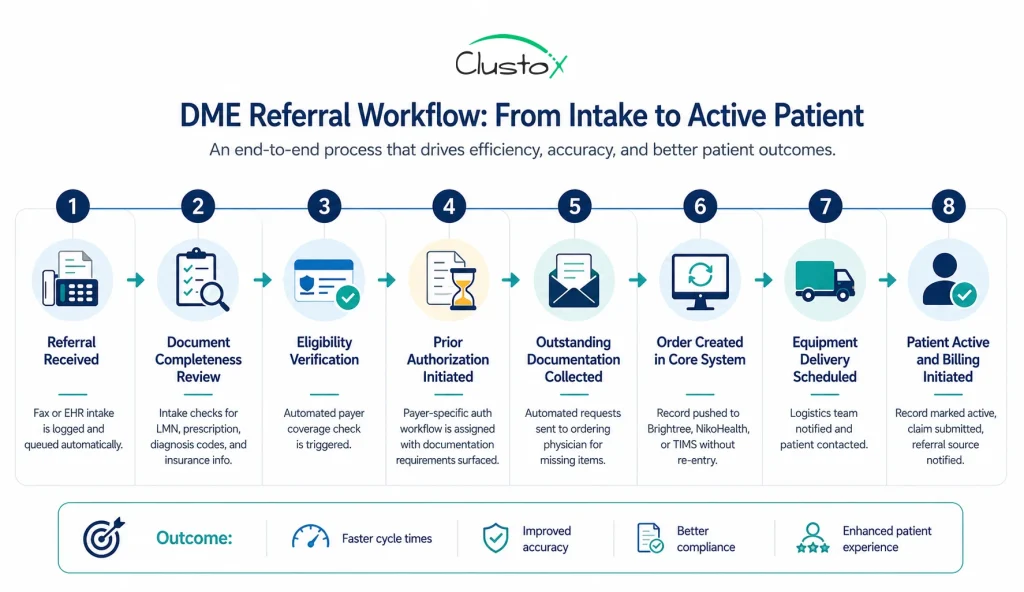
1. Referral received
The inbound document, whether by fax, EHR feed, or portal submission, lands in the intake queue. The system logs the receipt time, assigns a unique record ID, and notifies the designated intake coordinator. Nothing is waiting in a fax tray.
2. Document completeness review
The intake coordinator, supported by the platform’s document checklist, reviews the referral for required items. These include the letter of medical necessity (LMN), the physician’s order or prescription, diagnosis codes, insurance information, and patient demographics. Incomplete referrals are flagged immediately rather than discovered later in the process.
3. Eligibility verification
The platform triggers an automated insurance coverage check with the relevant payer. If coverage is inactive, the equipment category is not a covered benefit, or there is a payer mismatch, the intake team is alerted before any further time is invested in the referral.
4. Prior authorization initiated
For equipment requiring prior auth, the platform opens the appropriate workflow. Payer-specific documentation requirements are surfaced within the system. The submission is tracked, follow-up tasks are assigned, and the auth expiration window is logged for monitoring.
5. Outstanding documentation collected
When the referral is missing required items, the platform generates an outbound request to the ordering physician’s office. Automated reminders follow at defined intervals. The intake team does not need to make manual follow-up calls for every incomplete referral.
6. Order created in core system
Once the referral has cleared eligibility and authorization, the order record is pushed directly into Brightree, NikoHealth, TIMS, or your platform of choice. No duplicate data entry. The core system receives a complete, verified record.
7. Delivery scheduled
The operations or logistics team receives the work order. The patient is contacted for delivery coordination. Any equipment-specific setup or clinical handoff requirements are flagged at this stage.
8. Patient active and billing initiated
With the equipment delivered and delivery documentation signed, the patient record is set to active. The system automatically triggers the billing cycle, ensuring claims are submitted accurately and promptly.
The patient record is marked active in your system. The claim is prepared and submitted. If your platform supports referral source communication, the ordering physician’s office receives a status notification confirming delivery and active patient status.
What Are the Most Common Referral Workflow Breakdowns in DME?
Understanding where your current process breaks down is as important as understanding what new software can do. Most DME intake operations have the same structural failure points. They are the result of workflows built on manual tools and verbal handoffs, not the result of a poorly trained team. The following breakdowns appear consistently across DME organizations of different sizes and specialties.
Identifying which of these applies to your operation will help you prioritize which capabilities to evaluate most carefully in any platform you consider.
Each breakdown below includes the root cause and the mechanism by which referral management software addresses it.
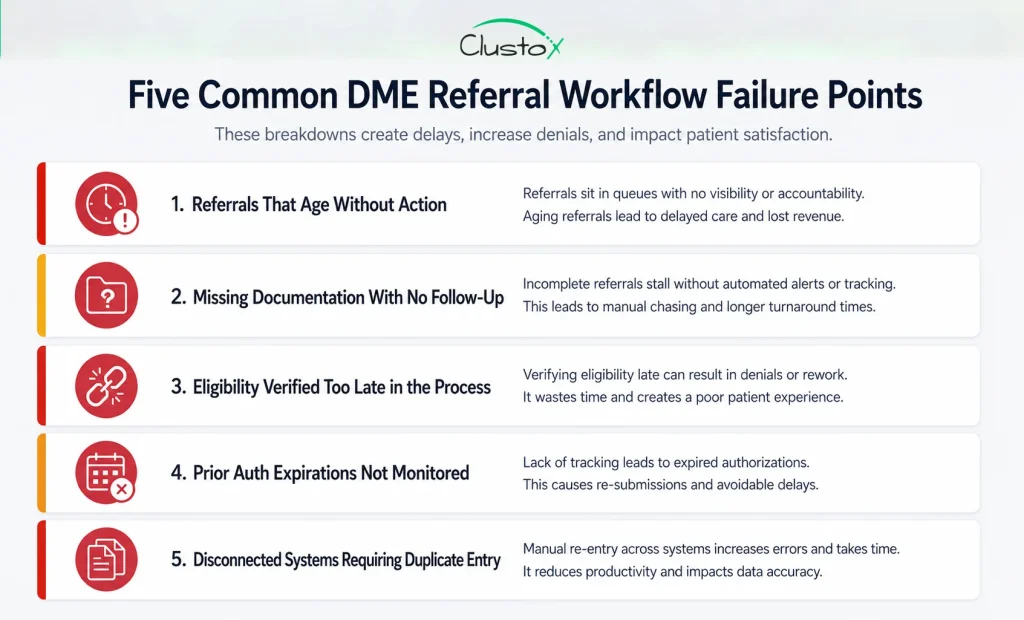
Referrals That Age Without Action
When no individual owns a referral at each stage, it waits. The intake coordinator assumes someone else followed up. The authorization specialist does not know the eligibility check cleared. Days pass. A well-configured referral management platform assigns ownership at each stage transition and sets time-based alerts. When a referral has not advanced within your defined service level window, a supervisor is notified before the record goes cold.
Missing Documentation With No Follow-Up Process
Incomplete referrals are a normal part of DME intake. What is not acceptable is allowing them to sit in a queue with no active follow-up. Without a structured process for requesting and tracking outstanding items, incomplete referrals accumulate. Automated document request workflows, combined with status tracking and reminder escalation, convert this from a passive waiting problem into an active retrieval process.
Eligibility Verification Happening Too Late
Running an eligibility check after prior auth submission is one of the most common and costly sequencing errors in DME intake. Discovering that a patient’s policy is inactive or does not cover the ordered equipment after your team has already invested time in documentation and auth submission wastes hours and delays the patient’s care. Eligibility verification should run at intake, before any other downstream work begins.
Prior Authorization Expirations Not Monitored
Prior authorizations have expiration windows. If an authorization is approved but the order is not fulfilled before the authorization expires, the provider must restart the prior auth process from the beginning, and the claim cannot be submitted against an expired auth. Proactive expiration monitoring and escalation alerts prevent this. Without them, your team discovers expired auths when a claim denies, not before.
Disconnected Systems Creating Duplicate Entry
When your referral management tool and your core DME platform do not integrate, every converted referral requires manual data entry in two systems. Beyond the time cost, every duplicate entry introduces the risk of transcription errors, mismatched patient records, and payer information discrepancies that create billing problems downstream. Bidirectional integration eliminates this category of error entirely.
Which Metrics Should You Track to Measure Referral Management Performance?
Implementing referral management software without establishing a measurement framework is a missed opportunity. The right metrics give you a clear picture of your intake operation’s performance before go-live, a baseline against which to measure improvement, and an ongoing management tool for identifying where new bottlenecks emerge as your workflow evolves.
The metrics below are the six that matter most for DME intake leadership. They are operational metrics, not vanity metrics. Each one connects directly to revenue impact or workflow health.
Use the table below as a starting point for your intake performance scorecard. Pull baseline data on each metric before your go-live date so you have a clear before-and-after comparison.
| Metric | What It Measures | Why It Matters |
|---|---|---|
| Referral-to-order conversion rate | Percentage of referrals that become active orders | Core indicator of overall intake effectiveness |
| Average intake cycle time | Days from referral receipt to order creation | Longer cycles increase leakage risk and delay revenue |
| Incomplete referral rate | Percentage of referrals missing required docs at intake | High rate signals upstream documentation process gaps |
| Prior auth first-pass approval rate | Percentage of submitted auths approved on first submission | Low rate indicates documentation quality or payer alignment issues |
| Referral volume by source | Number of referrals per ordering physician or facility | Identifies top-performing sources and at-risk relationships |
| Referral aging distribution | Referrals grouped by age bracket (0 to 3, 4 to 7, 8+ days) | Surfaces stuck referrals before they convert to lost revenue |
Tracking these six metrics consistently, before and after implementation, gives you the quantitative foundation to demonstrate ROI to organizational leadership and to identify where new configuration or process adjustments are needed as your operation scales.
How Should DME Providers Evaluate Referral Management Software Vendors?
A vendor demonstration is designed to show you the best-case version of their product. Your evaluation process needs to go deeper than the demo. The questions and criteria below are the ones that separate a platform that will genuinely improve your intake operation from one that looks good in a sales presentation but creates new friction in day-to-day use.
Bring your Director of Intake and Director of Sales into the evaluation process from the start. They know where the current process breaks down. They will ask the questions that a leadership-only evaluation will miss.
Below is a structured evaluation framework. Work through each item with every vendor you are considering, and request a live demonstration of each capability rather than accepting a yes or no answer.
- Bidirectional integration with your core platform. Ask for a live demo of the integration. Confirm data flows in both directions, not just order export.
- Inbound fax handling. Ask whether the system connects directly to a fax line or requires manual document upload. True fax integration and OCR parsing are not the same as a manual scan-and-attach workflow.
- Prior auth logic by payer. Ask what the workflow looks like for Medicare, commercial payers, and Medicare Advantage specifically. Payer-specific documentation prompts matter more than a generic auth checklist.
- Incomplete referral management. Request a walkthrough using a real incomplete referral scenario, not a clean demo record.
- Out-of-the-box reporting. Ask to see a referral source performance report and a pipeline aging report in a live environment on day one.
- Realistic implementation timeline. Ask specifically how long the integration with your core platform typically takes, not the best-case estimate.
- Post-launch support structure. Ask whether you get a dedicated account manager or a shared help desk and what the average ticket response time is.
How Does Referral Management Software Fit Into the Broader DME Technology Stack?
Referral management software does not operate in isolation. It is one component of a connected operational technology stack, and its value depends in large part on how well it integrates with the systems that surround it. Understanding where referral management software sits in your tech stack, and how it interacts with each adjacent system, helps you configure it correctly and avoid the integration gaps that undermine adoption.
The table below maps each system in a typical DME technology stack to its role in the referral-to-patient workflow. Use it to assess your current integration landscape and identify where data is currently moving manually between systems that should be connected.
Review each system below and consider whether your current setup has a live, bidirectional data connection or whether your team is bridging gaps manually.
| System | Role in the Referral-to-Patient Workflow |
|---|---|
| DME Core Platform (Brightree, NikoHealth, TIMS) | Order management, billing, delivery scheduling, patient records, and claims submission |
| Referral Management Software | Intake capture, document review, prior auth workflow, pipeline visibility, and referral source tracking |
| Eligibility Verification Tool | Real-time insurance coverage checks and benefit category verification at intake |
| EHR / HL7 Integration | Direct electronic referral feeds from hospital systems or physician practice EHRs |
| CRM / Sales Tracking | Referral source relationship management, volume and conversion reporting, and sales rep activity tracking |
| Document Management System | Storage, retrieval, and version control for LMNs, physician orders, and payer correspondence |
The ideal state is one where data flows between these systems without manual intervention at any handoff point. Referral management software is the intake layer that feeds every downstream system. When it is integrated correctly, your intake team spends their time on clinical and relationship tasks, not on re-keying data between platforms.
What Does a Successful Implementation of Referral Management Software Look Like?
Software implementation is a change management project as much as it is a technical one. The platforms that fail to deliver on their promise almost always fail for organizational reasons, not technical ones. Workflow ambiguity, incomplete integration setup, or inadequate training on real operational scenarios are the factors that cause DME teams to revert to old processes within 90 days of go-live.
The five practices below are the differentiators between a rollout that sticks and one that does not. They apply regardless of which platform you choose.
Map Your Current Workflow Before You Configure Anything
Document every step in your current intake process, including the informal workarounds your team has built around system gaps. Most DME intake operations have undocumented exception processes that staff follow instinctively but that no formal procedure captures. If you configure your new platform against an idealized workflow rather than your actual one, you will discover the gaps during go-live, not before.
The documentation exercise itself will also surface the specific customization requirements you need to bring to your vendor before configuration begins.
Define Ownership at Every Stage Before Go-Live
Referral management software enforces accountability. But it can only enforce what your organization has defined. Before go-live, assign intake roles at every stage of the workflow, define escalation paths for each exception type, and set service level agreements for stage transitions.
The software will track adherence to those SLAs. Your job is to define them. Teams that go live without this step find that the platform surfaces problems they cannot yet act on because no one knows who owns them.
Integrate With Your Core Platform Before Training Begins
The integration between your referral management tool and your core DME platform is the technical foundation the entire workflow depends on. If that integration is not stable at go-live, your team will revert to manual data entry, and the adoption case collapses.
Prioritize integration build, testing, and validation before you train a single intake coordinator on the new system. A training environment that requires manual workarounds teaches habits you will have to undo later.
Train on Real Referral Scenarios, Not Demo Data
Use actual historical referrals, de-identified appropriately for HIPAA compliance, as your training scenarios. Your intake team needs to navigate the edge cases: an incomplete referral missing the LMN, a failed eligibility check on a Medicare Advantage plan, an auth that was approved but is approaching expiration. Training on clean demo data does not prepare your team for real intake volume.
Establish Baseline Metrics Before Go-Live
Pull your current intake performance data before your go-live date: referral-to-order conversion rate, average cycle time, incomplete referral rate, and prior auth first-pass approval rate. You need a documented baseline to measure improvement against. Without it, you are managing the post-implementation period by anecdote, and you cannot build an ROI case for leadership or justify future platform investment.
What Questions Should Your Director of Intake Ask Before Choosing a Platform?
The person managing this software every day needs to evaluate it on operational terms, not on the strength of a vendor pitch. A Director of Intake thinks about edge cases, exception handling, and what happens when something breaks. Those are exactly the right questions to bring to a demo.
The list below covers the operational questions that most vendor demos do not volunteer answers to unless you ask directly.
- What happens when a referral arrives outside business hours?
- How does the system alert me when a high-priority referral stalls past my service level threshold?
- Can I configure different workflows for different referral types, such as CPAP, oxygen, and complex rehab?
- What does the prior auth process look like specifically for Medicare Advantage plans?
- How does the system handle referrals that arrive with incorrect or incomplete diagnosis codes?
- Can I pull a complete audit trail for a single referral from intake through billing in one view?
- What is the manual fallback process if the integration with our core platform goes down?
See Exactly Where Your Referral Workflow Is Breaking Down
Identify the gaps slowing referrals, delaying patient setup, and impacting revenue. Get a clear roadmap for a faster, more connected intake process.
Bringing It All Together
Referral management software is not a luxury for larger DME providers. It is the operational infrastructure that determines whether your intake process converts referrals into revenue or quietly loses them to competitors who respond faster and communicate better.
The workflow your organization runs today, built on fax, shared inboxes, and manual tracking, has a ceiling. It scales with headcount, not with efficiency. Every additional intake coordinator hired without improving the underlying process adds cost without addressing the root cause.
What referral management software gives you is visibility, accountability, and speed across every stage of the intake pipeline. Every referral is logged from the moment it arrives. Every stage has a named owner. Every delay surfaces as an alert before it becomes a lost order. And when a referral converts, the data flows directly into your core system without your team touching it twice.
The implementation work is real. Mapping your workflow, configuring the platform, building the integrations, and training your team on real scenarios all require focused effort. Organizations that invest in that groundwork see the results in their conversion rates, their cycle times, and their referral source relationships. Organizations that rush through it discover the gaps at the worst possible time.
Your current process has a cost. Every quarter it runs unchanged is another quarter of referrals your team worked hard to capture but could not hold. That cost is worth measuring before it gets any larger.
Frequently Asked Questions (FAQs)
Does Referral Management Software Replace Brightree or NikoHealth?
No. Referral management software sits upstream of your core DME platform. It handles intake, document tracking, and prior auth workflow. Brightree, NikoHealth, and TIMS handle order management, billing, and delivery. They work together. Bidirectional integration between the two is what eliminates manual re-entry and keeps data consistent across both systems.
How Long Does It Take to Implement Referral Management Software?
Most DME providers of moderate size report go-live timelines between 30 and 90 days. The longest variable is typically the integration with your core DME platform. Ask vendors for a realistic implementation timeline based on your specific tech stack. A best-case estimate and a realistic estimate are often not the same number.
What Is Referral Leakage and How Does Software Reduce It?
Referral leakage is the gap between inbound referrals received and referrals that convert to active orders. It accumulates at every stage where a manual process fails: a lost fax, an incomplete record that no one follows up on, a prior auth that expires before fulfillment, or a slow response that prompts the patient to contact another provider. Referral management software reduces leakage by logging every inbound document, assigning ownership at each stage, automating follow-up, and surfacing aging referrals in real time.
Is Referral Management Software HIPAA-Compliant?
Any platform handling patient referral data in a DME context must meet HIPAA requirements for protected health information. Before signing a contract, confirm that the vendor will execute a Business Associate Agreement (BAA) and request documentation of their security and access control practices. Do not assume compliance. Ask for it in writing.
What Is an LMN and Why Does It Matter in DME Referral Intake?
A letter of medical necessity (LMN) is a physician-authored document certifying that the ordered equipment is medically necessary for the patient. It is required for Medicare and most commercial payer claims. Missing or incomplete LMNs at intake are one of the most common causes of claim denials. Referral management software flags missing LMNs during document review and triggers automated requests to the ordering physician before the referral advances further in the workflow.
How Do I Measure the ROI of Referral Management Software?
Establish a baseline before go-live on three metrics: referral-to-order conversion rate, average intake cycle time, and incomplete referral rate. After implementation, track improvement against that baseline. Multiply the improvement in conversion rate by your average order value and monthly referral volume to get a direct revenue impact figure. Many providers also track the reduction in coordinator hours spent on manual follow-up as a labor efficiency gain.