

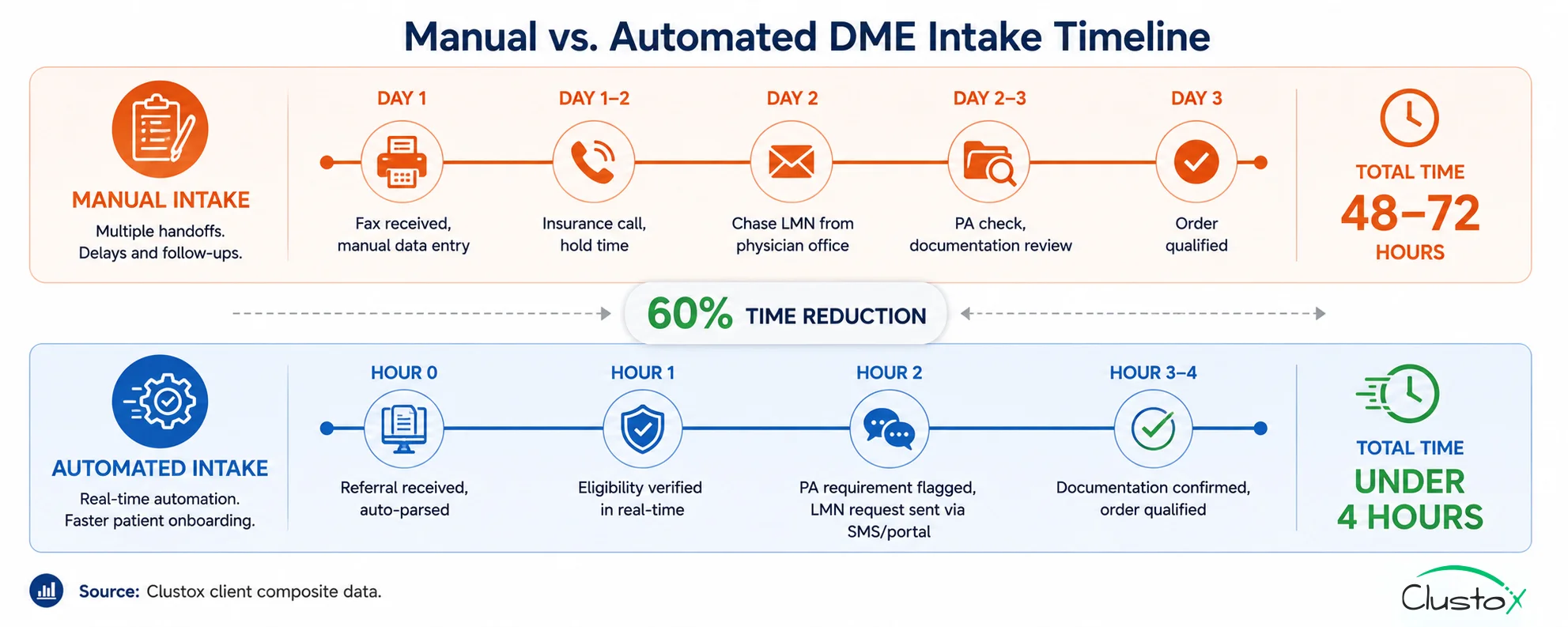
A referral comes in on a Tuesday morning. A physician’s office faxes over a prescription for a power wheelchair. Someone on your team picks it up from the fax queue, keys the patient information into Brightree, calls the insurance company to verify benefits, chases the office for a Letter of Medical Necessity, checks whether prior authorization is required, and then waits. And waits.
By Thursday, if everything goes smoothly, the order is qualified and ready to fulfill. That is 48 hours of calendar time on a workflow that, with the right automation in place, takes under 4 hours. And the 48-hour version is the good outcome, the one where the fax was legible, the insurance line picked up quickly, and the clinical office returned the call the same day.
For most DME operations, patient intake is the single most labor-intensive step in the order lifecycle and the one most exposed to dropout risk. When intake takes 2–3 days, patients go elsewhere. Physicians stop referring. And your team spends more time chasing documentation than fulfilling equipment orders.
The good news: intake automation is the highest-ROI automation investment available to DME operators right now because it addresses the problem at the very beginning of the revenue cycle before a claim is ever submitted, before a denial can occur, and before a delivery can be missed. Get intake right, and the rest of the workflow gets easier.
This guide walks through the five-step automated intake workflow that DME operators are using to cut intake time by 60% or more: what each step does, what tools it requires, and what realistic outcomes look like.
What this guide covers:
- Why DME patient intake is the most time-consuming and error-prone step in the order workflow
- The 5-step automated intake workflow what each step does and which tools power it
- How Brightree and NikoHealth fit into an automated intake setup
- Where AI agents (voice, SMS, LLM-based) add the most value in intake
- Implementation timeline and prerequisites
- Real benchmarks: intake time, staff hours, and order-to-fulfillment improvement
- What automation does not fix and what still requires human judgment
Why DME patient intake takes so long and why that’s a revenue problem
Patient intake for DME is more complex than intake for most other healthcare equipment categories.
A standard referral triggers multiple parallel verification requirements before the order can be qualified:
Table of Contents
- Insurance eligibility verification: Active coverage, HCPCS benefit confirmation, deductible status, and payer-specific rental vs. purchase rules must all be confirmed before the order moves forward.
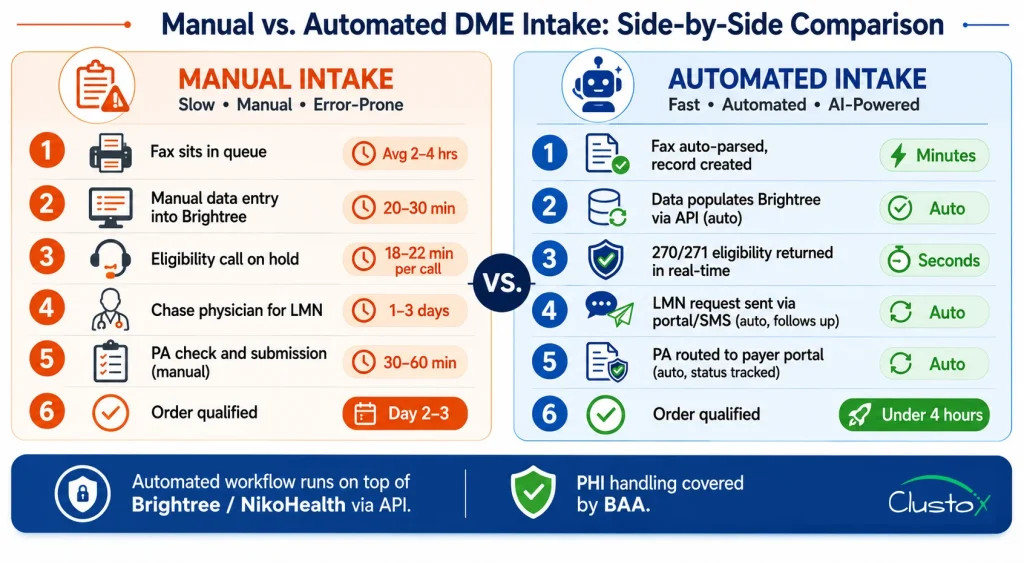
- Prior authorization check: For power mobility devices, certain orthotics, and other CMS-designated categories, a PA must be obtained before delivery. Missing this step at intake results in an automatic denial.
- Documentation collection: A Detailed Written Order (DWO) from the referring physician is required. For many equipment types, a Letter of Medical Necessity (LMN) and face-to-face encounter notes are also required. Collecting these from physician offices by phone, fax, or portal is the longest step in manual intake.
- Patient financial responsibility estimate: Patients increasingly expect a cost estimate before equipment is delivered. Intake teams must calculate the patient’s share based on the remaining deductible, copay/coinsurance, and whether the equipment is a rental or purchase.
- HCPCS code assignment: The correct HCPCS Level II code and modifiers must be assigned at intake, not at billing. Coding errors introduced at intake propagate into claim submission and are a leading cause of preventable denials.
The intake delay cost by the numbers
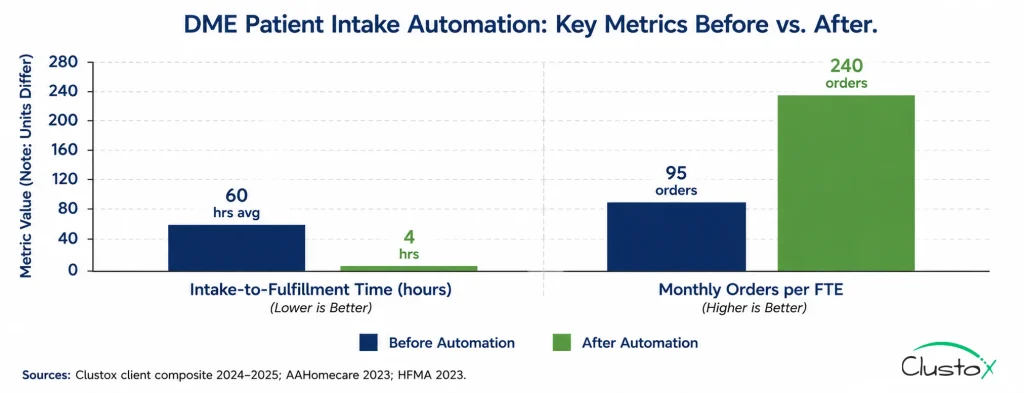
2–3 days Average DME intake-to-fulfillment time for operations without automation (AAHomecare, 2023)
Under 4 hours Achievable intake-to-fulfillment time with full automation (Clustox client composite)
28% Share of DME patients who abandon an order when intake takes more than 48 hours (HFMA patient access data, 2023)
18–22 minutes Staff time spent per manual eligibility verification call (AAHomecare, 2023)
$320–$480 Estimated revenue loss per abandoned DME order, accounting for lost referral relationship value
The 5-step patient intake automation workflow for DME
The workflow below reflects the automated intake architecture used by DME operators who have reduced intake time by 60% or more. Each step maps to a specific tool or AI agent.
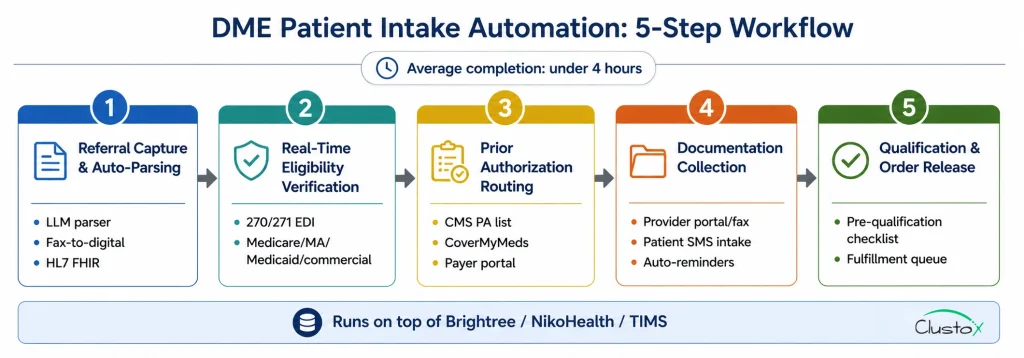
The workflow is designed to run on top of Brightree or NikoHealth, not to replace them.
Step 1: Referral capture and auto-parsing
The intake workflow starts the moment a referral arrives whether by fax, EHR portal, direct API, or phone. An AI-powered document parser (built on an LLM with a RAG layer for DME-specific document types) reads the incoming referral and extracts: patient demographics, referring physician NPI, diagnosis codes (ICD-10), equipment requested, and any attached clinical documentation. The parsed data populates the patient record in Brightree or NikoHealth automatically; no manual data entry. A confidence score flags fields where the extraction is uncertain and routes those specific fields to a human review queue, rather than halting the entire intake process. Fax-to-digital conversion (via tools like eFax or Kno2) feeds directly into the parser. EHR integrations (Epic, Cerner, athenahealth) pass structured HL7 FHIR data that requires minimal parsing. Phone referrals are transcribed by a voice agent and processed identically to fax referrals.
Step 2: Real-time eligibility verification
Immediately after the patient record is created, the eligibility agent submits a 270/271 EDI transaction to the relevant payer Medicare Part B (via the appropriate MAC), Medicare Advantage, Medicaid, or the commercial plan on file. The agent retrieves and parses: active coverage status, HCPCS-level benefit eligibility for the requested equipment, deductible remaining and copay/coinsurance rates, prior authorization requirements, rental vs. purchase rules (critical for oxygen, CPAP, and power mobility devices), and coordination of benefits (COB) if a secondary payer is present. Results populate the patient record in Brightree or NikoHealth and trigger the next workflow step. If the eligibility check returns an error or unexpected result, the order routes to a specialist queue it does not stall the automated workflow for other orders.
Step 3: Prior authorization routing and submission
Based on the eligibility results and the HCPCS code identified at Step 1, the system checks the CMS Prior Authorization program list and payer-specific PA requirements to determine whether a PA is required before delivery. If a PA is required, the workflow creates the PA request, attaches the available clinical documentation, and routes it to the appropriate submission channel payer portal, fax, or electronic PA platform (e.g., CoverMyMeds, Surescripts). The PA status is tracked in the patient record, and the order is flagged as pending PA until authorization is received. For payers who accept real-time PA decisions (an increasing number of Medicare Advantage plans), the agent submits and monitors for a response within the same workflow session. For payers requiring manual review, the system surfaces the PA case in a dedicated queue with the expected response date populated from the payer’s published SLA.
Step 4: Documentation collection via automated outreach
Documentation collection chasing the DWO, LMN, and face-to-face encounter notes from the referring physician’s office is the step that turns a 4-hour intake into a 3-day intake when done manually. Automation changes this materially. After the eligibility check, the system identifies which documentation is on file (attached to the referral) and which is missing. For missing items, an outreach agent initiates contact with the referring physician’s office through the most efficient available channel: secure provider portal message, fax, or direct EHR integration. For patient-side documentation (insurance card, patient consent, ID verification), an SMS or email agent contacts the patient directly with a HIPAA-compliant digital intake link. The patient completes the form on their phone no app download required. Completed forms route back into the patient record automatically. The system tracks open documentation requests, sends automated follow-up reminders at configurable intervals (e.g., 2 hours, 24 hours), and escalates to a human coordinator only if documentation has not been received within the escalation window.
Step 5: Qualification decision and order release
Once all required elements are confirmed active eligibility, PA on file (if required), complete documentation set, HCPCS code assigned the automated workflow runs a pre-qualification checklist against the order and marks it as qualified and ready to fulfill. The qualification checklist validates: correct HCPCS code and modifier applied, DWO signed and dated within 12 months, LMN present and covers the prescribed equipment, PA approval on file and within the covered date range, patient financial responsibility estimate generated and documented, and proof of delivery (POD) workflow initiated. Qualified orders release to the fulfillment queue in Brightree or NikoHealth with a complete documentation package. Orders that fail one or more qualification criteria route to a specific exception queue not a generic hold with the failing criteria flagged for the coordinator to resolve.
Tools And AI Agents That Power Each Intake Step
The five-step workflow above is a pattern, not a single product. It is assembled from a combination of the core DME platform (Brightree, NikoHealth, or TIMS), clearinghouse integrations, and an AI automation layer built on top.
Here is how the tool stack maps to each step:
| Workflow Step | Core Platform Role | AI / Automation Layer |
|---|---|---|
| Referral capture & parsing | Receives parsed data and creates patient record | LLM document parser (fax, HL7, PDF); voice agent for phone referrals |
| Eligibility verification | Stores and displays eligibility results | 270/271 EDI agent; real-time payer API calls; results parser |
| Prior auth routing | Tracks PA status per order | PA requirement lookup; portal submission agent; status monitor |
| Documentation collection | Stores received documents per order | Provider portal outreach agent; patient SMS/email intake; reminder scheduler |
| Qualification & release | Releases order to fulfillment queue | Pre-qualification checklist engine; exception routing logic |
Where Brightree fits?
Brightree is the record of truth for the patient, order, and document status. The automated workflow reads from and writes to Brightree via its published API it does not bypass the platform. Eligibility results, PA status, documentation receipts, and qualification decisions all populate Brightree fields, maintaining full audit integrity. Brightree’s API documentation covers the endpoints available for third-party integration.
Where NikoHealth fits?
NikoHealth’s cloud-native architecture provides a cleaner API surface for automation than most legacy DME platforms. The same workflow pattern applies the AI layer reads referral data from NikoHealth, writes eligibility and PA results back, and triggers the fulfillment queue on qualification. NikoHealth’s event-driven webhook system makes real-time status updates easier to implement than polling-based integrations.
Where the AI layer sits?
The AI automation layer, the parser, the eligibility agent, PA router, documentation outreach agent, and the qualification engine run as a set of orchestrated agents built on a framework like LangGraph, deployed on AWS Bedrock or equivalent HIPAA-eligible infrastructure.
The agents communicate with the DME platform via API and with payers via a clearinghouse (Availity, Waystar, or Change Healthcare) or direct payer API. All PHI handling must be covered by a signed BAA with each infrastructure vendor.
Implementation: what it Takes To Automate DME Patient Intake
Prerequisites
- Active Brightree or NikoHealth instance with API access enabled (most enterprise and mid-market licenses include API access; confirm with your account manager)
- Clearinghouse enrollment for 270/271 EDI is required for real-time eligibility. If you are currently doing manual portal calls, clearinghouse enrollment is the first prerequisite to resolve
- Fax-to-digital routing if your operation still receives referrals by fax (most do), you need a fax digitalization layer (eFax, Kno2, or equivalent) that routes inbound faxes to a monitored digital queue
- HIPAA-compliant infrastructure for the AI layer: signed BAAs with all infrastructure vendors (AWS, document storage, SMS provider)
- Referring provider contact database the documentation outreach agent needs accurate phone, fax, and portal contact data for your top referring physicians
Typical Implementation Timeline
| Phase | Duration | What Happens |
|---|---|---|
| Discovery & integration mapping | 1–2 weeks | Map referral sources, payer mix, documentation requirements by equipment category |
| Brightree / NikoHealth API integration | 2–3 weeks | Connect AI layer to platform; configure field mappings and workflow triggers |
| Eligibility agent setup & payer testing | 2–4 weeks | Enrol with clearinghouse; test 270/271 against top 10 payers by volume |
| Document parser training | 1–2 weeks | Train parser on your fax and referral document formats |
| PA routing configuration | 1–2 weeks | Map CMS PA list and top 5 payers' PA requirements |
| Patient outreach agent setup | 1 week | Configure SMS/email intake flow; test HIPAA-compliant delivery |
| Parallel run & staff training | 2–3 weeks | Automated workflow runs alongside manual; staff validate outputs and calibrate exception queues |
| Full rollout | Week 11–14 | Manual intake retired for automated-eligible referral types; exception handling documented |
Real Numbers: What DME Operators See After Automating Intake
The benchmarks below reflect operator-reported outcomes following automated intake implementation. Results vary by referral volume, payer mix, and starting workflow maturity.
| Metric | Before Automation | After Automation | Notes |
|---|---|---|---|
| Intake-to-fulfillment time | 48–72 hours | Under 4 hours | For straight-through eligible referrals; exception cases take longer |
| Staff hours per intake (per order) | 45–90 min | 10–15 min (exception review only) | Clustox client composite, 2024–2025 |
| Order abandonment rate | 18–28% | 5–9% | Patient dropouts due to intake delay; HFMA patient access data |
| Documentation complete rate at 24hrs | 55–65% | 85–92% | Automated outreach improves documentation return speed |
| Eligibility error denial rate | 8–12% of claims | 2–4% of claims | Errors caught at intake before claim submission |
| Monthly orders processed per FTE | 80–110 | 200–280 | Same headcount processes significantly more volume |
| Intake staff hours saved per month (200 orders) | ~200–300 hrs | Baseline | Recovered capacity redirected to exception handling and growth |
Sources: Clustox client composite data (anonymized, 2024–2025); AAHomecare Operational Survey 2023; HFMA Patient Access Benchmarking Report 2023.
What Automation Does Not Fix In DME Patient Intake?
Intake automation handles the structured, rule-based steps in the workflow well.
The following categories still require human judgment and will for the foreseeable future:
- Complex Medicare Advantage cases: Each MA plan has its own HCPCS coverage policies, PA thresholds, and documentation requirements. The automated workflow handles the standard eligibility check and flags the order for specialist review when the plan’s rules fall outside the standard parameters. Do not expect automation to resolve every MA edge case without human input.
- LMN content quality: The documentation outreach agent can request a Letter of Medical Necessity and confirm that a document was received. It cannot verify that the LMN’s clinical content meets the payer’s medical necessity criteria. That review remains a human responsibility, and it is a critical one, because a technically complete but clinically insufficient LMN is an audit risk under TPE and RAC review.
- Referring physician relationship management: Automated outreach works well for documentation requests when the relationship is established. For new referral sources or when a physician’s office is unresponsive to automated outreach, a human coordinator needs to step in. Automation reduces the volume of manual follow-up; it does not eliminate it.
- Disputed eligibility results: When a payer returns an eligibility response that conflicts with what the patient or physician believes is covered, someone needs to call the payer and resolve the discrepancy. This is a non-automatable exception that should be surfaced quickly within hours, not days so it does not hold up the order.
- Medicaid state-specific rules: Medicaid programs are administered at the state level, and DME coverage rules vary significantly across states. Automated eligibility handles the standard 270/271 transaction, but state-specific PA requirements, rate schedules, and documentation standards require configuration that must be maintained manually as Medicaid policies change.
Buyer’s Checklist: Evaluating DME Patient Intake Automation Solutions
Tier 1 Non-negotiables
- Native Brightree or NikoHealth integration via API not CSV export/import
- 270/271 EDI eligibility integration covering Medicare Part B, MA, Medicaid, and your top 5 commercial payers
- HIPAA-compliant infrastructure, signed BAA, SOC 2 Type II, documented data residency
- Fax-to-digital referral parsing if fax is still your primary referral channel, this is non-negotiable
- Exception queue with clear failure-reason routing the automation must surface why an order stopped, not just that it stopped
- Full audit trail per order: every automated action logged with timestamp and source, accessible for TPE, RAC, and ZPIC audit defence
Tier 2 Strong differentiators
- Patient SMS/email intake portal for self-service demographic and insurance submission
- Prior authorization submission and status tracking integrated into the intake workflow
- Voice agent for phone referral intake and transcription
- Referring provider outreach with automated follow-up scheduling
- HCPCS code suggestion at intake based on referral diagnosis and equipment type
- Denial prediction scoring that flags orders likely to have coverage issues before qualification
Tier 3 Worth evaluating
- Agentic AI orchestration (LangGraph or equivalent) for multi-step, multi-payer intake cases
- EHR integration (Epic, Cerner, athenahealth) for structured HL7 FHIR referral data
- Predictive intake volume forecasting to support staffing and equipment planning
Frequently Asked Questions
How Does Dme Intake Automation Integrate With Brightree?
The AI automation layer connects to Brightree via its published API. It reads referral and patient data and writes eligibility results, documentation status, and PA tracking back to the appropriate Brightree fields and triggers workflow automations (such as releasing a qualified order to the fulfillment queue) via Brightree's workflow engine. All data transactions are logged in Brightree's audit trail. Brightree's integration capabilities are documented in their partner resources for third-party developers.
What Referral Types Can Intake Automation Handle?
Automated intake handles fax referrals (via fax-to-digital parsing), EHR-originated referrals via HL7 FHIR, direct phone referrals (via voice agent transcription), and web-based referral portal submissions. Handwritten or poorly formatted faxes are the most common failure mode for document parsers these route to a human review queue for manual data entry rather than failing silently.
Is Automated Patient Intake HIPAA Compliant?
Automated intake involves PHI at every step: patient demographics, insurance information, and clinical documentation. Compliance requires signed Business Associate Agreements (BAAs) with every vendor in the workflow (AI platform, clearinghouse, SMS provider, document storage); SOC 2 Type II certification from infrastructure vendors; data encrypted at rest and in transit; and US-only data residency for PHI storage. AWS Bedrock, used by many DME automation vendors, supports HIPAA-eligible configurations when properly set up with a BAA in place.
How Long Does It Take To See ROIFrom Intake Automation?
Most DME operators begin seeing measurable intake time reduction within 4–6 weeks of going live the parallel run phase surfaces the gap between automated and manual processing times immediately. Financial ROI (reduced write-offs from eligibility errors, recovered revenue from reduced order abandonment, and staff capacity freed for growth) typically becomes calculable within 60–90 days. Full ROI payback periods for mid-size DME operators (200–400 orders/month) typically run 6–12 months depending on implementation cost and starting denial rate.
What Is The Difference Between Intake Automation And Eligibility Verification Automation?
Eligibility verification automation is one step inside a broader intake automation workflow. A standalone eligibility tool confirms insurance coverage for an order that has already been manually entered into Brightree. Intake automation starts earlier at referral capture and orchestrates the full sequence from referral parsing through eligibility check, PA routing, documentation collection, and order qualification. Eligibility automation reduces the time spent on one phone call; intake automation reduces the time spent on the entire process.
Can Intake Automation Work If My Operation Still Uses Fax For Referrals?
Yes, and most DME operations that automate intake are still fax-heavy at the referral stage. Fax-to-digital conversion tools (eFax, Kno2, and similar) convert inbound faxes to machine-readable documents in real time, feeding them into the document parser. The parser extracts structured data from the fax image. This approach handles the majority of legible fax referrals well; handwritten or multi-page faxes with poor formatting have higher exception rates and are routed to human review.
What Happens When The Automation Fails Or An Order Gets Stuck?
A well-built intake automation workflow is designed around exception management, not exception avoidance. Every order that the automation cannot fully process routes to a specific exception queue with the reason it stopped (missing field, eligibility error, payer timeout, document parsing confidence below threshold). Staff work the exception queue; they do not re-enter orders manually from scratch. The goal is to reduce the volume of orders requiring human intervention from 100% to 15–25%, not to eliminate human involvement entirely.
Final Thoughts
Most DME automation conversations start at the claims stage, denial management, eligibility verification, and prior authorization. Those are real problems, and they have real solutions. But the conversation that matters starts earlier: at intake, before a claim exists, before a denial can happen, before a patient gets frustrated and calls someone else.
A 48-to-72-hour intake process is not just slow; it is a revenue leak. Every order that takes three days to qualify is a patient who might not wait. Every manual eligibility call is a staff hour spent on a task an agent can do in seconds. Every documentation chase that goes unanswered for two days is an order that either stalls or ships without complete documentation and becomes an audit liability.
The five-step workflow described in this guide, referral parsing, real-time eligibility, PA routing, automated documentation collection, and automated qualification, is not theoretical. DME operators running this workflow on top of Brightree and NikoHealth are processing the same referral volume with meaningfully less staff time, catching eligibility problems before they become denials, and fulfilling orders in hours instead of days.
As more payers adopt interoperable workflows, many providers are also implementing electronic prior authorization DME processes to reduce payer delays, automate authorization tracking, and accelerate order approval timelines across intake operations.
The implementation is not trivial: 10–14 weeks to full rollout, clearinghouse enrollment as a prerequisite, and ongoing exception queue management built into the operating model. But the ROI case is among the clearest in DME operations: fewer abandoned orders, lower denial rates from eligibility errors, more volume per FTE, and a referral experience that makes physicians more likely to send the next patient to you instead of a competitor.
Reduce Intake Bottlenecks
Automate eligibility checks, documentation collection, and prior authorization workflows to accelerate DME order qualification and reduce operational delays.
Disclaimer
This article is intended for DME providers, operations leaders, and technology decision-makers. It is not medical advice and does not constitute guidance on patient care, equipment selection, or clinical decisions. Regulatory references (CMS, HIPAA, accreditation standards) are accurate as of the review date; regulations change frequently, and providers should consult primary sources or qualified counsel for current requirements.