

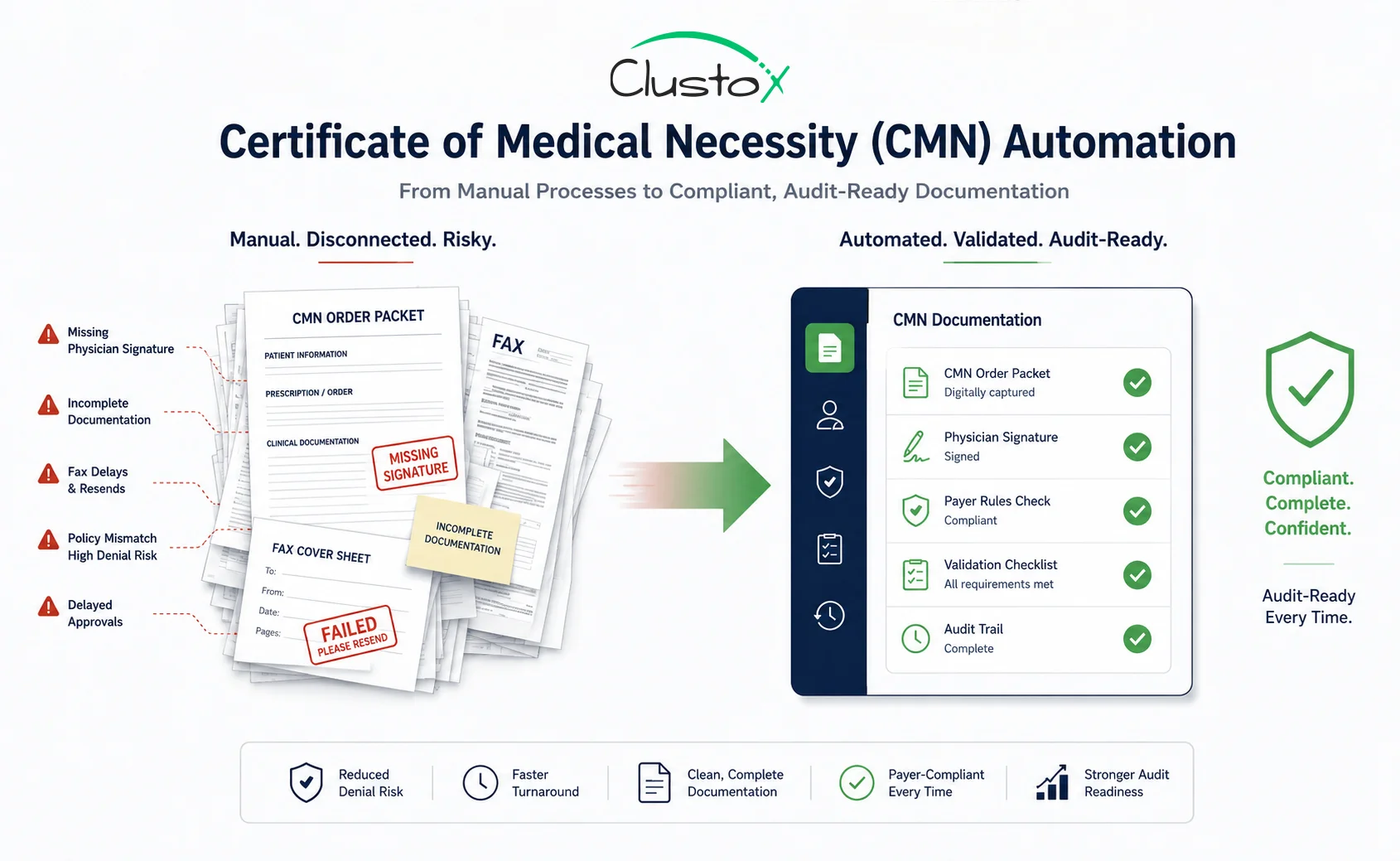
DME providers operate in one of the most documentation-intensive environments in healthcare billing. Even though Medicare discontinued many traditional CMN forms for fee-for-service claims after January 1, 2023, the operational challenge never disappeared. Providers still need accurate physician orders, supporting clinical documentation, payer-specific medical necessity requirements, prior authorization workflows, and audit-ready records.
For most DME organizations, the real issue is if the documentation pipeline is complete, compliant, and fast enough to prevent denials and reimbursement delays. Manual workflows built around faxes, spreadsheets, disconnected portals, and repeated physician follow-ups continue to create revenue leakage across oxygen, CPAP, mobility, enteral nutrition, and other high-volume categories.
This guide explains how modern DME operators are using workflow automation, intelligent validation, and centralized tracking systems to improve documentation accuracy, accelerate order processing, and reduce audit exposure without increasing administrative overhead.
What Is a Certificate of Medical Necessity and Why Does DME Billing Depend on It?
A certificate of medical necessity (CMN) historically referred to documentation used to support the medical necessity of durable medical equipment for reimbursement purposes.
While Medicare retired many traditional CMN and DIF requirements after January 1, 2023, DME suppliers still depend heavily on compliant physician documentation, standard written orders (SWOs), supporting clinical records, and payer-specific authorization requirements to support reimbursement workflows.
The document itself is not complicated. The operational challenge is collecting, validating, and tracking it across dozens of orders per day, multiple referring physicians, multiple payers, and two or more software platforms simultaneously. That is the specific workflow that CMN automation is built to solve.
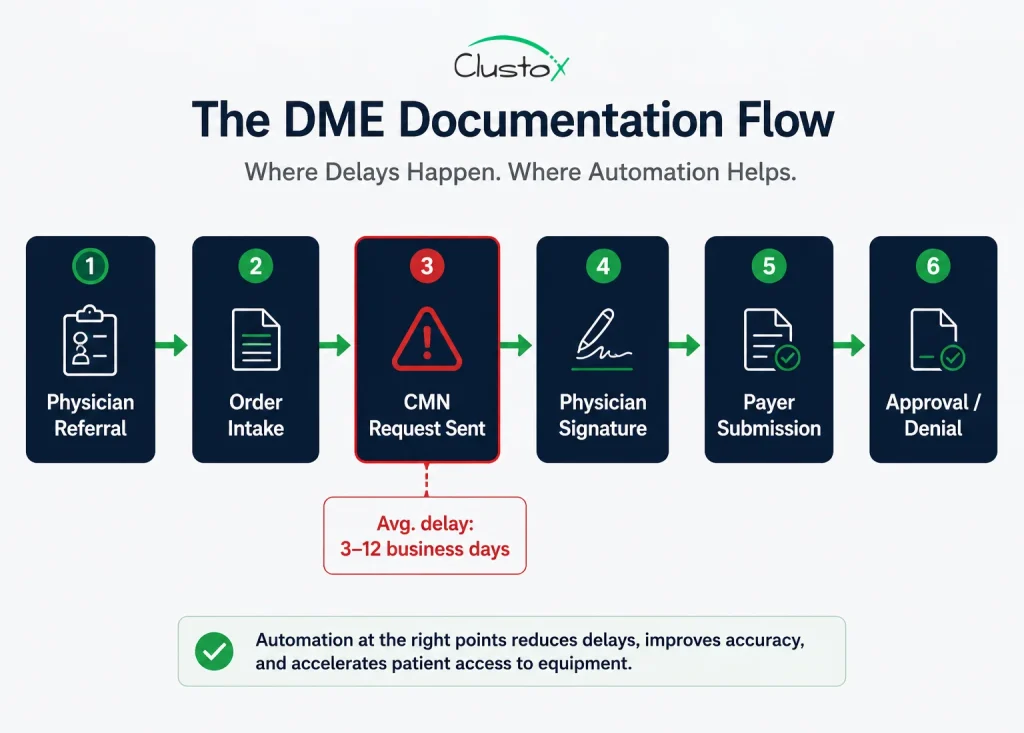
Why CMN Documentation Failures Are the Leading Driver of DME Claim Denials
Documentation deficiencies remain one of the most common causes of DME claim denials and improper payments across Medicare and commercial payer workflows.
Table of Contents
Documentation bottlenecks frequently overlap with prior authorization in DME workflows, especially for oxygen, PAP therapy, and mobility equipment.
CMS review activity continues to focus heavily on documentation completeness, medical necessity support, and payer compliance for high-risk DME categories, including oxygen, CPAP, and mobility equipment.
The cost extends beyond the denied claim itself. Resubmissions, appeals, documentation follow-ups, audit exposure, and delayed reimbursements can place significant operational and financial pressure on DME billing teams.
Here is what that looks like in day-to-day operations:
- Intake teams often spend significant time resolving missing documentation, correcting physician information, and validating payer-specific requirements.
- A completed CMN returns with the wrong ICD-10 code on line 4 or the wrong answer to a qualifying question, undetected until the claim is denied.
- An oxygen order ships before the CMN is validated because of delivery pressure, and the documentation gap surfaces only at remittance.
Certificate of Medical Necessity Requirements by Equipment Category and CMN Form Type
Before any automation layer can validate CMN completeness, you need a precise map of what a complete and compliant CMN actually requires. Requirements vary by equipment category, which is one of the primary reasons error rates remain high in manually managed workflows.
CMS Form 484: Home Oxygen Therapy
Section A captures patient demographics and referring diagnosis. Section B contains qualifying questions, responses that must align with clinical documentation supporting the order. Section C is physician certification.
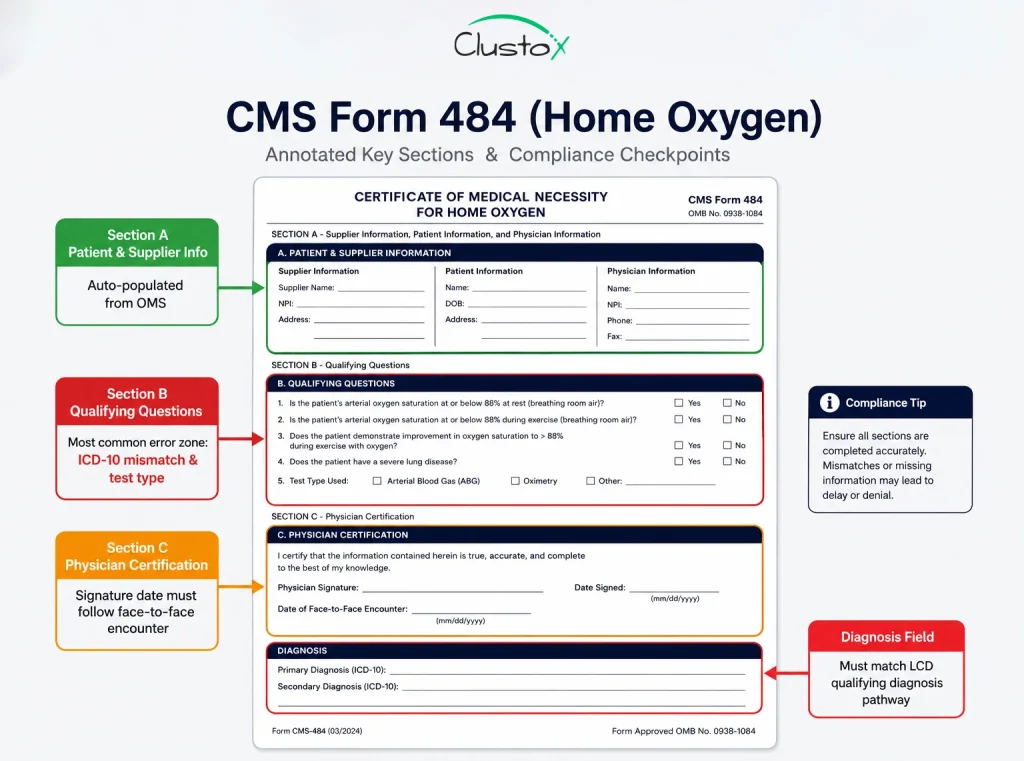
The most common error points are oxygen saturation values entered from the wrong test type (resting vs. exertion vs. exercise), a physician signature date that precedes the face-to-face encounter, and an ICD-10 code that does not map to the qualifying diagnosis pathway selected in Section B.
Home Health Documentation Coordination
DME suppliers often coordinate with home health agencies, physicians, and clinical teams to manage supporting documentation for complex care workflows. For categories such as oxygen therapy, mobility equipment, enteral nutrition, and respiratory support, documentation gaps between providers can delay approvals and increase audit risk.
Automation platforms help centralize these workflows by tracking supporting records, validating signature timelines, linking physician documentation with OMS data, and maintaining audit-ready documentation trails across payer systems.
Non-Assigned and Payer-Specific CMN Forms
For commercial payers and Medicare Advantage plans, the certificate of medical necessity is often a payer-designed form, not a CMS standard.
Aetna, United, Humana, and regional BCBS plans each maintain their own formats, some of which vary by product line and update without formal notice. This variation is the single largest driver of manual review burden in multi-payer DME billing environments.
The qualifying criteria embedded in a CMN or supporting documentation workflow must align with the Local Coverage Determination (LCD) requirements for that equipment category in the beneficiary’s Medicare Administrative Contractor (MAC) jurisdiction.
For example, a CPAP documentation process that satisfies Novitas requirements may still fail under CGS Administrators if sleep study documentation or qualifying criteria differ. Differences across MAC jurisdictions, including Novitas, CGS, NGS, and WPS, make it difficult for DME suppliers to standardize documentation and reimbursement workflows across payer environments.
How CMN Automation Works: A Step-by-Step Breakdown of the Validation Workflow
Automating the certificate of medical necessity process is not a single tool. It is a sequence of agents and validation rules working on structured data extracted from clinical and administrative documents.
Here is how a well-designed CMN automation workflow operates from order intake to billing clearance.
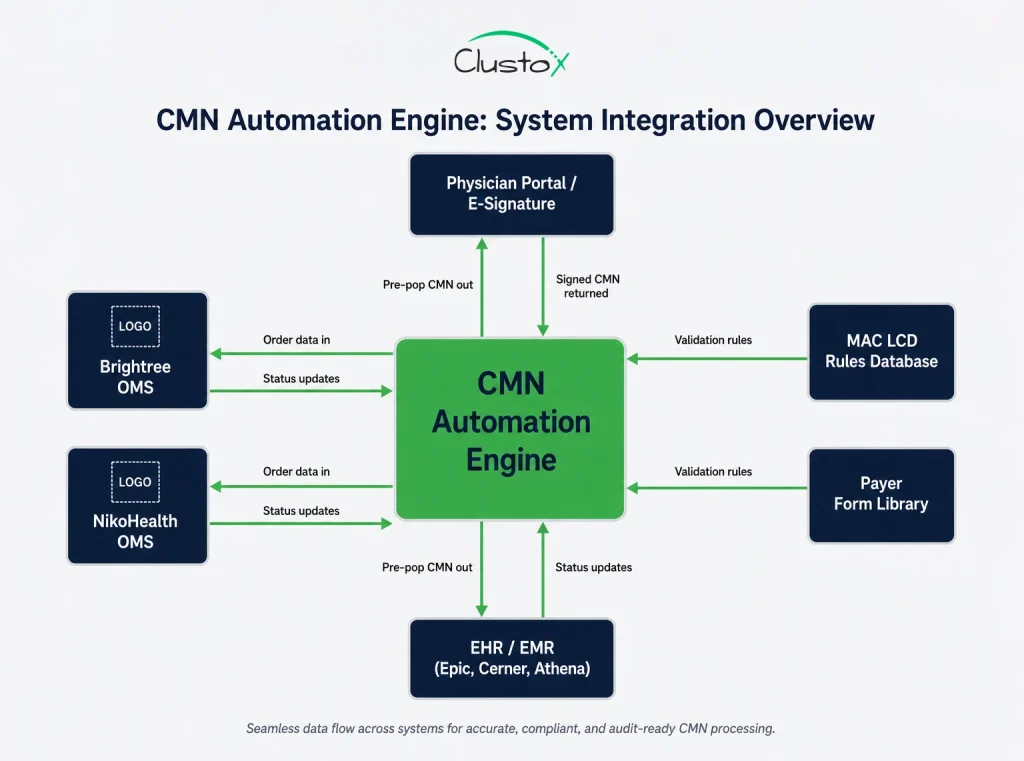
Step 1: Order Intake and Referral Parsing
When a referral arrives, by fax, EHR portal message, electronic order, or phone intake, an extraction agent parses the document for the data elements needed to determine which CMN is required: patient demographics and insurance, referring physician NPI, prescribed equipment HCPCS code, and diagnosis codes.
In Brightree and NikoHealth environments, this step connects through the OMS API; the intelligence layer (which includes the CMN form, the LCD, and the physician portal) sits on top.
Step 2: CMN Template Generation and Pre-Population
Once the required CMN type is identified, the automation engine pre-populates every field it can from source data already on file: patient demographics from the intake record, diagnosis codes from the referral, payer details from the eligibility verification result, and physician information from the NPI registry.
The goal is to send the physician a form that requires only clinical judgment responses and a signature, nothing that staff should have to type from memory.
Step 3: Physician-Side Routing and Automated Follow-Up
Instead of a billing team member sending a fax and waiting, an automated workflow sends the pre-populated CMN to the physician’s preferred channel (fax, physician portal, or e-signature platform), sets a follow-up timer at 48 to 72 hours, sends automatic reminders if no response arrives, and escalates to a billing team member only when a configurable threshold is hit, typically three unanswered follow-ups or an approaching deadline.
Any CMN automation platform handling protected health information must implement strong HIPAA technical safeguards around encryption, access controls, and audit logging.
Step 4: CMN Validation Engine
When the completed CMN returns, an automated validation layer checks it against a rule set before it reaches a billing team member. Validation rules cover:
| Validation Check | What It Catches |
|---|---|
| Signature date vs. face-to-face date | Backdating issues |
| ICD-10 code vs. LCD qualifying criteria | Diagnosis code mismatch |
| Qualifying question answers vs. clinical documentation | Medical necessity gap |
| Physician NPI vs. PECOS enrollment | Provider enrollment gap |
| CMN form version vs. current CMS edition | Outdated form usage |
| Payer-specific field requirements | Commercial payer deviations |
Items that pass all checks route automatically to billing clearance. Items that fail route to a human reviewer with the specific failure reason pre-populated.
Step 5: Audit-Ready Documentation and Tracking
Every CMN, every follow-up attempt, every validation check, and every status change is logged with a timestamp and stored against the order record. In a TPE or RAC audit, the ability to pull 40 complete, timestamped CMN files in under two hours is a material operational difference from assembling records from fax queues and email threads.
Modern agentic AI systems can coordinate multi-step DME documentation workflows across intake, validation, physician outreach, and payer submission.
CMN Automation Integration with Brightree, NikoHealth, and Legacy DME Billing Stacks
CMN automation does not live in isolation. It has to connect to the software stack you are already operating. For most mid-market DME operators, that means Brightree or NikoHealth as the order management and billing core, plus some combination of fax servers, payer portals, and EHR access built up over years.
- Brightree Integration
Brightree’s API surface supports order status reads and writes, document attachment, and workflow trigger events. A CMN automation layer built on Brightree reads new orders as they enter the system, pushes pre-populated CMN PDFs as document attachments, updates order status fields as CMN stages complete, and writes validation flags back to the order record.
The native Brightree physician portal has limited outreach automation; a middleware integration layer typically handles the follow-up cadence and escalation logic.
- NikoHealth Integration
NikoHealth was built with API-first architecture, which makes it more flexible for custom automation integration. The CMN workflow can be event-driven off NikoHealth’s order creation webhook, with all status updates written back through the API. NikoHealth’s intake workflow features reduce the pre-population burden since demographic and insurance data is often already structured in the system at order creation.
- Fax-Heavy Environments
A significant share of CMN traffic still moves by fax. CMN automation in a fax-heavy environment requires OCR-based document capture to convert inbound fax to structured data.
outbound fax API integration for physician outreach, and fallback routing logic that handles fax responses differently from portal responses. This is solvable but adds integration complexity and affects per-CMN unit economics.
- EHR Read Access for Pre-Validation
The most sophisticated CMN automation environments read clinical documentation directly from the referring physician’s EHR to pre-validate qualifying criteria before the CMN is sent. This requires EHR API access (Epic, Cerner, Athena, or eClinicalWorks depending on the practice) and a clinical rules engine that knows what documentation is required per equipment category under each active LCD.
Reliable healthcare API integration is essential for syncing OMS platforms, EHR systems, physician portals, and payer workflows.
What CMN Automation Does Not Handle: Documented Limitations for DME Operators
This section is not optional, and any credible vendor conversation should include it. CMN automation handles structured, rule-based validation well. It does not handle clinical judgment, payer relationship nuance, or edge cases outside its rule set.
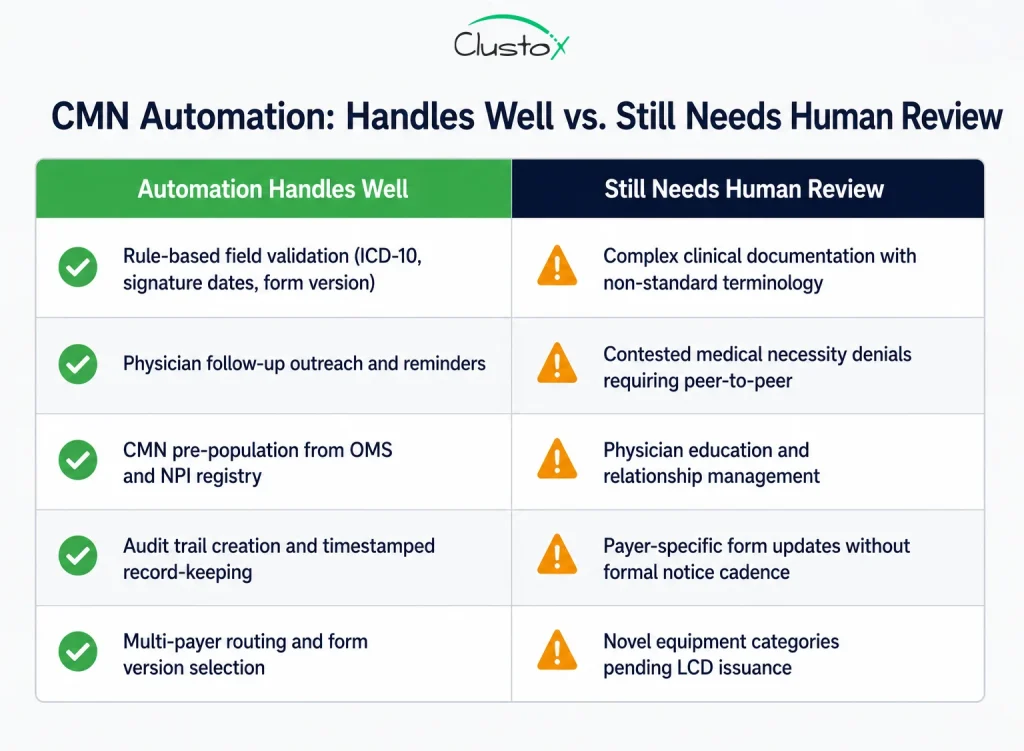
Specific limits to state clearly when evaluating any CMN automation system:
- Complex clinical documentation review: if the physician’s note supports the diagnosis but uses non-standard terminology, or if qualifying criteria are met through a combination of findings rather than a single clear value, a rules engine will typically fail validation and escalate. This is correct behavior, but it means the exception rate on clinically complex orders remains meaningful.
- Payer-specific form versioning: commercial payers update CMN forms without formal notice cadences. A Medicare Advantage plan may update its form quarterly. Unless the automation system maintains an actively managed payer form library, version mismatches will cause denials.
- Physician education and relationship management: when a physician’s office consistently returns incomplete CMNs, the right intervention is a conversation, not another automated reminder. Automation can surface the pattern; it cannot have the call.
- Contested medical necessity decisions: If a payer denies a claim because they dispute the clinical indication, not because the CMN is incomplete, that is an appeals process requiring human judgment, clinical documentation review, and potentially a physician peer-to-peer call.
- Novel equipment categories: when CMS issues coverage decisions for new categories or an LCD is revised, the validation rule set needs updating before automation can reliably handle those orders. There is always a lag.
CMN Automation Performance Benchmarks: Operational Results from DME Billing Workflows
The metrics below reflect operational benchmarks from DME providers in the 300 to 2,000 orders per month range.
These benchmarks reflect observed workflow patterns from DME operations and should be treated as directional operational examples, not guaranteed performance outcomes.
| Metric | Manual Workflow Baseline | With CMN Automation |
|---|---|---|
| CMN turnaround time | 5 to 8 business days | 1.5 to 3 business days |
| CMN-related denial rate (initial submission) | 12 to 22 percent | 4 to 8 percent |
| Staff time per CMN (all follow-up activity) | 22 to 35 minutes | 5 to 8 minutes |
| Audit documentation retrieval per record | 2 to 4 hours | Under 30 minutes |
| CMN exception rate routed to human review | N/A (all manual) | 8 to 15 percent of orders |
The staff time reduction is typically the largest single component of CMN automation ROI in the first year. For a billing team handling 800 orders per month, reducing average CMN handling time from 28 minutes to 7 minutes can create meaningful operational savings and reduce administrative workload significantly over time.
How CMN Automation Reduces DME Audit Risk Under CMS TPE, RAC, and UPIC Programs
For a Director of Billing or Compliance Officer, CMN automation is not solely an operational efficiency initiative. It is an audit preparedness strategy. CMS’s Medicare audit landscape for DME suppliers includes four overlapping contractor programs: TPE audits conducted by MACs, SMRC reviews focused on national error patterns, RAC audits targeting specific billing codes, and ZPIC/UPIC investigations triggered by fraud referrals.
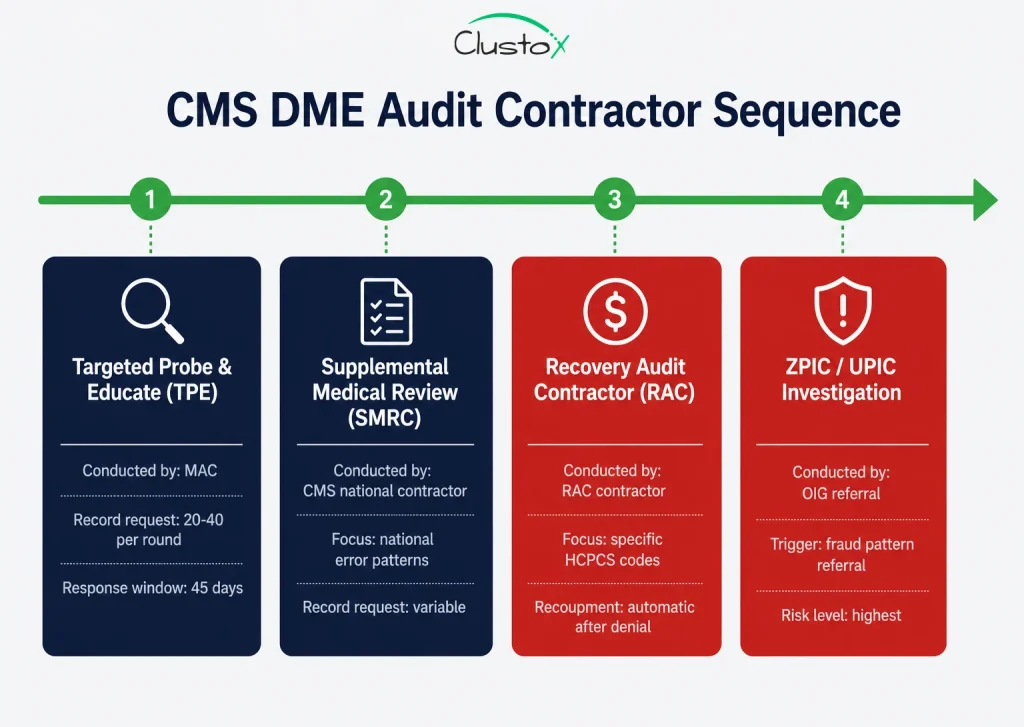
The OIG Work Plan includes active reviews of DME-related billing and documentation risk. For example, OIG is reviewing Medicare payments to suppliers for oxygen and oxygen equipment, noting that suppliers must provide documentation from the treating practitioner showing the equipment was reasonable and necessary.
Automation addresses audit risk in three specific ways:
- It reduces the incidence of incomplete or invalid CMNs reaching billing, creating fewer gaps to expose in an audit.
- It creates a complete, timestamped documentation trail for every CMN, reducing the risk of missing or incomplete documentation during audit response workflows.
- It enables fast, complete audit response; meeting CMS’s 45-day response window with organized documentation is significantly easier when records are centralized and structured.
- For suppliers operating under heightened review or corrective action workflows, documentation automation is commonly considered part of broader operational remediation efforts.
- Before designing an automation strategy, suppliers should review whether their MAC has identified documentation deficiencies or medical necessity review patterns within recent probe activity.
Vendor Evaluation Checklist: 8 Questions to Ask Before Selecting CMN Automation
Many DME organizations ultimately face a build vs. buy AI tools decision based on payer complexity, customization needs, and integration requirements.
Whether you are evaluating a purpose-built CMN automation vendor, a broader DME workflow platform with CMN features, or a custom build from an Agentic AI engineering partner, these are the questions that determine if the system will hold up in production.
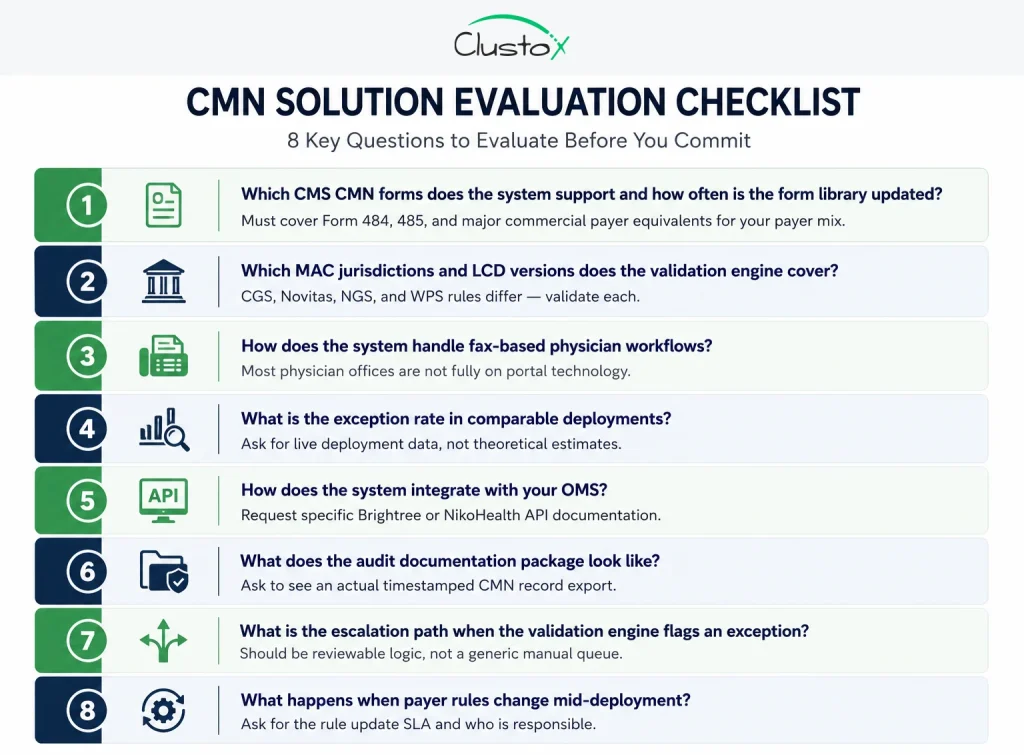
1. Which CMS CMN forms does the system support, and how frequently is the form library updated?
You need Forms 484 and 485 and at minimum the major commercial payer equivalents for your payer mix. Ask who maintains the library and what the update lag is when CMS issues a revised form.
2. Which MAC jurisdictions and LCD versions does the validation engine cover?
If you operate in CGS, Novitas, NGS, and WPS jurisdictions, the validation rules differ. A system built for one MAC’s LCD set will generate false validation results in others.
3. How does the system handle fax-based physician workflows?
Most physician offices are not fully on portal technology. If the answer is ‘we only support portal,’ you will have a meaningful coverage gap in your CMN population.
4. What is the exception rate in comparable deployments, and what does the exception workflow look like?
Ask for actual exception rates from live deployments, and ask what information a billing team member sees when an exception is routed to them.
5. How does the system integrate with your order management software?
Ask for specific API documentation for Brightree or NikoHealth, not a general ‘we integrate with everything’ answer. Confirm whether the integration is bidirectional.
6. What does the audit documentation package look like?
Ask to see an actual audit-ready CMN record export. It should include the original document, all follow-up timestamps, validation check results, and status change history.
7. What is the escalation path when the validation engine fails?
The system should have defined, reviewable escalation logic, not just a catch-all manual review queue. Billing teams need to know what failure reason triggered the escalation.
8. What happens when payer rules change?
Ask specifically about the process when a MAC publishes an LCD update or a commercial payer revises their CMN requirements. Is there a rule update for the SLA? Who is responsible?
CMN Automation Readiness Assessment: What to Measure Before You Build or Buy
Before selecting a vendor or starting a build, you need a baseline. Without it, you cannot measure ROI, set realistic exception rate targets, or prioritize which equipment categories and payer segments to automate first. A structured readiness assessment covers four areas.
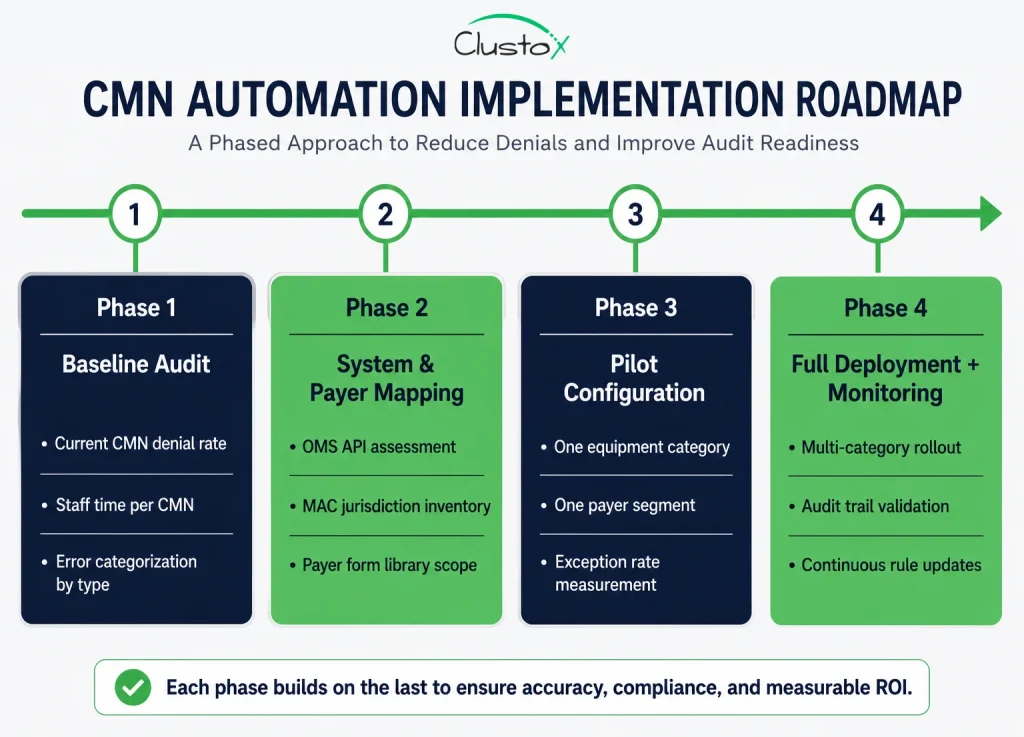
Phase 1: Current State Documentation
Pull your last 90 days of claims data and categorize denials by root cause. Quantify how many denials trace back to CMN issues that are missing, incomplete, invalid, or not on file at time of service. This is your baseline denial rate and your ROI numerator.
Phase 2: Staff Time Allocation
Have two or three billing team members track their CMN-related activity for one week. Categorize time by task: initial CMN requests, follow-up calls and faxes, validation review, re-requests, and audit document assembly. This gives you the labor cost baseline, typically the largest single component of CMN automation ROI.
Phase 3: System and Payer Inventory
Map your OMS, your fax infrastructure, your payer mix by volume, and which MAC jurisdictions you operate in. This determines integration complexity and the scope of the LCD and payer rule library the automation system needs to cover. Mismatches here are the most common reason CMN automation deployments underperform in the first 90 days.
Phase 4: Equipment Category Prioritization
Start with high-volume, high-CMN-complexity categories where the baseline denial rate is elevated. For most mid-market DME operators, that means oxygen, CPAP/BiPAP, and power mobility devices. These three categories account for the majority of CMN-related denial volume and audit activity, and they offer the clearest ROI signal in a pilot configuration.
Frequently Asked Questions (FAQs)
Which equipment categories require a CMN for Medicare DME billing?
Some categories, such as home oxygen therapy and enteral nutrition, historically relied on CMN-based workflows. Today, most Medicare DME claims depend on standard written orders, supporting clinical documentation, and payer-specific medical necessity requirements based on the HCPCS code and LCD criteria.
How long is a certificate of medical necessity valid?
Validity periods vary by equipment category and payer requirements. Oxygen therapy documentation often requires periodic recertification and updated clinical review. DME suppliers must ensure documentation remains current for the dates of service being billed.
What are the most common reasons a CMN leads to a claim denial?
The most common issues include missing physician signatures, incorrect diagnosis codes, incomplete qualifying documentation, outdated form versions, and mismatches between clinical records and payer requirements. Signature timing and ICD-10 validation errors are especially common in oxygen and PAP therapy workflows.
Can a DME supplier complete the CMN on behalf of the physician?
No. Suppliers may pre-populate non-clinical sections, such as patient demographics and equipment details, but physicians must independently complete and sign the clinical certification portions. Improper completion can lead to claim denials and compliance risk.
What is the difference between a CMN and a prior authorization for DME?
A CMN documents medical necessity, while prior authorization is a payer approval process completed before equipment delivery. Some equipment categories require both supporting documentation and prior authorization approval before reimbursement.
How does CMN automation integrate with Brightree and NikoHealth?
CMN automation platforms typically integrate through APIs that exchange order data, document status updates, validation results, and completed forms. These systems work alongside OMS platforms rather than replacing them entirely.
What happens if a CMN is found to be deficient during a Medicare audit?
If documentation deficiencies are identified during an audit, the result may include claim denial, recoupment requests, or additional review activity. Repeated documentation issues can increase audit exposure and operational risk for DME suppliers.
Is the certificate of medical necessity the same as a prescription for DME?
No. A prescription documents the physician’s order for equipment, while a CMN or supporting documentation explains why the equipment is medically necessary. Depending on the payer and equipment category, suppliers may need both.
Summary: Where CMN Automation Fits in Your 2026 DME Operations Roadmap
The certificate of medical necessity requirement is not going away. CMS has made clear through its audit contractor activity and LCD revision cycles that documentation of medical necessity will remain a central compliance focus for DME suppliers. The question is not whether you need tight CMN processes; it is about whether your current process is built to scale, survive audits, and stop leaking revenue through preventable denials.
CMN automation addresses the specific operational failure modes that billing directors and compliance officers deal with every quarter: physician follow-up delays, validation gaps, audit documentation scrambles, and the staff time drain that scales with order volume. It is not a replacement for clinical judgment or physician relationships. It is infrastructure, the kind that makes the rest of your billing operation more reliable.
Large DME organizations often require custom healthtech software development to support payer-specific workflows, audit readiness, and OMS integration needs.
Build a Smarter DME Documentation Workflow
Identify operational gaps and get a practical roadmap from healthcare automation experts experienced in DME reimbursement and compliance workflows.
This article is intended for DME providers, operations leaders, billing directors, and technology decision-makers. It is not medical advice and does not constitute guidance on patient care, equipment selection, or clinical decisions. Regulatory references (CMS, HIPAA, accreditation standards) are accurate as of the review date. Regulations change frequently; providers should consult primary sources or qualified counsel for current requirements.