

What if hidden code flaws or weak architecture are silently slowing your software’s performance?
Overlooked bugs and system gaps often delay releases and increase technical debt, leaving teams scrambling to fix problems later.
A comprehensive software audit uncovers these issues early, keeping your software architecture and system quality strong. In fact, studies show that up to 50% of defects come from overlooked code or architectural gaps, significantly increasing repair time.
These challenges make a structured software audit process essential for maintaining performance, scalability, and long-term reliability.
Here’s what this guide will help you achieve:
- Identify defects with a step-by-step code audit checklist.
- Review software architecture to ensure scalability and reliability.
- Strengthen system quality for better performance and maintainability.
- Reduce technical debt through actionable insights.
- Integrate audit findings effectively into your development workflow.
What is a Comprehensive Software Audit, and When Should You Conduct One?
A comprehensive software audit assesses your software’s code, architecture, and system performance to identify risks, assess technical debt, and identify performance bottlenecks.
It goes beyond simply spotting bugs, providing actionable insights that help teams maintain code quality, ensure stable software architecture, and improve long-term maintainability.
Moreover, a well-executed audit involves a system quality audit, backend code review, performance audit, and even a DevOps audit to strengthen your CI/CD pipelines and infrastructure.
Table of Contents
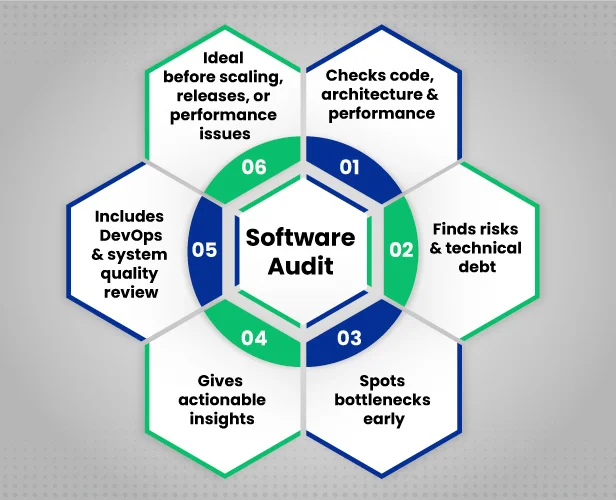
Combining these methods gives businesses a comprehensive picture of their software’s state.
When Should You Conduct a Software Audit?
A software audit process delivers the most value when performed at strategic stages of a product’s lifecycle rather than only after problems appear.
Teams can maintain system stability, identify risks early, and get software ready for future expansion, cloud architecture audits, and scalability assessments by taking proactive measures.
Here are common situations where conducting a comprehensive software audit becomes especially important:
- Before Scaling Your Application: Rapid growth increases system load and complexity. An audit ensures your software architecture, Microservices Architecture on the Cloud setups, or monolithic architecture can handle increased demand efficiently and remain maintainable as your system grows.
- Before Major Releases or Product Updates: Large feature releases introduce new dependencies and risks. A code audit checklist, refactoring strategy, and API performance review help reduce deployment issues and unexpected downtime.
- During the MVP-to-Production Transition: Early-stage products often prioritize speed over structure. Performing a system quality audit ensures that database indexing, load testing, and stress testing are in place for reliability.
- Before Fundraising, Acquisition, or Technical Due Diligence: Investors often evaluate technical health. A software risk assessment highlights security vulnerability scanning, logging, and observability, as well as infrastructure readiness, such as a Kubernetes infrastructure review or an AWS architecture review.
- When Performance or Stability Issues Increase: Frequent bugs, slower response times, or recurring failures indicate deeper architectural or code-level issues that require static code analysis, SOLID principles, and CI/CD pipeline audits.
Conducting audits at these moments moves organizations from reactive fixes to proactive improvement, ensuring software remains reliable, scalable, and aligned with business goals.
For organizations looking to implement these improvements effectively, professional software development services can help integrate audit findings into daily workflows, optimize frontend and backend development, and strengthen both system architecture and code quality.
Improve software reliability and reduce technical debt by up to 50% with a professional audit of your code, architecture, and system performance.
With these possibilities in mind, the next step is learning how to conduct a software audit step by step, which we’ll explore in the following section.
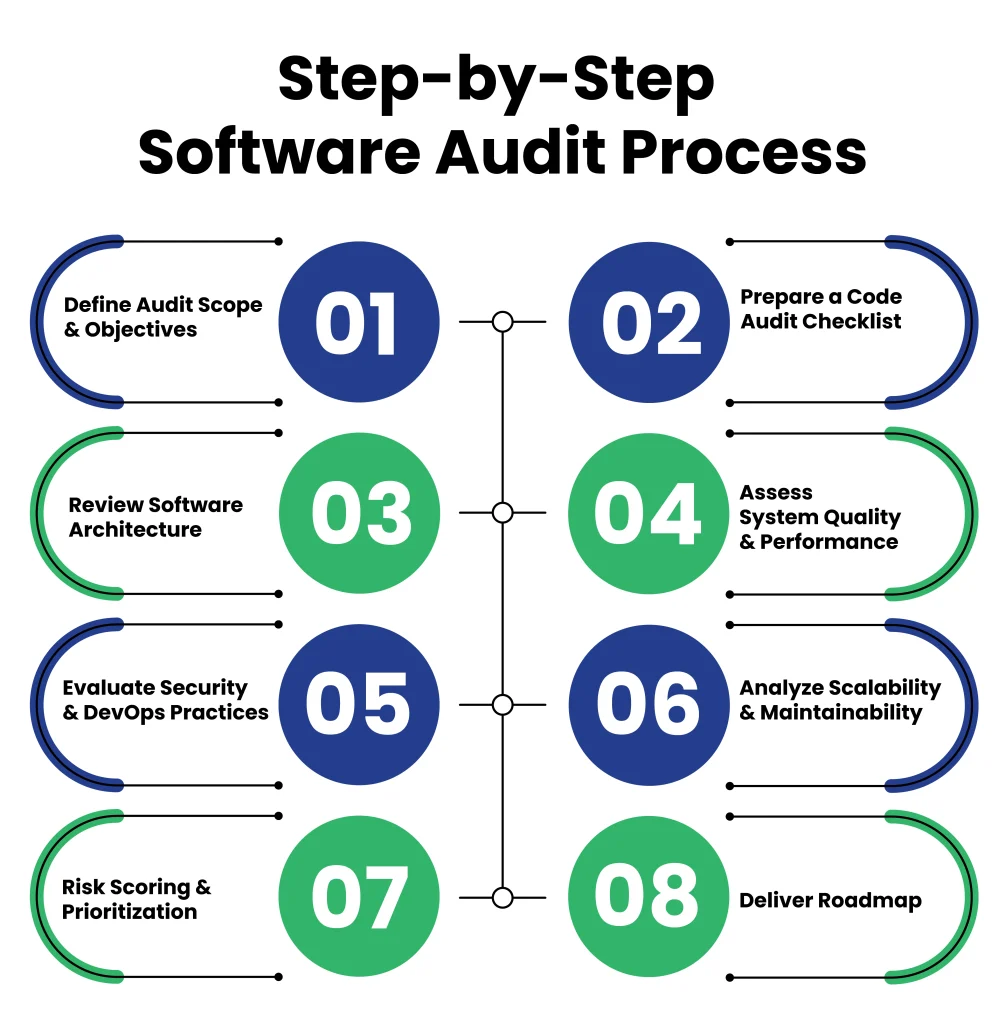
What Is the Step-by-Step Process for a Software Audit?
Conducting a software audit may feel overwhelming at first, but breaking it into clear, actionable steps makes the process easier. This approach ensures every critical aspect of your software, including code quality, architecture, system performance, security, and scalability, is thoroughly evaluated.
These steps help teams identify issues early, reduce technical debt, and maintain reliable, high-performing software while minimizing surprises and ensuring smoother releases.
Step 1: Define Audit Scope and Objectives
The first step in any software audit is to clearly define the scope and objectives. Identify which parts of your software need evaluation, whether it’s backend code, system architecture, or overall system quality.
Setting clear goals ensures the audit focuses on the areas that matter most, such as performance, security, reliability, and maintainability.
Defining the scope also helps teams allocate resources efficiently, avoid unnecessary work, and create a structured audit plan. A well-defined audit objective acts as a roadmap, guiding every subsequent step and ensuring that the process delivers actionable insights.
Step 2: Prepare a Code Audit Checklist
Before starting a software audit, it’s important to have a clear checklist to ensure every critical part of your code is reviewed. A structured checklist keeps the audit organized, saves time, and ensures high-risk areas are not overlooked.
Here’s a code audit checklist you can use to guide your review:
| Category | Questions | Status |
|---|---|---|
| Coding Standards Compliance | Does the code follow internal guidelines and best practices? | ☐ |
| Bug Detection | Are there existing bugs, redundancies, or error-prone areas in the code? | ☐ |
| Static Code Analysis | Have automated tools been used to scan for vulnerabilities, errors, or code smells? | ☐ |
| Refactoring Opportunities | Are there areas where the code can be simplified, optimized, or made more maintainable? | ☐ |
| Documentation Review | Are functions, modules, and APIs properly documented for future maintenance? | ☐ |
| Code Consistency Checks | Are naming conventions, formatting, and structure consistent across the codebase? | ☐ |
| Dependency and Library Review | Are third-party libraries up to date and free from risks that could affect stability? | ☐ |
This step reduces technical debt, strengthens backend code review, and improves the system’s overall audit results.
Step 3: Review Software Architecture
The architecture of your software forms its backbone. Reviewing it ensures your system is scalable, maintainable, and resilient to errors or failures. A thorough architecture review helps teams identify design flaws before they become costly problems.
Here are the areas to focus on during a software architecture review:
- Modularity and Structure: Check if components are well-organized, loosely coupled, and easy to maintain.
- Scalability: Ensure the system can handle increased load and growth without major redesigns.
- Strength: Verify the architecture can withstand errors and system failures.
- Cloud Architecture and Integrations: Review how cloud services and provider setups are configured and managed to support scalability, reliability, and smooth integration with third-party tools.
- Alignment with Business Goals: Confirm the system design supports both current requirements and future business needs.
Reviewing software architecture is essential for maintaining long-term reliability and performance. It reduces technical debt, prevents bottlenecks, and ensures your software can scale efficiently as your business grows.
Step 4: Assess System Quality and Performance
Evaluating system quality ensures your software delivers reliable performance, minimal downtime, and smooth user experiences. This step uncovers bottlenecks and performance issues before they affect end users.
Particular Areas to Check:
- Performance Testing: Structured testing approaches, such as those used in professional software quality assurance testing services, help teams detect performance gaps before deployment.
- Reliability Assessment: Check uptime, error rates, and system stability under different conditions.
- Scalability Testing: Verify how the system behaves as traffic grows or under high traffic.
- Cloud Architecture Health: Evaluate cloud services, deployment setups, and resource utilization.
- System Monitoring & Logging: Ensure monitoring tools and logs provide clear insights into system behavior.
Assessing system quality and performance helps teams identify and fix issues early, improve user experience, and reduce the risk of costly downtime. It also provides insights for future improvements and scaling strategies.
Step 5: Evaluate Security and DevOps Practices
Security vulnerabilities or flawed deployment processes can create serious risks. Evaluating security and DevOps-as-a-service practices ensures smooth releases, protected data, and reduced system risk while streamlining your CI/CD pipelines.
The Areas to Check:
- CI/CD Pipeline Review: Ensure automated deployments follow best practices and avoid errors.
- Security Assessment: Check for vulnerabilities in code, integrations, and cloud setups.
- Access Control & Permissions: Verify only authorized users have access to critical systems.
- Backup and Recovery Procedures: Confirm disaster recovery plans are in place and tested.
- Monitoring and Alerts: Ensure monitoring systems detect issues early and alert the team.
Evaluating security and DevOps practices reduces risk, prevents deployment failures, and ensures your software is safe, stable, and ready for production.
Step 6: Analyze Scalability and Maintainability
Even well-functioning software can struggle as it grows. This step checks whether your system can handle increased user load, features, or data, and whether the codebase remains easy to maintain.
Important Areas to Check:
- Scalability: Can the system handle future growth without major redesigns?
- Maintainability: Is the code easy to read, modify, and extend?
- Technical Debt Review: Identify areas where shortcuts or outdated code may cause future problems.
- Performance Under Load: Verify that performance stays strong as usage increases.
- Documentation & Knowledge Transfer: Ensure teams can efficiently maintain and scale the system.
Analyzing scalability and maintainability helps teams plan for growth, reduce technical debt, and ensure long-term software reliability. It also makes future audits faster and more effective.
Step 7: Risk Scoring & Prioritization
After gathering findings from code, architecture, system quality, and security reviews, it’s important to score risks based on their impact, likelihood, and urgency. This helps teams focus on the most critical issues first.
Main Areas to Check:
- Impact Assessment: Determine which issues could most affect performance, security, or maintainability.
- Likelihood Assessment: Identify which problems are most likely to occur or recur.
- Prioritization Matrix: Categorize findings into high, medium, and low risk.
- Dependencies & Critical Paths: Highlight potential blockers to other improvements.
Risk scoring ensures resources are focused on high-impact improvements, preventing teams from spending time on low-priority fixes while critical issues persist.
Step 8: Deliver Roadmap
A structured roadmap transforms audit findings into actionable steps, guiding development and operations teams toward measurable improvements.
Primary Components:
- Actionable Recommendations: Clear steps for resolving high-priority issues.
- Timeline & Milestones: Define when each improvement should be implemented.
- Ownership & Accountability: Assign tasks to developers, architects, or DevOps engineers.
- Integration with Workflow: Include updates in sprint planning, CI/CD processes, or release schedules.
- Monitoring Progress: Track completed actions and verify improvements during follow-up reviews.
A roadmap ensures that audit insights lead to tangible improvements, reduces technical debt over time, and provides management with a clear plan to improve software quality and scalability.
What are the Best Practices for Conducting a Software Audit?
A structured software audit process delivers real value only when supported by the right practices. Clear planning, collaboration, and consistent evaluation help teams uncover risks early and improve overall system quality.
Applying proven audit practices also ensures that findings lead to meaningful technical improvements rather than to unused reports.
Below are the best practices for conducting an effective and reliable software audit.
1. Define Clear Audit Goals
Every software audit process should start with clearly defined objectives. Teams must know what to evaluate, whether it’s a code quality review, software architecture audit, or system quality audit.
Clear goals keep the audit focused, prevent unnecessary work, and provide a framework for assessing technical debt.
2. Use a Structured Code Audit Checklist
A well-prepared code audit checklist ensures consistency across all evaluations. It helps track issues related to backend code review, static code analysis, refactoring strategy, and adherence to SOLID principles.
Using a checklist reduces the risk of overlooking critical vulnerabilities or bottlenecks.
3. Combine Automated and Manual Reviews
Static code analysis tools quickly detect vulnerabilities, code smells, and performance concerns. Manual reviews, however, provide deeper context about architectural decisions and design logic.
Combining both approaches improves accuracy and strengthens the overall software audit process.
4. Involve Cross-Functional Teams
DevOps audits, developers, QA specialists, and architects bring different perspectives that help uncover hidden risks in cloud architecture audits, CI/CD pipelines, and logging and observability practices.
Cross-functional involvement ensures the software audit process captures both technical and operational issues.
5. Prioritize Risks Based on Impact
Not all findings require immediate action. Categorize issues based on severity, impact on system quality, and business risk. This step ensures high-priority problems, such as those found in performance audits, database indexing, or load and stress testing, are addressed first.
6. Document Findings and Create Action Plans
Audit results should translate into actionable steps. Proper documentation helps teams track progress, reduce technical debt, and maintain long-term software maintainability.
Action plans should include recommendations for improving CI/CD pipeline audits, Kubernetes infrastructure reviews, AWS architecture reviews, and security vulnerability scanning.
Ultimately, these best practices enhance software architecture and system quality audits, strengthen backend code review, and ensure scalable, maintainable, and high-performing systems.
What are the Common Software Audit Challenges and How to Overcome Them?
Conducting a comprehensive software audit helps teams improve code quality, architecture stability, and overall system performance.
However, the process can present practical challenges, especially when dealing with complex systems or evolving development environments. Recognizing these obstacles early allows teams to plan effectively and complete audits more efficiently.
Below are some common software audit challenges and practical ways to address them.
| Challenge | Description | How to Overcome |
|---|---|---|
| Undefined Audit Scope | Audit goals are unclear, causing teams to review unnecessary areas or miss critical components. | Define clear audit objectives and scope before starting the software audit process. |
| Large and Complex Codebases | Legacy systems and large applications make audits time-consuming and difficult to manage. | Divide the audit into modules and prioritize high-risk or business-critical areas first. |
| Lack of Documentation | Missing or outdated documentation makes it difficult to understand the architecture and code. | Combine code analysis with developer discussions, architecture diagrams, and system logs. |
| Overreliance on Automated Tools | Automated tools detect issues but cannot fully assess architecture or business logic. | Use automated tools alongside manual expert reviews for deeper evaluation. |
| Resistance from Development Teams | Audits may be perceived as criticism, limiting collaboration and transparency. | Present audits as improvement initiatives focused on system quality and long-term success. |
In short, Teams can minimize technical debt, maintain scalable, dependable, and high-performing software, and expedite the software audit process by foreseeing these obstacles and implementing practical solutions.
Frequently Asked Questions (FAQ)
2. What Tools Are Recommended for a Code and Architecture Audit?
There are multiple tools that support automated analysis, but combining them with manual review ensures completeness:
Static Code Analysis Tools: Detect bugs, vulnerabilities, and code smells.
Architecture Review Tools: Evaluate modularity, scalability, and dependencies.
Performance Monitoring Tools: Identify bottlenecks and scalability issues.
Using both automated and manual methods ensures a thorough and accurate audit.
3. How Can Teams Ensure Audit Findings Are Effectively Implemented?
No, simply generating an audit report is not enough. Teams should follow these steps:
Prioritize issues based on risk and impact.
Assign actionable tasks to developers, architects, or DevOps engineers.
Track progress through project management tools.
Schedule follow-up reviews to confirm fixes and improvements.
This approach ensures audits translate into meaningful software improvements.
4. Can a Software Audit Detect Hidden Security Vulnerabilities?
Yes, security assessment is a crucial part of a comprehensive audit. It uncovers:
Unpatched third-party libraries or dependencies.
Weak access controls and permissions.
Misconfigured cloud services or deployment pipelines.
Potential risks in CI/CD processes.
Identifying these issues early helps prevent breaches and ensures system stability.
5. What are the Indicators That a Software Audit Is Needed?
A software audit is recommended when teams notice:
Frequent bugs or recurring errors in production.
Performance degradation under load or traffic spikes.
Difficulty in adding new features due to complex code or architecture.
Increasing technical debt is affecting maintainability.
Regular audits help proactively address issues before they escalate, improving reliability and scalability.
Conclusion: Strengthening Software Quality Through Regular Audits
Regular, comprehensive software audits help uncover hidden issues in code, architecture, and system performance before they become costly problems. They also provide insight into technical debt, security gaps, and scalability limits, allowing teams to make informed improvements.
Combining structured code audit checklists, architecture reviews, performance assessments, and risk prioritization ensures software remains reliable, maintainable, and ready to scale with future growth.
Integrating audit findings with professional Cloud & DevOps services can strengthen CI/CD pipelines, optimize infrastructure, and enhance overall system reliability, turning insights into actionable improvements.
Proactive audits reduce risk, lower technical debt, and give confidence in every release, keeping software secure, scalable, and future-ready.
Hidden code flaws slowing your software? Clustox experts fix them, cut technical debt by 50%, and boost performance by 40%.