


Prior authorization is not a new problem. DME providers have been fighting payer documentation requirements for decades. But something changed in 2024 and 2025. Denial rates on prior auth claims climbed past 20 percent for many mid-size providers. CMS expanded its prior auth program to more HCPCS code categories.
Medicare Advantage plans added new criteria without advance notice. And the billing teams responsible for managing all of it did not get any bigger.
The result is a revenue problem hiding inside a process problem. Most prior auth denials are not clinical rejections. They are administrative failures. Wrong form version. Outdated payer criteria applied at submission.
Missing line item in the Letter of Medical Necessity. These are fixable errors. But fixing them manually, across 10 to 15 active payers, with a billing team already stretched thin, is not sustainable.
This case study documents what happened when one mid-size US DME provider stopped trying to fix that problem manually and automated it instead. The provider billed $8 million annually, ran their operation on Brightree, and had a denial rate sitting at 22.4 percent on prior auth claims.
What This Guide Covers
- The operational problem: why prior auth denials were rising despite a competent billing team
- The workflow audit findings that identified the root cause
- The Agentic AI build: architecture, integration, and timeline
- The results at 30, 60, and 90 days post-launch
- What did not work and what had to be fixed mid-deployment
- How to assess whether the same approach applies to your operation
What Did the 48-Hour DME Workflow Audit Reveal About Prior Auth Denials?
Clustox conducted a 48-hour AI Readiness Audit before any build began. The audit mapped the current-state prior auth workflow across five payers representing 80 percent of the provider’s claim volume.
What were the three root causes of prior auth denials?
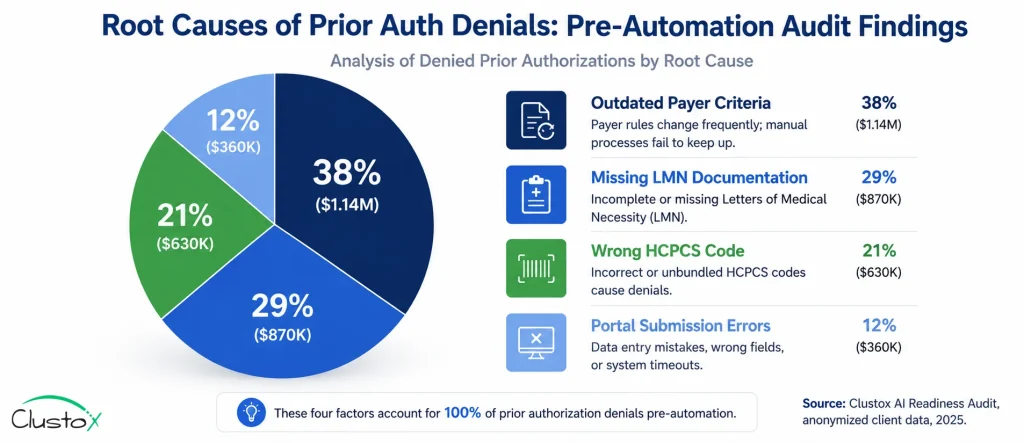
The audit identified three root causes. Each one was specific, measurable, and addressable with automation.
Table of Contents
| Root Cause | Frequency | Revenue Impact |
|---|---|---|
| Outdated payer criteria applied at submission | 38% of denials | $159,600 annually |
| Missing or incomplete LMN documentation | 29% of denials | $121,800 annually |
| Wrong HCPCS code submitted for product category | 21% of denials | $88,200 annually |
| Payer portal submission errors (wrong form version) | 12% of denials | $50,400 annually |
The first root cause was the most important finding. Thirty-eight percent of denials came from staff applying payer criteria that had already changed. This was not a documentation problem or a coding problem. It was a knowledge currency problem. No human team can stay current on criteria changes across 14 payers in real time without a system that does it for them.
The second root cause, incomplete LMN documentation, was partly a communication failure between the referring physician’s office and the DME provider. The Agentic AI system needed to handle both the detection of missing documentation and the outreach to obtain it.
How Was the Agentic AI Prior Auth Automation System Built on Brightree?
The build had four components. Each one addressed a specific root cause identified in the audit. The entire system integrated with the provider’s existing Brightree instance. No practice management system replacement was required.
What were the four components of the automation build?
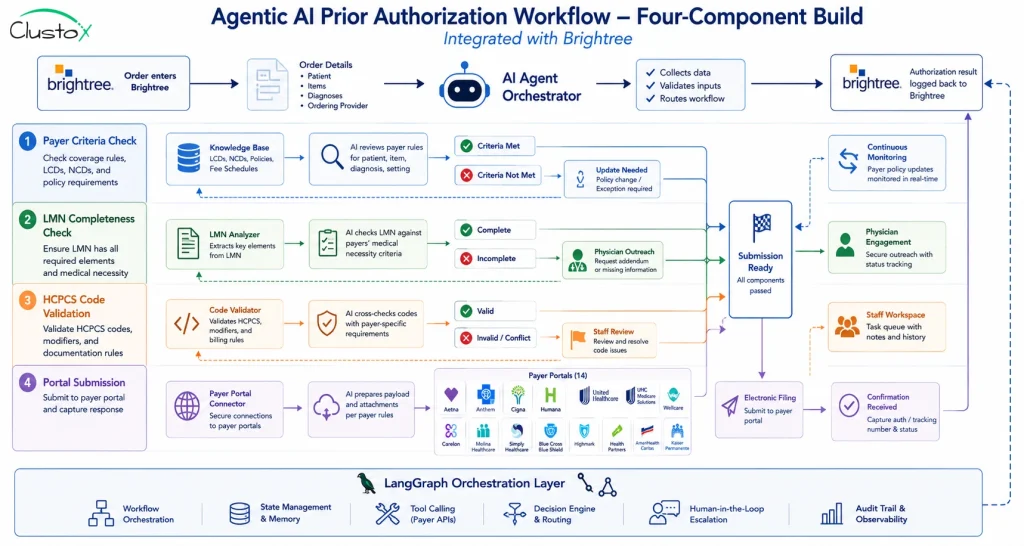
- Payer criteria knowledge base with automated updates. A structured knowledge base was built containing prior auth criteria for all 14 active payers. The knowledge base is connected to payer portal updates via scheduled monitoring. When criteria changed, the system flagged the update and applied it to all pending submissions before they were processed. This directly addressed the 38% of denials caused by outdated criteria.
- LMN completeness checker with physician outreach. Before a prior auth request was submitted, the Agentic AI agent checked the patient record in Brightree against the specific LMN requirements for the relevant HCPCS code and payer. If documentation was missing, the agent automatically sent a structured request to the referring physician’s office via secure fax and email, with a 48-hour follow-up if no response was received. This addressed the 29% of denials caused by incomplete documentation.
- HCPCS code validation layer. A code intelligence layer cross-referenced the ordered product against the correct HCPCS code for the specific payer and product configuration. The system flagged mismatches before submission and routed them to a billing staff member for one-click correction. This addressed the 21% of denials caused by wrong codes.
- Payer portal submission automation. The submission layer used LangGraph-based orchestration to navigate payer portals, select the correct form version, populate fields from the Brightree record, and submit electronically. Confirmation numbers were written back to Brightree automatically. This addressed the 12% of denials caused by portal submission errors.
What was the technology stack used in the build?
| Component | Technology | Purpose |
|---|---|---|
| Orchestration layer | LangGraph | Multi-step agent workflow management |
| Knowledge base | RAG (Retrieval-Augmented Generation) | Payer criteria storage and real-time lookup |
| Infrastructure | AWS Bedrock | HIPAA-eligible compute and model hosting |
| Practice management integration | Brightree API | Bidirectional data sync for orders and results |
| Physician outreach | Secure fax + encrypted email | LMN request and follow-up automation |
| Portal navigation | Browser automation with LangGraph | Form selection, population, and submission |
AWS Bedrock was selected as the infrastructure layer because it supports HIPAA-eligible workloads and provides the audit logging required for CMS compliance documentation. Every automated action was logged with a timestamp, the criteria version applied, and the outcome. This audit trail was a deliberate design decision, not an afterthought.
How long did the implementation take?
The full deployment took 67 days from kickoff to live operations. Here is how that time was allocated.
| Phase | Duration | Key Activities |
|---|---|---|
| Workflow documentation | Days 1 to 14 | Map current-state prior auth process across all 14 payers, document HCPCS code categories, identify Brightree integration requirements |
| Payer criteria knowledge base build | Days 10 to 28 | Build and populate knowledge base; configure update monitoring for each payer portal |
| LMN and HCPCS layers | Days 22 to 40 | Build completeness checker logic, configure physician outreach templates, validate code matching rules |
| Portal submission automation | Days 35 to 55 | Build and test portal navigation for each payer; configure LangGraph orchestration |
| Parallel testing | Days 50 to 65 | Run automated workflow alongside manual process, compare submission accuracy and outcomes |
| Go-live and monitoring | Day 67 | Full cutover, daily monitoring for first two weeks, staff training on exception handling |
What Were the Prior Auth Denial Reduction Results at 30, 60, and 90 Days?
Results were tracked against three metrics: prior auth denial rate, average submission-to-decision turnaround time, and billing staff hours spent on prior auth per week.
Key Results at a Glance
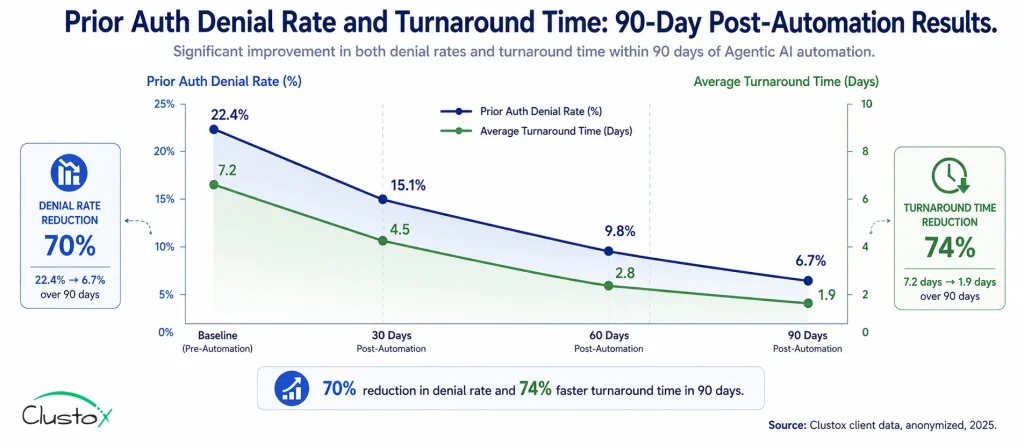
Prior auth denial rate: from 22.4% to 6.7% at 90 days (70% reduction).
Average turnaround time: from 7.2 days to 1.9 days at 90 days.
Billing staff hours on prior auth: from 28 hours per week to 7 hours per week.
Annualized revenue recovered: $294,000 in previously denied claims.
Full ROI on automation deployment: achieved at month 4.
What did the results look like month by month?
| Metric | Baseline | 30 Days | 60 Days | 90 Days |
|---|---|---|---|---|
| Prior auth denial rate | 22.4% | 18.1% | 11.3% | 6.7% |
| Avg submission-to-decision (days) | 7.2 | 5.8 | 3.4 | 1.9 |
| Staff hours on prior auth per week | 28 hrs | 22 hrs | 12 hrs | 7 hrs |
| Payer criteria accuracy at submission | 62% | 89% | 96% | 98% |
| LMN completeness rate at submission | 71% | 84% | 93% | 97% |
The denial rate improvement was not linear. The biggest drop happened between day 30 and day 60, when the payer criteria knowledge base had been fully validated against live submissions and the LMN outreach workflow had been tuned based on physician response patterns.
At day 30, the system was still catching up on criteria updates for three payers whose portals had changed format during the build period. Those three payers accounted for most of the remaining denials at the 30-day mark.
What Went Wrong During the DME Prior Auth Automation Deployment?
Three things went wrong during the deployment. All three were fixable. None of them were fundamental flaws in the approach. But they are worth documenting because they are common failure points in DME automation builds.
What Were the Three Problems Encountered During Deployment?
No automation deployment is completely frictionless. While the overall implementation delivered the expected results, three common challenges emerged during rollout. Each issue was resolved without changing the core automation strategy, but they offer valuable lessons for DME providers planning similar initiatives.
1. Payer Portal Instability
Two of the 14 payer portals changed their form layout mid-deployment without notice. The portal navigation automation broke on those two payers and required reconfiguration, adding eight days to the implementation timeline.
The fix was to add a portal monitoring layer that detected layout changes and flagged them for rapid reconfiguration rather than waiting for submission failures to surface the problem.
2. Physician Outreach Non-Response
Three referring physician offices did not respond to automated LMN requests within the standard 48-hour follow-up window.
To address this, the team introduced a manual escalation path on day 35. Cases that remained unresolved after two automated outreach attempts were automatically routed to a billing specialist for direct phone follow-up.
3. Knowledge Base Gaps at Launch
A small number of HCPCS code validation flags were incorrect during the first two weeks because the knowledge base contained gaps in product-specific coding rules for one niche category: custom orthotics.
After updating the knowledge base, the false-flag rate dropped to under 1 percent by day 21.
None of these issues were fundamental flaws in the automation approach. Instead, they highlighted three realities of DME prior authorization automation: payer portals change, physician response times vary, and knowledge bases improve through real-world usage. Building for those realities from day one significantly reduces implementation risk.
Is Prior Auth Automation the Right Fit for Your DME Operation?
The prior auth automation approach in this case study works best for providers who match a specific operational profile. Here is how to assess your fit.
Which DME Providers Are The Best Candidates For Prior Auth Automation?
| Criteria | Good Fit | Poor Fit or Not Yet Ready |
|---|---|---|
| Billing volume | 60 or more prior auth requests per week | Under 20 per week (ROI too slow) |
| Payer mix | 3 or more active payers with prior auth requirements | Single-payer operation |
| Practice management system | Brightree or NikoHealth with API access enabled | Legacy systems with no API |
| Denial rate | 10% or higher prior auth denial rate | Under 5% (diminishing returns) |
| Staff situation | Billing team stretched thin or growing volume without headcount | Fully staffed with capacity to absorb more volume manually |
| HIPAA readiness | Willing to implement BAA with AI vendor and document audit trail | Not ready to engage AI vendor compliance process |
If your operation matches four or more of the good-fit criteria, a workflow audit will almost certainly identify a build plan with a sub-six-month ROI. If you match two or fewer, automation is likely premature, and the priority should be stabilizing your current-state workflow first.
What Questions Should DME Operators Ask a Prior Auth Automation Vendor?
Before engaging any vendor on prior auth automation for your DME operation, ask these eight questions. The answers will separate genuine DME-specific solutions from generic AI tools repackaged for healthcare.
| Evaluation Question | Why It Matters | Status |
|---|---|---|
| Can you show a live demo using a real CMS prior auth denial reason code, not a scripted scenario? | Validates that the solution can handle real-world DME denial workflows, not just polished demos. | ☐ |
| How does your system handle payer portal layout changes mid-deployment? | Payer portals change frequently. The vendor should have monitoring and update processes in place. | ☐ |
| What is your approach to LMN completeness checking, and how do you handle physician non-response? | Missing or incomplete LMNs are a major source of prior auth denials. | ☐ |
| Which HCPCS code categories does your knowledge base cover, and how is it updated when payer criteria change? | Ensures the platform stays aligned with changing payer policies and coverage rules. | ☐ |
| How does your system integrate with Brightree or NikoHealth, and what does the data flow look like in both directions? | Confirms the solution works with your existing DME workflow instead of creating manual workarounds. | ☐ |
| What is your HIPAA compliance architecture, and can you provide a signed BAA before any PHI is shared? | Protects patient data and verifies regulatory compliance before implementation begins. | ☐ |
| What is the typical time from kickoff to live operations for a provider with our billing volume? | Helps set realistic expectations for implementation timelines and ROI realization. | ☐ |
| Can you connect me with three DME operators of similar size who have been live for at least six months? | Customer references provide proof that the solution performs in production environments. | ☐ |
Frequently Asked Questions
How does the automation handle payers that do not have portal APIs?
Most commercial payer portals do not expose a public API. The LangGraph-based automation layer uses structured browser automation to navigate portal interfaces, select the correct form, populate fields from the Brightree record, and submit. This approach works across the majority of payer portals in the US market. The exception is payers with CAPTCHAs or multi-factor authentication requirements, which require a hybrid approach with staff completing the final submission step.
What happens to denied claims that the automation did not prevent?
Claims that still receive a denial after the automated submission go into an automated denial management workflow. The system reads the denial reason code, pulls the supporting documentation, and drafts an appeal package using RAG. A billing staff member reviews and approves the appeal before submission. The goal is to catch denials before they happen, but the denial management layer ensures that what does get denied is appealed quickly and accurately.
How does the LMN outreach workflow handle HIPAA requirements?
All physician outreach uses secure fax and HIPAA-compliant encrypted email. No PHI is transmitted through standard email. The system maintains an audit log of every outreach attempt, the content sent, and the response received. This log is stored in the HIPAA-eligible AWS Bedrock environment and is available for audit review. The vendor signs a BAA before any PHI enters the system.
What is the cost of a prior auth automation build for a mid-size DME provider?
Build cost varies based on the number of active payers, the HCPCS code complexity of your product mix, and the depth of Brightree or NikoHealth integration required. The starting point for any engagement is a 48-hour AI Readiness Audit, which is fixed price and produces a specific cost estimate alongside the ROI model. Most mid-size providers in the $5 to $15 million billing range see build costs recovered within four to six months of go-live.
Can the same automation system handle both Medicare and Medicare Advantage prior auth?
Yes, but they require separate configurations. Medicare prior authorization follows CMS rules and is submitted through the Medicare portal. Medicare Advantage prior auth requirements vary by plan and are submitted through each plan's own portal. The knowledge base and submission automation are built with separate rule sets for each payer. This is one reason why the initial workflow audit is essential: mapping the payer-specific requirements before building prevents the most common failure mode in prior auth automation.
How does this approach hold up during CMS audits such as TPE or RAC reviews?
The automated workflow produces a complete, timestamped audit trail for every prior auth submission. Each record shows the criteria version applied at submission, the LMN documentation checked, the HCPCS code validation result, and the payer response. This documentation package is exactly what TPE and RAC auditors request during a review. Providers running automated workflows typically produce audit response packages faster and with fewer documentation gaps than those relying on manual records.
Final Takeaway
The provider in this case study did not have a people problem. They had a system problem. Their billing team was competent, experienced, and working hard. They were losing prior auth claims because no human team can track real-time criteria changes across 14 payers while simultaneously managing the rest of a DME billing operation.
Agentic AI did not replace the billing team. It removed the impossible task from their workload. Staff went from spending 28 hours per week on prior auth to 7 hours. Those 21 recovered hours moved to denial recovery and audit preparation. Revenue recovered by $294,000 in the first year. Full ROI was reached at month four.
For DME providers exploring similar initiatives, modern Agentic AI Development Services make it possible to automate complex prior authorization workflows without replacing existing systems such as Brightree or NikoHealth.
Ok, 20 minutes during the workflow audit. That is where this kind of project always starts: not with a technology decision, but with a clear-eyed map of where the revenue is leaking and whether the leak is fixable with a rule-based automated system.
If your denial rate is above 10 percent and your billing team is stretched, the question is not whether to automate prior auth. The question is how fast you can get a workflow audit done and a build plan on the table.