

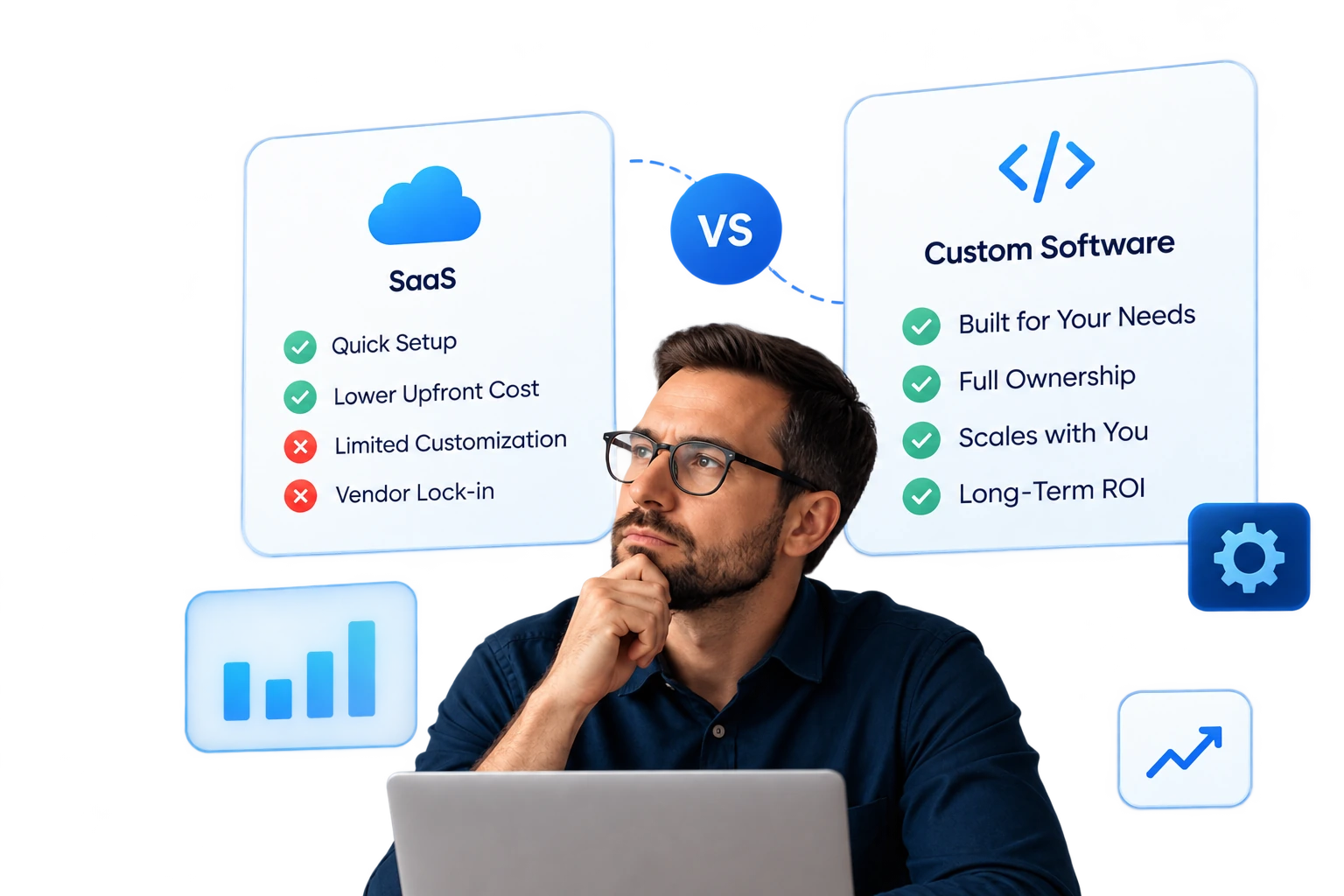
A few years ago, we saw growth-phase companies seeking to move from off-the-shelf SaaS to custom-built software. The causes behind it were SaaS sprawl, the number of apps in use, workflow fragmentation, vendor lock-in, and rising costs at scale.
Today, that reason has drastically shifted to cost volatility.
With the AI surge, SaaS vendors are transitioning from predictable, seat-based pricing to consumption-, outcome-, and capacity-based models.
Zylo’s 2026 SaaS Management Index shows that in the past 12 months, 61% of IT leaders had to cut planned projects due to unexpected spikes in SaaS costs.
For CTOs managing a growing business, this is a clear signal. More SaaS tools mean more unstable pricing, which ultimately results in:
- Stalled strategic initiatives
- Budgeting and forecasting breakdowns
- Workflow and team inefficiencies
- Increased operational risk
- Missed opportunities for innovation
We’ve created this guide for CTOs seeking a realistic path to replace their SaaS tools. In the sections that follow, we will break down the subscription trap, explore the SaaS dependency curve, compare custom software with SaaS, and outline how to transition to systems you fully own.
The SaaS Subscription Trap
SaaS pricing used to be relatively predictable. Most tools followed simple seat-based subscriptions, so CTOs could forecast costs as teams grew.
Today, that predictability is fading. Vendors are layering usage-based, AI-driven, and hybrid pricing models, which makes the total cost of ownership of SaaS tools far harder to control.
Table of Contents
IDC, in its FutureScape 2026 predictions, predicted that by 2028, seat-based pricing will be completely outdated due to the integration of agentic AI into business operations.
The shift is subtle but important, especially for teams trying to reduce SaaS stack costs or evaluate when to build their own internal tools instead.
SaaS Pricing: Then vs Now
The table below shows how SaaS pricing models have evolved.
| Pricing Aspect | Earlier SaaS Model | Modern SaaS Model |
|---|---|---|
| Core pricing structure | Mostly subscription / per-seat pricing | Mix of subscription, usage-based, hybrid, and outcome-based pricing |
| Cost predictability | Costs scaled mainly with the number of users | Costs fluctuate based on API calls, AI tokens, compute usage, and automation volume |
| Feature access | Core capabilities bundled inside pricing tiers | AI capabilities sold as separate usage-based modules |
| Pricing transparency | Fixed tiers with clear pricing | Vendor-specific usage metrics and token models |
| Cost scaling trigger | Costs increased mainly as the team grew | Spending rises with product usage, integrations, and AI activity |
| Integration usage | API access typically included | API usage often tied to consumption limits or compute costs |
| Budget stability | Gradual cost growth | AI-driven features introduce unexpected usage spikes |
The SaaS Dependency Curve
Working with CTOs and IT leaders, we’ve found that, in the SaaS vs. custom software debate, most still prefer the former. This reliance creates what we call the ‘SaaS Dependency Curve,’ where efficiency in the early adoption phases gradually gives way to workflow fragmentation and limited operational control in the later phases.
Consider this typical workflow:
Client books a call → Contract sent → Deal notes logged → Lead added to CRM → Tasks assigned → Invoice issued
Let’s map out this workflow across the four phases of the curve.
Phase 1: Tools Adoption
Client books a call through Calendly, and the contract is sent via DocuSign. Early on, tools are chosen for speed, convenience, and automation. The priority is to get processes running quickly with minimal manual effort.
Phase 2: Stack Expansion
Deal notes are stored in Notion, leads go into the CRM, and tasks are tracked in Asana or Jira. As teams grow, additional tools are layered in to support new processes, expanding the SaaS stack naturally.
Phase 3: Workflow Fragmentation
With more tools in use, workflows start to fragment. Data duplication appears across systems, processes require manual syncing, and information is scattered. Each new tool adds potential points of friction, making the stack harder to manage.
Phase 4: Ownership Realization
When business growth triggers inconsistent data, unexpected costs, broken automations, and delayed initiatives, you recognize the limits of SaaS. These symptoms signal that building custom internal systems are necessary to regain control, reduce dependency, and consolidate critical workflows.
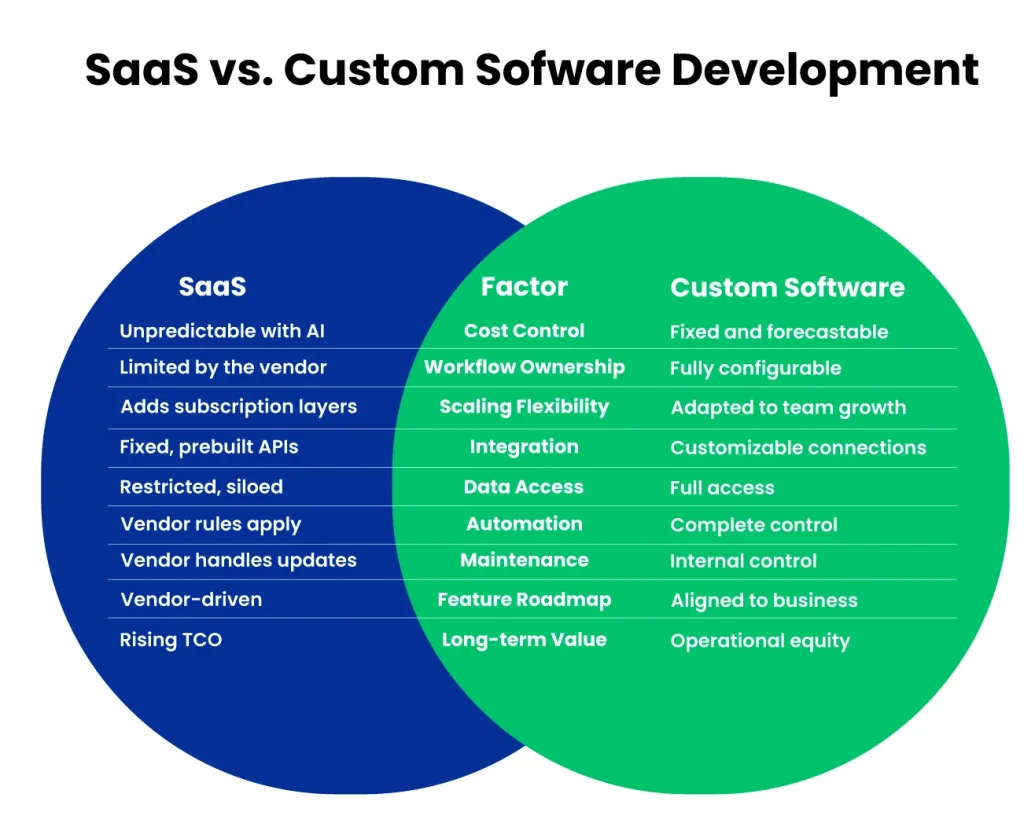
SaaS vs. Custom Software Development: A Comparison
If you’re still unsure about building your own internal tools, consider the long-term value. This is the biggest and most defining trade-off to keep in mind during the build vs. buy decision. AI-driven pricing not only leads to cost problems but also to a value crisis.
So, if you’re using SaaS, your organization must know the measurable business value it’s getting from the usage-based pricing and AI costs.
Are Your Workflows Breaking Under Too Many SaaS Tools?
Centralize your operations with a system built around your workflows, not vendor limits.
In the upcoming sections, we’ll do a side-by-side comparison of the top 3 SaaS tools, such as Calendly, DocuSign, and Notion, against their custom-built alternatives to understand how custom software outperforms third-party tools.
Calendly vs. Custom Scheduling Software
Calendly makes scheduling simple and quick for early-stage teams. You can run sales and customer calls smoothly without extra setup. But as your business scales, rising AI-driven subscription costs, limited integration with internal systems, and inflexible reporting will start to slow processes.
If you’re looking for any Calendly alternative, we’d recommend building your own to have full control, personalized automations, and operational visibility that Calendly can’t provide.
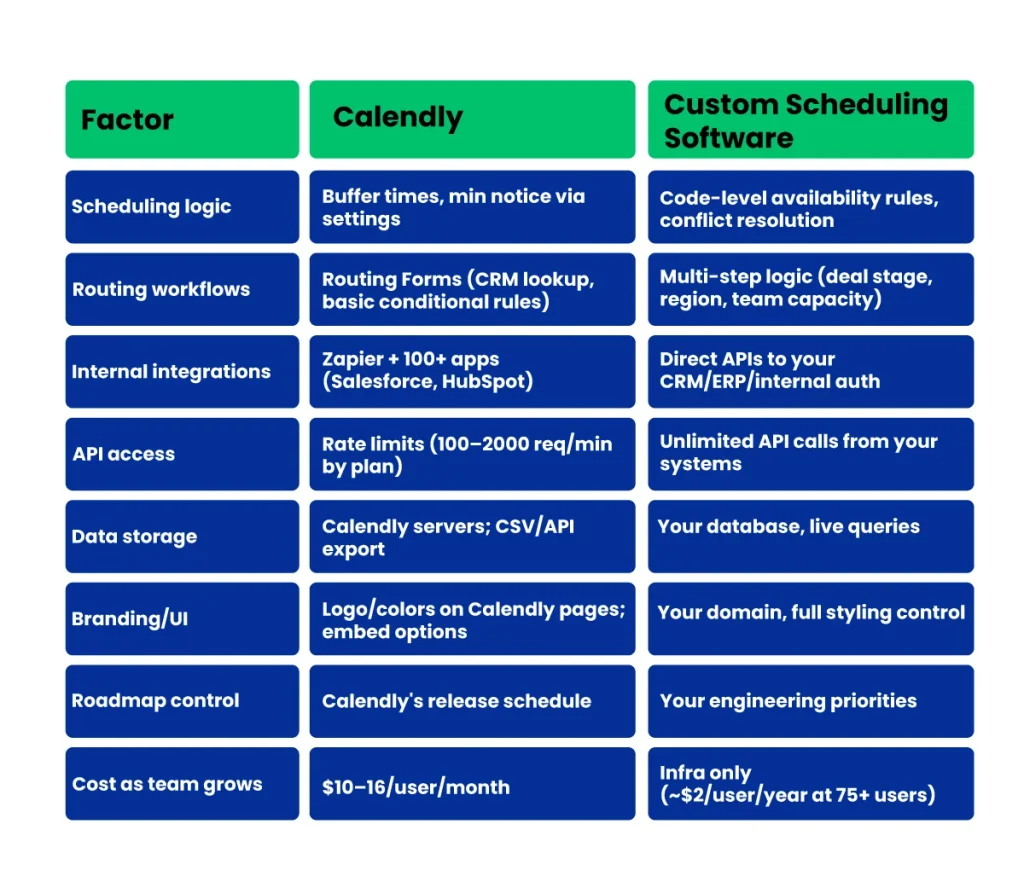
Operational Comparison Between Calendly & Custom Scheduling Software
In the infographic below, we’ve highlighted operational differences you must evaluate when deciding between a SaaS scheduling tool and a custom internal system.
Note: Feature availability reflects current platform capabilities and may change as the vendor updates pricing or product tiers.
Cost Breakdown Comparison
The table below shows a practical cost comparison between typical Calendly usage and the cost of building a lightweight internal scheduling system.
| Cost Component | Calendly | Custom Scheduling Software |
|---|---|---|
| Base pricing | $10/seat/mo (Standard), $16/seat/mo (Teams) annual | — |
| Advanced features | Teams ($16) or Enterprise ($15K/yr min) | Included in initial build |
| Cost scaling | +$120–192/user/year as team grows | Infra only (~$2/user/year at scale) |
| Integration tooling | Zapier Pro ($20+/mo) for complex flows | Native integrations built-in |
| Annual team cost | $120–192/user/year | — |
| Initial development | — | $15K–50K (4–12 weeks dev time) |
| Ongoing maintenance | — | $1.5K–5K/year (10–20% of build cost) |
Note: Cost ranges are practical estimates based on common implementations. Actual pricing may vary depending on team size, infrastructure choices, AI provider usage, and development scope.
DocuSign vs. Custom E-Signature Software
DocuSign helps teams send contracts quickly and maintains basic audit trails. However, when your business is scaling, managing bulk agreements, linking signing steps to internal systems, and reporting on multiple contract types becomes cumbersome.
A DocuSign alternative in the form of custom e-signature software lets you automate multi-step approvals, unify contract data with internal workflows, and handle complex compliance rules without workarounds.
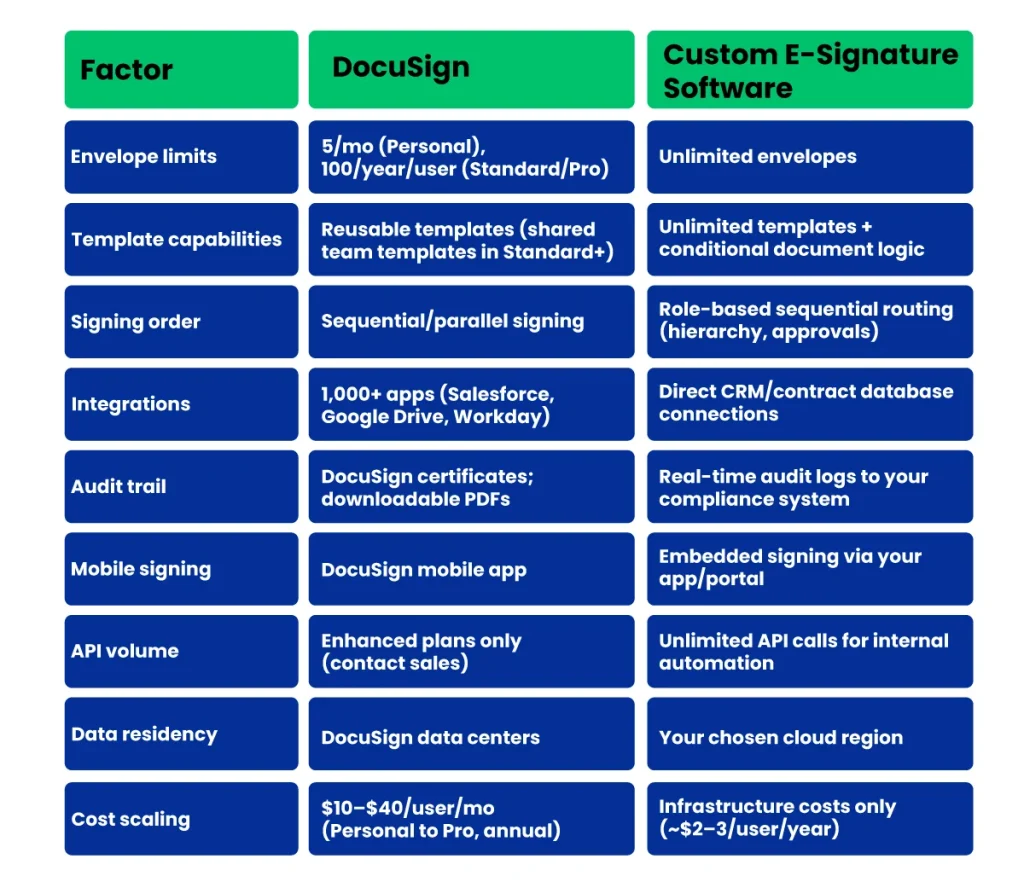
Operational Comparison Between DocuSign & Custom E-Signature Software
When evaluating between DocuSign and its custom-built software, you must consider taking a look at the following aspects:
Note: Feature availability reflects current platform capabilities and may change as the vendor updates pricing or product tiers.
Cost Breakdown Comparison
In the table below, we’ve broken down each option’s cost components:
| Cost Component | DocuSign | Custom E-Signature Software |
|---|---|---|
| Base pricing | $10/user/mo (Personal), $25–40/user/mo (Standard/Pro) | — |
| High volume | SMS: £0.35/delivery, ID verify £2 | Unlimited volume included |
| Cost scaling | +$120–480/user/year | Infra (~$2–3/user/year) |
| API access | Enhanced plans (contact sales) | Built-in unlimited |
| Annual team cost | $120–480/user/year | — |
| Initial development | — | $20K–60K (8–16 weeks compliance build) |
| Maintenance | — | $2K–6K/year |
Note: Cost ranges are practical estimates based on common implementations. Actual pricing may vary depending on team size, infrastructure choices, AI provider usage, and development scope.
Notion vs. Custom Internal Knowledge Software
OpenAI, Figma, NVIDIA, Volvo, Adobe, and many other innovative teams use Notion for everything from project management and internal documentation to lightweight CRMs and AI-powered features.
However, for a growing company trying to reduce SaaS costs and avoid SaaS subscription stacking, replacing Notion with a custom internal system is often the more practical choice, especially since Notion now uses a usage-based credit model for custom agents alongside its seat-based pricing.
As mentioned earlier, these AI-driven costs will only escalate. With your own custom internal knowledge system, you can control which capabilities to build, how AI runs across workflows, and keep operational costs aligned with your infrastructure rather than fluctuating vendor costs.
Operational Comparison Between Notion & Custom Internal Knowledge Software
The table below shows how a SaaS workspace compares with a knowledge system built through custom software development.
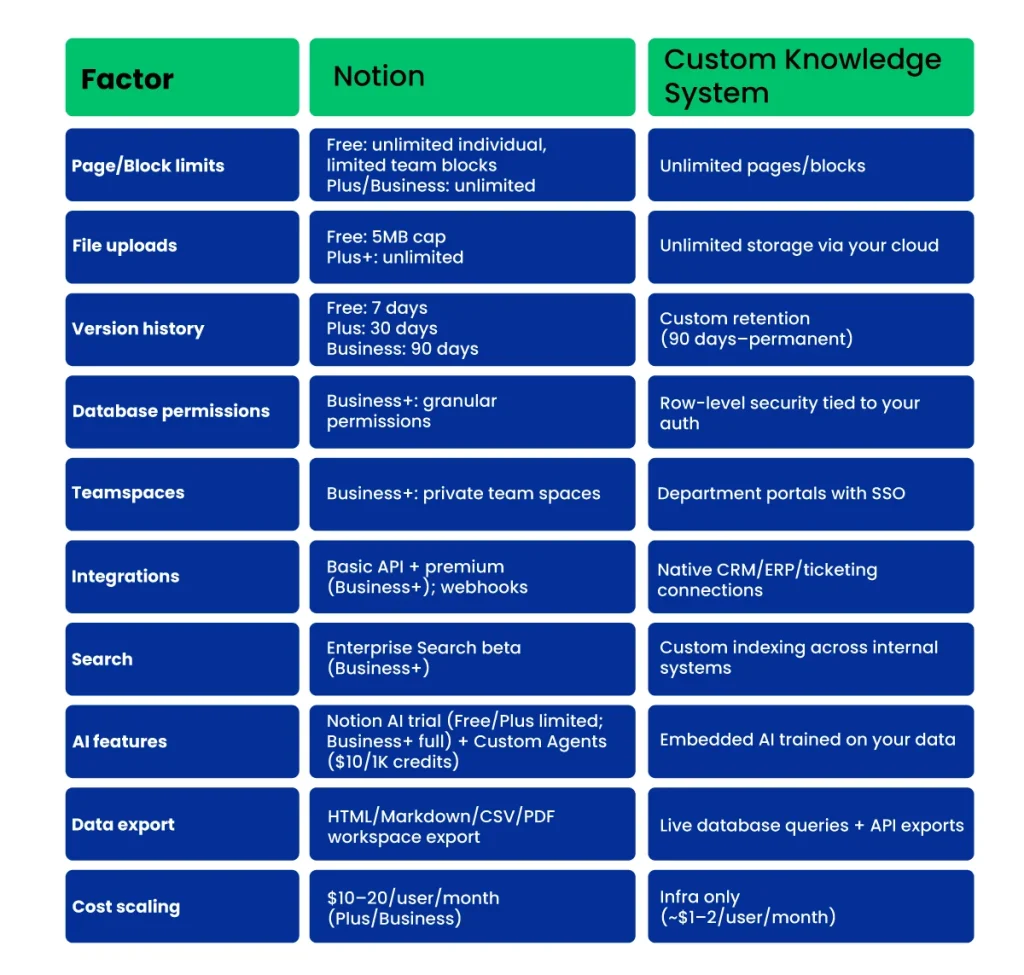
Note: Feature availability reflects current platform capabilities and may change as the vendor updates pricing or product tiers.
Cost Breakdown Comparison
The table below outlines typical cost differences between using Notion and building your own internal knowledge system as a Notion alternative:
| Cost Component | Notion | Custom Knowledge System |
|---|---|---|
| Base pricing | $10/member/mo (Plus) $20/member/mo (Business) | — |
| Advanced features | Business ($20+) for SSO/team spaces/permissions | Included in initial build |
| Cost scaling | +$120–240/user/year as team grows | Infra (~$1–2/user/month) |
| AI add-ons | Custom Agents: $10/1,000 credits | Built-in (your AI provider costs) |
| Annual team cost | $120–240/user/year | — |
| Initial development | — | $25K–75K (8–20 weeks wiki + DB + AI) |
| Ongoing maintenance | — | $3K–8K/year (12–15% build cost) |
Note: Cost ranges are practical estimates based on common implementations. Actual pricing may vary depending on team size, infrastructure choices, AI provider usage, and development scope.
Thinking About Replacing SaaS With Custom Software?
Our top 1% software experts deliver a focused assessment of SaaS costs, integrations, and workflow gaps so you can prioritize the first internal system to build.
When Should You Use SaaS Tools?
Just because SaaS vendors have shifted to usage-based and AI-driven pricing doesn’t mean you should avoid them entirely. For certain workflows and scenarios, renting a mature SaaS product is still smarter, faster, and more cost-efficient than building your own internal tool.
Let’s find out when.
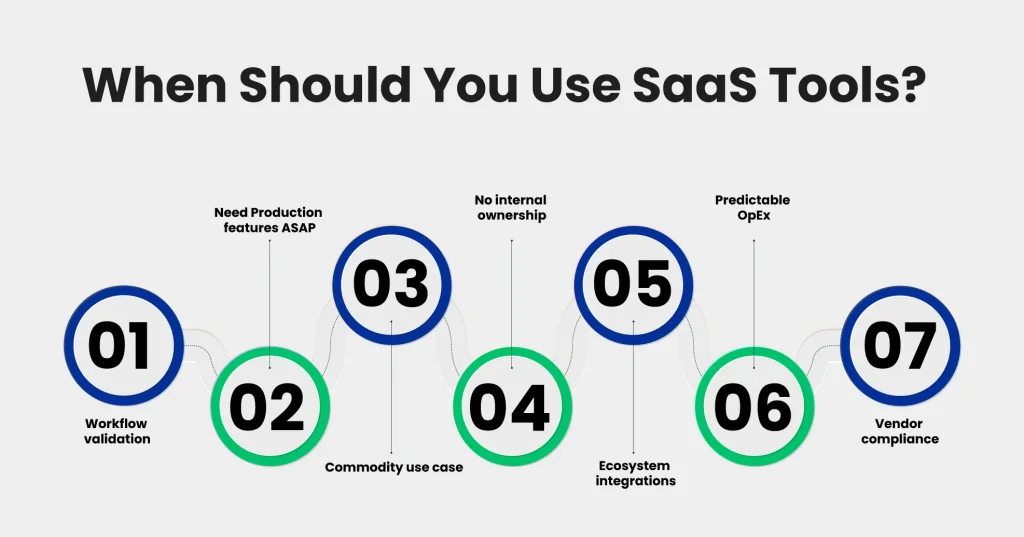
1. You’re validating a new workflow or function
When the process itself might change in 3–6 months (e.g., a new sales motion, support queue, or onboarding flow), it’s smarter to use a SaaS tool than to invest in a custom build that may be discarded.
2. You need production-grade features immediately
If you must go live this quarter with features such as audit trails, SSO, role permissions, or SLAs (e.g., e‑signature, helpdesk, or billing), established SaaS products often provide these “out of the box,” whereas a custom build would take weeks or months.
3. Your use case is very standard, not a differentiator
For commodity functions (email, calendar, generic docs/wiki, basic ticketing), SaaS is usually “good enough,” and building your own doesn’t create competitive advantage.
4. You don’t have stable internal ownership yet
If there’s no team ready to own the backlog, QA, and uptime for an internal tool, using SaaS avoids creating an orphaned internal product that will decay.
5. You rely heavily on ecosystem integrations
When you need to plug into dozens of external tools (CRM, HRIS, finance, marketing), SaaS products with mature app marketplaces usually beat a custom integration layer in both time and reliability.
6. You need predictable OpEx, not CapEx
If finance prefers a clean, per-seat monthly spend over lumpy project budgets (e.g., pre-IPO, tight burn control), SaaS subscription lines are easier to forecast than a single large custom build or two.
7. Regulatory burden is lower with a vendor
In some domains, it’s cheaper and safer to lean on a vendor’s existing certifications and audits (e.g., SOC 2, ISO 27001) instead of owning the entire compliance surface yourself.
When Should You Build Your Own Custom Software?
We’ve already touched on why building your own software makes sense, including rising AI-driven costs, subscription stacking, and a lack of personalization.
Here are a few additional reasons to consider a custom build:
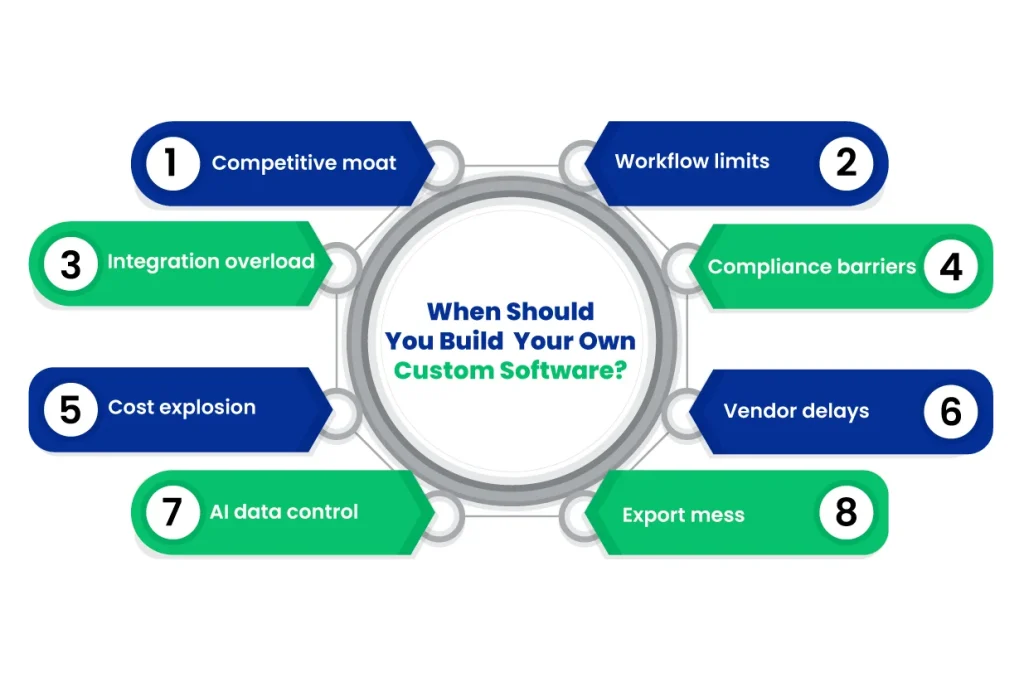
1. Your process is a genuine moat
If your sales cycle, support triage, or fulfillment workflow is something competitors can’t easily copy, encoding it in an internal system gives you a durable advantage rather than forcing it into generic SaaS fields and stages.
2. You’re hitting real limits in critical workflows
Examples: approvals that must cross multiple departments and legal checks, multi-entity relationships that don’t fit a “record = company or deal” model, or complex capacity/routing logic that your current SaaS can only approximate with hacks and Zapier.
3. Integration work is now larger than the tools themselves
When engineering spends more time maintaining glue code, sync jobs, and automations between 5–10 SaaS apps than building product features, it’s a sign you need a single internal system that owns the data model and exposes stable APIs.
4. Compliance and data residency keep blocking deals
If customers or regulators are asking where data lives, how long it’s stored, and who can access raw logs, and your SaaS vendors can’t align with your policies, then owning the core system (in your own cloud accounts, with your IAM) becomes a strategic requirement.
5. Unit economics break at your current or next scale step
When per-seat and new AI usage models are doubling your SaaS spend and sit in the middle of high-volume workflows (scheduling, signing, internal knowledge, and support), a custom build that turns this into mostly infra cost is worth the upfront investment.
6. You need workflow changes on your timeline, not a vendor roadmap
If GTM or ops teams are waiting quarters for a field, state, or automation that’s central to revenue or risk, a custom system lets you ship that change in sprints and iterate weekly instead of lobbying a vendor.
7. You’re planning significant AI automation around your own data
When the roadmap includes AI agents that read tickets or contracts or run internal playbooks, it’s much easier (and cheaper long-term) to build them on top of a system you control. You own embeddings, indexes, and prompts instead of piping data in and out of multiple SaaS tools.
8. You’re already rewriting exports in spreadsheets every week
If teams regularly pull data out of SaaS, normalize it, and join it with other internal sources to get “the real report,” you’ve outgrown the reporting layer of those tools and would benefit from a custom system with a single, accurate schema and BI on top.
Tips For Transitioning From SaaS To Custom-Built Softwares
In 2018, Lidl, a global grocery retailer, tried modernizing its inventory system with a massive software rollout. They attempted to replace legacy processes all at once, skipped phased testing, and did not fully align the new system with existing workflows. This caused misaligned operations, costly errors, and ultimately €500M in losses over 7 years.
Even though this wasn’t a SaaS-to-custom move, it highlights a universal truth: rushing critical system changes without careful planning can blow up costs and disrupt operations.
That’s exactly why every SaaS-to-custom transition needs structured planning, small proofs of concept, and clear workflow alignment. The tips below show how to do it right.
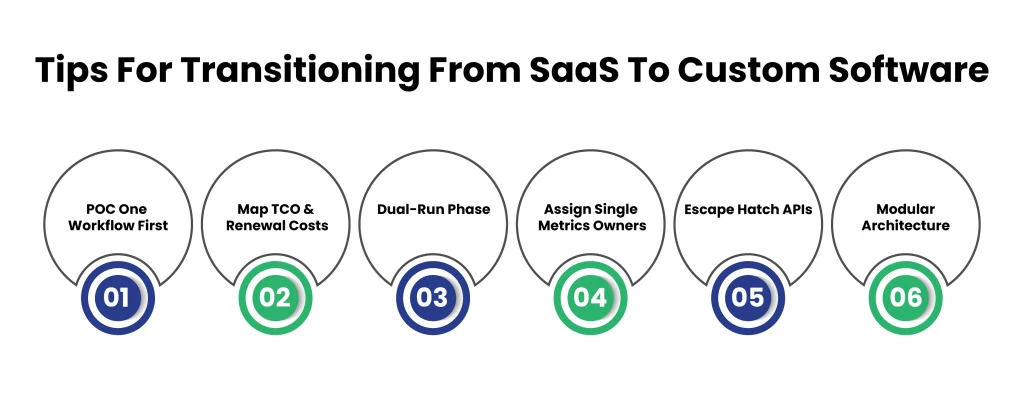
Core Planning
Tip #1: POC One Workflow First
Pick your highest-impact workflow and build, test, and migrate only that module first to validate assumptions without disrupting teams.
Tip #2: Map TCO & Renewal Costs
Compare SaaS renewal projections with custom dev, ops, and infrastructure costs. Include realistic estimates for ongoing maintenance to avoid unexpected budget gaps.
Execution Safeguards
Tip #3: Dual-Run Phase
Keep the SaaS tool live alongside your custom system for several months with parallel data sync. This ensures rollback capability if uptime or adoption falls short.
Tip #4: Assign Single Metrics Owners
Designate a VP-level owner for fundamental KPIs, such as “workflow efficiency,” from Day 1. Maintains accountability and prevents orphaned tools from being left behind when the builder leaves.
Tech Debt Prevention
Tip #5: Escape Hatch APIs
Build data exports in SaaS-compatible formats from day one. Test regularly to ensure you can migrate or roll back if needed.
Tip #6: Modular Architecture
Break the system into 3–5 microservices at first. Prioritize the most complex workflows, and use internal sandbox environments to test scalability before full rollout.
Final Takeaway
One thing we’d recommend you do right off the bat is the SaaS stack audit. Notice you’ll find three types of tools from the audit:
- Workflow tools (scheduling, approvals, knowledge systems)
- Commodity tools (email, docs, communication)
- Glue tools (Zapier, integrations, sync scripts)
The #1 sign that your business has hit the ceiling with the SaaS is the moment those glue tools start multiplying.
But hold on a sec…
After realizing this, most companies think they need to replace all their SaaS tools immediately. However, the real problem is the workflow orchestration layer between tools.
We’ve successfully delivered 200+ custom software projects for growth-stage companies across 15+ industries, including Fintech, Healthtech, Edtech, Retail, and Agtech. Based on these implementations, the workflow orchestration engine should be built first, as it coordinates tasks, approvals, and state changes across teams.
Because once you control that layer, scheduling, approvals, routing, automation, and reporting triggers can all run from a single internal system. Everything else becomes easier to rebuild later.
Frequently Asked Questions (FAQs)
2. What Is the Most Critical Layer To Build First In Custom Software?
Start with the workflow orchestration engine that manages tasks, approvals, routing, and reporting triggers. Controlling this layer consolidates multiple SaaS tools and stabilizes operations.
3. Can Custom Software Control AI-Driven SaaS Costs?
Yes. Centralized workflow engines convert variable per-seat or token pricing into predictable infrastructure spend, reducing unexpected AI-driven cost spikes across teams.
4. Which Workflows Should CTOs Prioritize When Moving From SaaS?
Focus on cross-team, high-volume workflows: scheduling, approvals, routing, and automated reporting. These workflows are often the source of inefficiencies and cost overruns in SaaS stacks.
5. How Should Enterprises Transition From SaaS To Custom Software Safely?
Run critical workflows in parallel with existing SaaS tools, maintain escape-hatch APIs for rollback, and assign a metrics owner for KPIs such as workflow efficiency. Modular microservices reduce tech debt and risk.
6. Should Startups Build Their Own Internal Tools Early?
Only if core processes form a competitive advantage or scale-critical workflow. Commodity tools like email or generic docs are better off using SaaS until the internal workflow and orchestration layer stabilizes.
Struggling With Scope Creep & Delayed Deliveries In Custom Software?
Clustox uses modular architecture, prioritized workflows, and step-by-step deployment to keep projects on time, on budget, and fully aligned with your business goals.