


Have you ever been caught off guard by unexpected rain or a sudden heatwave?
Planning your day or outdoor activities becomes stressful when weather information isn’t accurate or easily accessible.
The global weather app market is booming, valued at around USD 1.0 billion in 2024 and projected to double by 2033. Clearly, users are looking for reliable, real-time weather insights more than ever.
Yet building a weather app that consistently delivers accurate forecasts isn’t simple. Developers face challenges such as integrating multiple data sources, delivering hyperlocal updates, and creating a seamless, user-friendly interface.
In this blog, we explore weather app development, highlighting core features, top tech stack, and realistic cost estimates for 2026, so you can understand what it takes to build an app users can trust and enjoy.
So let’s begin by uncovering what makes these apps tick.
What Does Weather App Development Involve?
Weather app development refers to creating digital platforms that deliver accurate, real-time climate information right to a user’s device. These apps combine intuitive design with data-driven technology to help users plan their day, travel, or events more efficiently.
In 2026, building a high-quality weather app development goes far beyond showing temperature updates. Many apps even feature hyperlocal forecasts that refresh within seconds, giving users personalized updates.
Table of Contents
Developers usually focus on a few core elements when building a weather forecasting app, such as:
- Real-time weather data and radar mapping
- Location-based alerts and notifications
- Seamless data integration across devices
- Integration with external APIs for accurate forecasting
Recent app market analytics show that demand for smarter, data-driven weather apps continues to grow globally.
Now look at their core features!
What are the Core Features of a Reliable Weather App?
Weather app development is more than just displaying temperatures. It’s about creating an experience that helps users plan their day, stay safe, and even enjoy a sunny outing without surprises.
When it comes to core features, these are the essentials that every user expects:
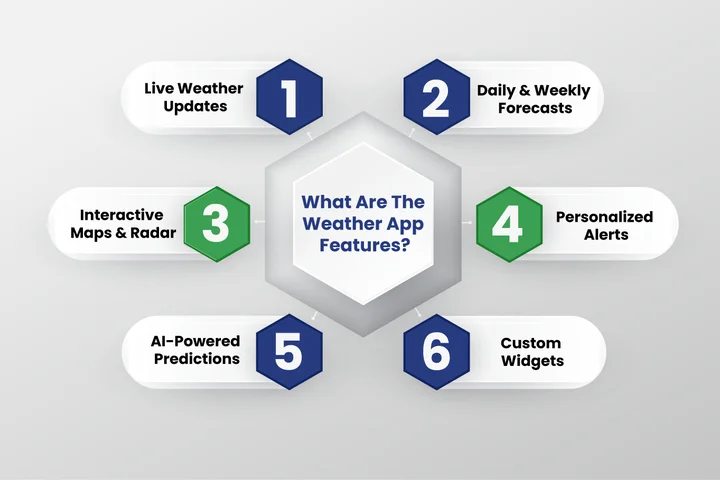
1. Real-Time Weather Updates
Most users expect instant, accurate information. Backend Development Services processes live weather data and ensures that updates are refreshed quickly. This involves efficient server-side logic, API integration, and data pipelines that enable reliable, responsive real-time updates.
2. Hourly and Weekly Forecasts
People plan their routines around the weather, whether it’s a work commute or a weekend road trip. Forecast screens that load quickly and feel easy to scan create a better experience.
This level of smoothness is created through thoughtful Mobile App Development services that keep the user journey simple.
3. Interactive Weather Maps and Radar
Maps and radar visuals require transforming raw weather data into interactive, easy-to-read displays. This depends on frontend frameworks that render visuals quickly, while backend services provide the necessary data streams in real time.
4. Location-Based Alerts
Timely warnings and alerts about sudden weather changes relies on backend systems that track location data, analyze weather patterns, and automatically trigger alerts. Cloud computing often supports these operations, ensuring that notifications are delivered reliably at scale.
5. Simple and Intuitive Interface
Weather information should always feel easy to check. A clean, welcoming interface lets users get what they need in seconds. This level of clarity comes from thoughtful decisions in Product Design, supported by smooth performance through Web App Development.
58% of Weather Apps Lose Users Due to Weak Accuracy. Give your audience accurate forecasts, hyperlocal insights, and real-time alerts that keep them engaged in 2026.
6. AI-Based Weather Predictions
Modern apps increasingly apply AI development Services to improve forecast accuracy. Predictive models analyze historical and real-time data to provide hyperlocal and personalized insights.
Backend processing handles these computations efficiently and integrates the results into the user interface.
7. Air Quality and Pollution Tracking
Apps that provide air quality data combine environmental sensor feeds, weather API data, and backend processing to generate real-time AQI updates. Cloud services help manage large datasets and ensure continuous data delivery to users’ devices.
8. Smart Device and Wearable Compatibility
For wearables and smart devices, backend systems synchronize updates across platforms. This ensures users receive weather alerts instantly, whether on a smartphone, smartwatch, or home device, a strategy also applied in meditation app development.
9. Custom Notifications and Widgets
Delivering personalized summaries or widgets requires backend logic to process user preferences, local weather data, and alert rules. This ensures that updates are relevant, timely, and optimized for multiple devices.
Now that we’ve explored the features that make a weather app truly reliable, it’s time to dive into the technology that powers these apps, ensuring accuracy, speed, and scalability.
Which Technologies Are Essential for Building a Reliable Weather App?
Reliable weather apps depend on the technologies working behind the scenes to deliver accurate, real-time forecasts. Effective weather app development combines powerful front-end frameworks, robust back-end systems, and precise data integrations to provide fast, reliable, and user-friendly apps.
Furthermore, choosing the right tech stack influences not only the app’s performance but also its development cost and long-term scalability.
Now let’s take a closer look at several technologies that power modern weather apps and ensure they meet user expectations.
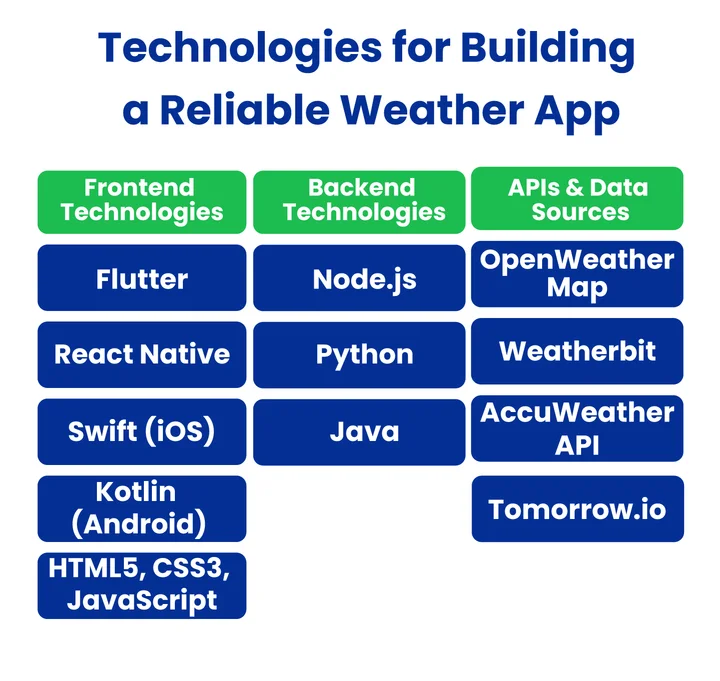
1. Frontend Technologies
The frontend is what users see and interact with, making it one of the most critical parts of weather app development. A smooth, intuitive, and responsive interface ensures users can check forecasts, maps, and alerts without any friction.
Some of the most popular frontend technologies used for weather apps include:
- Flutter: Cross-platform framework for Android and iOS
- React Native: allows building apps for multiple platforms using a single codebase
- Swift: native iOS development for faster performance and smooth animations
- Kotlin: native Android development for optimal functionality
- HTML5, CSS3, and JavaScript libraries: improve design, interactivity, and responsiveness
Hiring a skilled Flutter developer or React developer to make sure these technologies are implemented effectively, creating a smooth and engaging user experience.
2. Backend Technologies
The backend is the engine of any weather app, handling data processing, storage, and server communication to ensure accurate, real-time forecasts. Strong weather app development depends on a reliable backend that keeps the app fast and responsive.
Key backend technologies include:
- Node.js: efficient server-side logic
- Python: great for data analysis and predictive models
- Java: reliable for large-scale applications
Popular cloud solutions for scalability are:
- AWS: scalable servers and storage
- Google Cloud Platform: real-time data processing
- Microsoft Azure: secure cloud infrastructure
Hiring a skilled Node.js developer or Python developer ensures these technologies are implemented effectively, making your weather app robust, fast, and ready to handle real-time data.
3. APIs and Data Sources
A weather app is only as smart as the data it uses. Weather API integration lets you know whether it will rain before you step out or when the sun will be perfect for a walk.
Some of the most popular APIs include:
- OpenWeatherMap: gives up-to-date forecasts for any location worldwide
- WeatherBit: provides local weather updates and air quality info
- AccuWeather API: sends alerts for sudden storms or extreme weather
- Tomorrow.io: offers predictive forecasts for real-time planning
Picking the right API also affects development cost, as premium services give more features while basic options cover essentials. Working with experienced developers ensures the data flows smoothly, making the app fast, reliable, and easy for anyone to use.
How Much Does It Cost to Develop a Weather App in 2026?
The cost to develop a weather app in 2026 varies depending on features, platform, and technology. Each factor can impact the budget differently.
Additionally, reviewing these main elements helps business plan more effectively and allocate resources more efficiently.
1. App Features
In weather app development, the right features decide how useful and reliable your app becomes. A great mobile weather app development project focuses on accuracy, simplicity, and quick, reliable updates.
Below Is A List Of Expected Costs Based On The Feature Level:
| Feature Level | Included Features | Estimated Cost (USD) |
|---|---|---|
| Basic Weather App | Core features like forecasts and location tracking | $15,000–$25,000 |
| Mid-Level App | Maps, alerts, and analytics | $30,000–$50,000 |
| Advanced App | AI models, custom dashboards, and advanced API integrations | $60,000+ |
For a scalable solution, it’s better to start small and expand over time. As trends in weather app development evolve in 2026, investing in quality design and backend architecture ensures your app stays relevant for years.
2. Platform Choice
Once you’ve finalized your app’s features, the next step in weather app development is choosing the right platform. This decision directly impacts the cost to develop a weather app and the overall development timeline.
Here’s An Estimated Cost Breakdown By Platform:
| Platform | Description | Estimated Cost (USD) |
|---|---|---|
| iOS | Single-platform development for smooth performance | $15,000–$30,000 |
| Android | Single-platform development for a broader user base | $20,000–$35,000 |
| Cross-Platform | Launch on both iOS & Android using Flutter or React Native | $25,000–$45,000 |
Setting the foundation for a successful app by choosing the right platform early helps balance budget, scalability, and reach.
3. Design and Tech Stack
In weather app development, a clean design and the right weather app tech stack ensure your app is fast, accurate, and user-friendly. Design and technology typically account for around 25–30% of the total development cost.
In the following, breakdown of essential design and tech elements:
| Component | Description | Cost Impact |
|---|---|---|
| Simple UI | Easy navigation and clean design | Included in app development |
| Frontend Tools | React Native, Flutter, or Swift | Part of design & tech stack (25–30% of total cost) |
| Backend Frameworks | Node.js or Python for real-time data | Part of design & tech stack (25–30% of total cost) |
| Smooth Performance | Optimized loading for maps & forecasts | Part of design & tech stack (25–30% of total cost) |
Investing in scalable tools and frameworks ensures your app stays reliable and future-ready as weather app development continues to evolve.
4. Location and API Integration
Accurate weather data relies on precise location tracking and reliable APIs in weather app development. These features make the app practical and trustworthy for daily users.
The summary of the essential components with cost impact is as follows:
| Component | Description | Estimated Cost (USD) |
|---|---|---|
| GPS-Based Location | Automatic user location detection | $2,000–$5,000 |
| Weather APIs | OpenWeatherMap, AccuWeather, Weatherbit | $3,000–$8,000 |
| Data Updates | Real-time refresh of forecasts | Slight increase for high-frequency updates |
| Custom Alerts | Notifications for severe weather or personalized updates | $1,000–$3,000 |
Including these features ensures your weather app delivers a reliable user experience while reflecting realistic development costs.
Frequently Asked Questions (FAQs)
2. Can Weather Apps Work Without an Internet Connection?
No, most weather apps require an internet connection to fetch real-time forecasts, radar data, and updates. However, some apps can provide limited offline functionality:
- Cached data from previous updates
- Basic temperature and forecast information
This is useful for users in areas with intermittent connectivity.
3. Which Weather APIs are Most Accurate for App Development?
Several APIs are highly reliable for real-time weather updates:
- OpenWeatherMap: Global coverage and frequent updates
- AccuWeather: Provides severe weather alerts and accurate hourly forecasts
- WeatherBit: Includes air quality and hyperlocal forecasts
- Tomorrow.io: Predictive modeling for planning and real-time notifications
Your app's objectives, user base, and budget all play a role in selecting the best API.
4. How Can AI Improve Weather App Accuracy?
AI and machine learning models improve predictions by analyzing historical and real-time data patterns. They can:
- Predict sudden weather changes
- Provide hyperlocal forecasts
- Offer personalized recommendations to users.
Developers can provide more intelligent and trustworthy weather insights that increase user engagement by incorporating AI.
5. Is Cross-Platform Development Better Than Native Development for Weather Apps?
Yes, cross-platform development (Flutter or React Native) lets you launch your app on both iOS and Android simultaneously, saving time and costs. However:
- Native apps can offer slightly faster performance and smoother animations
- Cross-platform apps provide a wider reach with a single codebase
Ultimately, the choice depends on your target audience, timeline, and budget.
Weather App Development in 2026: Important Insights and Takeaways
A successful weather app combines real-time updates, interactive maps, accurate forecasts, and a smooth, intuitive interface. Core and advanced features, paired with the right frontend and backend technologies, make the app reliable, scalable, and engaging.
Factoring in platform choice, design, and API integration helps create a solution that meets user expectations and performs consistently.
Partnering with experts in Web App Development makes turning your weather app idea into reality easier, faster, and more cost-effective. With professional guidance, your app can deliver trusted forecasts, personalized alerts, and a seamless experience that keeps users coming back.
Take action now to build an app that stands out in 2026 and beyond.
Struggling With Slow Updates And Inaccurate Forecasts? Our experts deliver the features and tech stack your app needs to provide reliable, hyperlocal weather insights.