


If you’ve been keeping an eye on the tech world lately, you’ve probably noticed that AI is driving some of the most impressive web applications today.
In fact, a recent McKinsey report found that 88% of organizations have now integrated AI into at least one business function, highlighting just how essential AI has become across industries. From AI chatbots that feel surprisingly human to recommendation engines that anticipate what users need, AI is changing the way we interact with software.
Building an AI-powered web application requires more than integrating a pre-trained model. It depends on architecture, data flow, and a stack designed for scale.
That’s where concepts like LLM integration and RAG architecture come in; they help your app work smartly.
In this blog, we’re going to walk you through everything you need to know to build your own AI-powered web app in 2026. We’ll cover how LLMs fit into your app, why RAG architecture matters, and the modern tech stacks that make it all possible.
Let’s get started!
What Are AI-Powered Web Applications?
AI-powered web applications use artificial intelligence to make decisions, generate context-aware responses, and adapt to user behavior.
Unlike traditional web applications, which follow fixed rules, AI-powered apps can learn from data, recognize patterns, and improve over time.
You’ve probably interacted with them more than you realize.
Table of Contents
For example, AI-powered web applications include:
- Customer support chatbots that understand your questions and provide helpful, context-aware answers.
- eCommerce recommendation engines that suggest products based on your browsing and purchase history.
- Intelligent search tools that deliver results specific to what you’re actually looking for, not just keyword matches.
At their core, these applications combine data, algorithms, and user interactions to deliver experiences that feel more intuitive, responsive, and personalized than traditional apps.
Imagine Your App Predicting What Users Want Before They Even Ask.
Use AI-driven insights and predictive models to deliver faster decisions, smarter recommendations, and measurable user engagement improvements.
Now that the foundation is clear, the next step is understanding how to structure the development process from start to finish.
A Step-by-Step Guide to Building an AI-Powered Web App
Building an AI-powered web application can seem complex at first, but if you break it down step by step, it becomes manageable.
Here’s a detailed roadmap to guide you from idea to deployment.
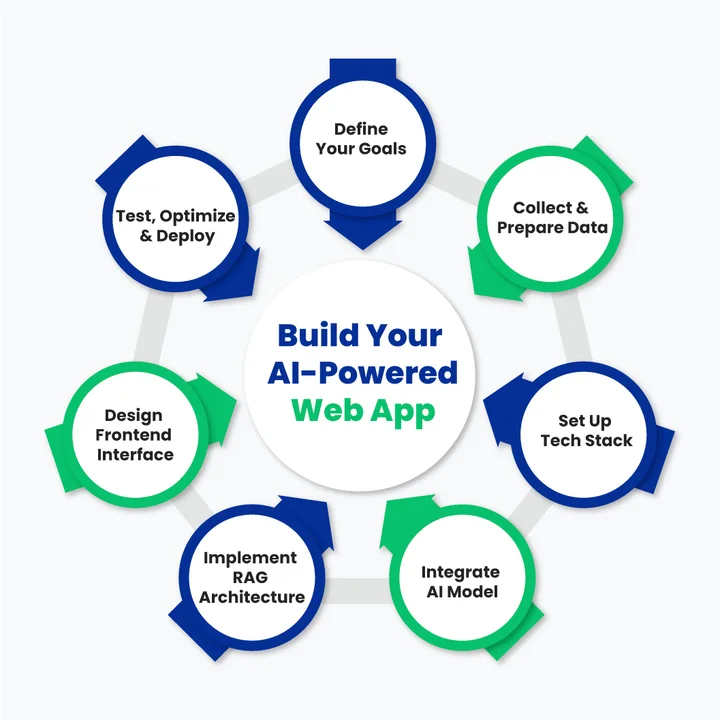
Step 1: Define Your Goals and Use Case
Before you write a single line of code, ask yourself:
What problem is your app solving?
This will determine everything else.
Identify the Type of App: Are you building a customer support chatbot, an intelligent recommendation engine, or an AI-powered search tool?
Determine the Scope: Will your app handle a small dataset or need to scale to millions of queries?
User Experience Focus: Think about how users will interact. Do you want short, precise responses or more conversational answers?
Defining your goals clearly now saves headaches later and ensures your AI works effectively.
Once your goals are clearly defined, the focus shifts to preparing the data that will power your AI system.
Step 2: Collect and Prepare Your Data
Data is the foundation of any AI-powered application. Even the best LLM will fail if the underlying data is messy or irrelevant. This step is all about gathering, cleaning, and organizing the information your app will use.
Collect Relevant Data: Depending on your use case, this might be customer chats, product descriptions, support documents, or knowledge bases.
Clean and Structure the Data: Remove duplicates, correct errors, and format your data consistently. AI models perform much better with clean inputs.
Embed your Data for Retrieval: Use embedding models to convert text into vectors your AI can understand. This is crucial for later steps like vector search and RAG architecture.
Organize for Indexing: Create a structured document indexing system so your AI can quickly find the right information.
Tip: Start small with a manageable dataset and scale up as your app improves.
With clean, structured data in place, the next step is selecting a tech stack that can support AI workloads efficiently.
Step 3: Set Up Your Modern Tech Stack
Your modern tech stack for AI apps is the backbone of your project. When you choose the right tools early, it makes the next steps much smoother.
Backend Frameworks
This is where all the heavy lifting happens, handling data, APIs, and connecting your AI to your app. Python frameworks like Django or FastAPI are great if you’re working closely with AI libraries.
They’re reliable and make it easy to manage complex workflows. If you prefer JavaScript, Node.js works too, especially for handling lots of user requests quickly.
Strong backend development services ensure your application is scalable, secure, and performant.
Frontend Frameworks
Your frontend is what users actually interact with. React and its libraries are perfect for building dynamic interfaces that feel smooth and responsive. Next.js adds server-side rendering, which is great if your app serves lots of content or AI responses that need to load fast.
Modern AI frontends also rely on TypeScript, real-time updates, and conversational UI patterns that make AI responses feel natural and responsive.
AI Tech Stack
This is the intelligence layer of your application.
It includes:
- Large Language Models (LLMs): GPT-based models, Claude, or open-source models like LLaMA, depending on cost, control, and data sensitivity.
- Inference APIs: Secure, scalable API connections to run prompts and generate responses.
- Prompt Orchestration Tools: Frameworks like LangChain or similar orchestration layers help manage multi-step reasoning, tool calls, and contextual prompts.
This layer is responsible for understanding intent, generating responses, and coordinating with retrieval systems like RAG.
Vector Database for LLM Apps
When your AI needs to pull in information fast (think RAG setups), you need a vector database. Options like Pinecone, Weaviate, or Milvus store and search embeddings quickly, so your AI can retrieve relevant info in milliseconds.
Cloud Infrastructure
AI apps can get heavy, so you’ll probably want cloud hosting.
AWS and Azure both provide the compute power, storage, and reliability you need to keep your app running smoothly for multiple users.
Modern deployments also rely on containerization, Kubernetes, and automated pipelines supported by DevOps, MLOps, ModelOps, and AIOps practices to manage models, prompts, and updates in production.
Optional Libraries/Tools
Libraries like LangChain help chain AI calls together, while FAISS or OpenAI APIs can make your AI smarter without a ton of setup. These aren’t mandatory, but they can save you a lot of time and make your app feel more polished.
Pro Tip: Think about your goals and scale when picking each part of your stack. The right combo makes building your AI app much less stressful.
Now it’s time to integrate the component that enables natural language understanding: the LLM.
Step 4: Integrate Your LLM
Now comes the brain of your AI-powered web app: the large language model (LLM). This is what lets your app understand natural language and generate intelligent, human-like responses.
Follow these steps to integrate it properly:
Choose the Right Model
There are lots of LLMs out there: OpenAI GPT, Anthropic Claude, or open-source models like LLaMA. Your choice depends on what you need your app to do, how complex the queries are, and your budget.
Connect via API
Your app will communicate with the LLM through API calls. This is how your app sends a question or request and gets a response back. It’s the core connection that makes your AI interactive.
Prompt Engineering
Prompts are instructions for your AI. The better you craft them, the more accurate and useful the answers will be. You can add context, examples, or constraints so your AI knows exactly what kind of response to generate.
Handle Responses Wisely
Once the AI responds, make sure your app parses it correctly and presents it clearly to the user. You can also add logic to handle errors, incomplete answers, or unexpected outputs.
LLM integration is what makes your web app “think.” Without it, your app can’t have intelligent conversations, provide personalized recommendations, or understand user intent.
Done right, it’s the step that turns a basic web app into an AI-powered one.
Step 5: Implement RAG Architecture
Next up is RAG architecture. If the LLM is the brain, RAG is the memory and context. It allows your AI to pull in specific, relevant information from your database before generating answers, so responses are accurate and context-aware.
Use the following workflow to integrate it effectively:
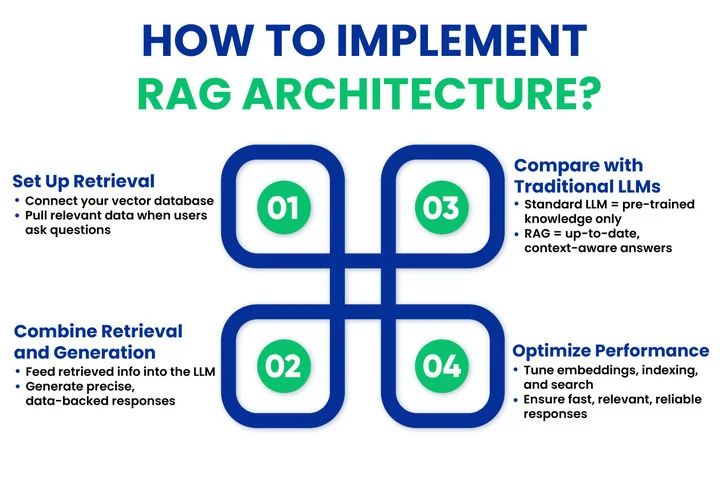
Set Up Retrieval
Connect your vector database to your app. When a user asks a question, the system searches your database for the most relevant documents or data points.
Combine Retrieval with Generation
Feed the retrieved information into the LLM. Instead of guessing or hallucinating, the AI can generate responses grounded in real data.
Compare with Traditional LLM
Traditional LLMs generate responses from pre-trained knowledge, which can sometimes be vague or outdated. RAG ensures your app provides precise, up-to-date answers.
Optimize for Performance
Play with embedding dimensions, indexing, and search parameters. A well-tuned RAG setup means fast, relevant, and reliable responses for users.
RAG turns your AI app from something that’s “smart in theory” to something that’s actually useful and reliable in real-world situations. Users get answers that feel informed and accurate, which builds trust in your app.
Is Your AI Generating Confident But Inaccurate Responses?
We will implement RAG architecture so your AI pulls verified data before responding, improving accuracy and trust.
With intelligence and context handled on the backend, attention now turns to delivering a smooth user experience on the frontend.
Step 6: Build the Frontend Interface
A smart AI backend needs a smooth, intuitive, and well-designed frontend interface to truly shine. This is where reliable frontend developers play an important role in translating complex AI functionality into an experience that users actually enjoy.
- Clear Responses: Make outputs easy to read and highlight key points.
- User Interaction: Keep input fields simple, and allow follow-ups or multiple actions.
- Real-Time Updates: Use websockets or API polling for instant responses.
- Feedback: Let users rate or correct AI outputs to improve the experience.
Tip: Test the interface with real users to see if the AI answers feel natural and helpful.
Step 7: Test, Optimize, and Deploy
Final steps make sure your AI app runs reliably and scales well.
- Testing: Check accuracy, speed, and consistency across queries.
- Optimization: Fine-tune prompts, embeddings, and retrieval methods for better performance.
- Deployment: Launch on cloud or on-premise servers with scalability in mind.
- Monitoring & iteration: Track AI performance and user feedback to continually improve your app.
Now that your AI-powered web app is built and deployed, the next step is to make it perform at its best, stay reliable, and scale effectively.
What Are the Best Practices for Optimizing AI-Powered Web Applications?
Once your AI-powered web app is live, the real work begins: making sure it performs efficiently, delivers accurate results, and provides a smooth experience for users. Following best practices helps you maintain reliability, improve scalability, and build trust with your audience.
Follow these tips to ensure your AI app performs at its peak:
- Fine-tune your LLM prompts regularly to improve response accuracy and relevance.
- Keep your datasets clean and up-to-date, removing outdated or duplicate information.
- Optimize your vector database queries to speed up retrieval for RAG-enabled apps.
- Monitor performance metrics like response time, accuracy, and latency to detect issues early.
- Collect and use user feedback to refine prompts, AI behavior, and UX interactions.
- Plan for scalability by designing cloud infrastructure and APIs that can handle growing traffic.
- Secure your data with encryption, access controls, and privacy-compliant storage.
- Document your architecture and workflows to make maintenance, updates, and onboarding easier.
- Test edge cases frequently, including unusual queries, large datasets, and concurrent users.
- Stay updated with AI trends and tools, integrating new techniques or models when they improve performance.
How Do Industry Leaders Approach AI-Powered Web Applications?
Creating an AI-powered web application that truly delivers requires experience, a clear strategy, and the right combination of technology. Leaders in this space focus on smart LLM integration, context-aware RAG architecture, and modern tech stacks that grow with their apps.
How Can Clustox Help Build Your AI-Powered Web App?
Clustox brings years of experience in AI and web app development, helping businesses turn complex AI concepts into practical, usable applications.
We help you turn your AI ideas into reality by:
- Integrating large language models so your app can understand and respond accurately.
- Setting up RAG architecture to provide context-aware, reliable answers.
- Choosing modern tech stacks that fit your app’s goals and growth needs.
- Designing systems that scale efficiently and perform reliably.
- Supporting the entire process from planning to deployment.
With our approach, building an AI-powered web app becomes much simpler, and you get a solution that’s smart, responsive, and ready for real-world use.
Wrapping Up
AI-powered web applications sit at the intersection of intelligent models, reliable data, and modern web architecture.
As we’ve seen, success doesn’t come from simply adding an LLM to your app; it comes from integrating it thoughtfully, grounding it with RAG architecture, and supporting it with a scalable, well-chosen tech stack.
From chatbots that understand context to recommendation engines that anticipate user needs, following a clear, step-by-step approach and applying best practices ensures your AI app delivers real value.
With the right strategy, tools, and AI consulting services to guide architectural and implementation decisions, you can turn your AI ideas into fully functional web applications. These applications can perform reliably and scale smoothly as your users grow.
Now it’s time to experiment, innovate, and bring your AI-powered web app to life in 2026 and beyond!
Frequently Asked Questions (FAQs)
2. How Do You Design APIs for Scalable AI-Powered Web Applications?
To keep your AI app running smoothly, separate AI processing from your core app logic. You can use asynchronous requests, caching, and rate limits to handle heavy workloads without slowing things down. This way, your APIs stay fast, reliable, and ready to grow with your app.
3. Which Vector Databases Work Best For RAG-Based Search Systems?
Vector databases help your AI quickly find relevant information from large datasets. Pinecone, Weaviate, and Milvus are popular options depending on your performance and control needs. Choosing the right one ensures your app can deliver accurate, context-aware responses to your users.
4. What Are Common Challenges When Building Large Language Model Web Apps?
You might face issues like inaccurate responses, slow processing, or unpredictable behavior when building large language model apps. Handling prompts well, optimizing embeddings, and using RAG can reduce these problems. Being aware of these challenges helps you create a smoother experience for your users.
5. How Do You Keep AI-Powered Web Applications Accurate And Up To Date Over Time?
Accuracy improves through ongoing maintenance, not one-time setup.
Best practices include:
- Regularly updating data sources.
- Re-indexing documents and refreshing embeddings.
- Using RAG to ground responses in current information.
- Monitoring user feedback and refining prompts.
This approach keeps AI responses reliable as your app evolves.
Got an AI Web Idea But Unsure How to Execute It Properly?
With our AI and web experts, you will execute your idea using the right architecture, LLMs, and RAG setup.