


Search doesn’t work the way it used to. Gartner predicts that traditional search engine volume will drop by 25% by 2026 as users migrate toward AI chatbots and virtual assistants for more precise, conversational results.
People aren’t typing short keywords and scrolling through pages of links anymore. They’re asking full questions, talking to AI assistants, and expecting clear, direct answers.
That’s why more product teams are starting to ask a simple but important question:
Is my product UX ready for AI-driven search?
AI-powered search engines and assistants rely heavily on how your product is structured and how easy it is for users to interact with it. If your UX isn’t clear, conversational, or easy to understand, AI struggles, and so do your users.
This is where building an AI-ready UX really starts to matter.
It’s not about chasing trends or redesigning everything overnight. It’s about making sure your website UX design supports how people actually search today and how AI helps them find answers.
If you’re offering UX design services or improving an existing product, preparing UX for AI-powered search is quickly becoming part of good UX practice.
Table of Contents
In this blog, we’ll look at how to check if your product UX is AI-ready, what makes a product UX work well with AI assistants, and how to design experiences that feel natural in AI-driven search.
Read on to find out what makes a UX AI-ready!
Why Is UX Influencing How Search and AI Systems Evaluate Content?
AI has fundamentally changed how search works. Google and other AI-driven engines now evaluate how humans and AI agents can interact with your content. UX isn’t a direct ranking factor on its own. Instead, it influences engagement signals and content clarity, which both traditional search engines and AI-powered assistants rely on to judge quality and relevance.
In other words, search systems are starting to behave more like users.
The “Zero-Click” Search Economy
AI assistants like Google’s Gemini or Search Generative Experience aim to deliver answers directly to users. If your UX is cluttered or your data is hidden behind complex menus or interactive elements, AI can’t easily retrieve it.
Engagement as a Quality Signal
Engagement plays different roles across search systems.
Traditional search components like RankBrain use engagement signals, such as dwell time and task completion, to better understand query intent. If users leave quickly because an experience is confusing, those signals can affect visibility over time.
AI-powered assistants don’t rank pages the same way, but they still rely on similar behavioral and clarity cues when deciding what content to summarize or cite.
Accessibility Helps Both Users and AI
Accessibility isn’t just about compliance anymore. Clean HTML, clear headings, descriptive labels, and logical structure help AI systems understand your content more accurately.
Accessibility won’t boost rankings by itself; it improves how AI reads, summarizes, and cites your content. That supports both Answer Engine Optimization (AEO) and Generative Engine Optimization (GEO).
The Summary
Traditional rankings and AI-generated answers aren’t the same thing, but UX influences both.
- Search rankings are shaped by relevance and authority, supported by engagement signals.
- AI answers depend on clarity, structure, and how easy your content is to interpret.
This shift relies on how Large Language Models differ from traditional ML in the way they process site structure.
Good UX makes your product easier for people to use and easier for AI to understand, and that’s what modern search is moving toward.
Stop Losing Traffic to “Answer Engines” and Start Becoming the Answer They Provide.
How to Check if Your Product UX Is AI-Ready?
Before making any changes, it’s important to understand where your product stands today.
AI‑driven search and assistants interact with UX differently than traditional users. They rely on clarity, structure, and context to guide people to the right answers. If your UX isn’t designed with this in mind, even a strong product can feel confusing when accessed through AI.
The strategies below focus on how your UX performs in real AI-powered search scenarios. They help you identify if your product supports natural language queries, clear navigation, and smooth AI interactions, without overcomplicating the process.
By evaluating these areas, you’ll get a clear picture of how well your UX aligns with modern AI-driven search and assistant experiences.
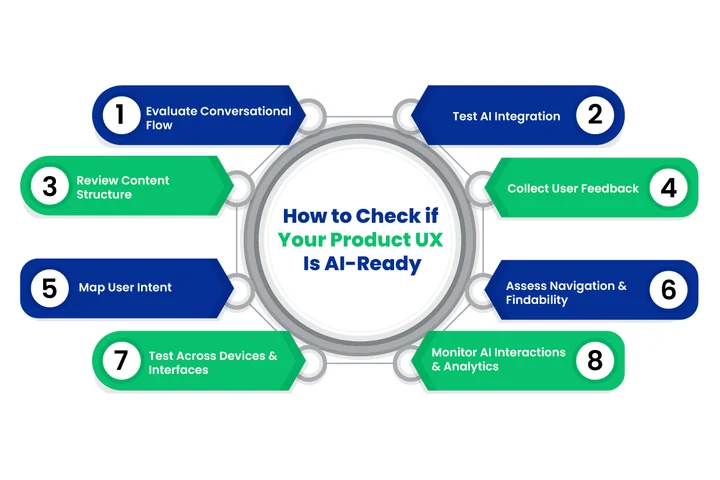
1. Evaluate the Conversational Flow
AI assistants rely on natural language UX design. Your product should make sense when users ask questions, not just click buttons.
Look at menus, labels, and prompts: do they guide users clearly in a conversational way?
If AI struggles to interpret a page, your UX may need refinement.
2. Test AI Integration
The easiest way to see if your UX works is to try it with AI tools. Use popular AI search engines and assistants, such as ChatGPT, Bing AI, or voice assistants like Siri and Alexa, to run queries and see how well your content and product flows are understood.
Take note of confusing pages, unclear instructions, or points where AI can’t guide users properly.
3. Review Content Structure
AI performs best with structured, clear content. Make sure your website UX design uses headings, bullet points, and short paragraphs. Structured data, or schema markup, also helps AI understand and surface the right information. Clear content benefits both AI and your human users.
Example: If your product has an FAQ section, ensure each question is clearly marked and answers are concise. This helps AI assistants present the right answer quickly in a chat or voice interface.
4. Collect User Feedback
Your users are the ultimate test. Ask them how easy it is to complete tasks through AI-powered search or assistants.
Where do they get stuck?
Which areas feel confusing?
Even small amounts of user feedback can reveal big insights about your UX readiness.
5. Map User Intent for AI Queries
AI interprets queries based on user intent, not just keywords. List the questions your users are likely to ask an AI about your product.
Can your UX guide them to the right answers?
Identifying gaps here is critical for designing a UX for AI assistants that actually works.
6. Assess Navigation and Findability
Clear navigation is essential.
Ask yourself:
- Can users, or AI, easily find key features and content?
- Are menus, links, and buttons intuitive for conversational queries?
If users need to guess where to click, your UX won’t feel AI-ready.
Example: If a user asks a voice assistant, “Show me the subscription plans,” your UX should make it easy for AI to surface the right page without extra clicks.
7. Test Across Devices and Interfaces
AI users interact in many ways, such as voice, chat, mobile apps, and web.
Make sure your UX for AI assistants works seamlessly across all these interfaces. A design that only works on desktops won’t provide a smooth experience for AI-powered search or voice assistants.
Example: Test your product on mobile, in a voice assistant like Siri or Alexa, and through chatbots like WhatsApp or Messenger to ensure consistent guidance.
8. Monitor AI Interactions and Analytics
Use analytics to see how AI interacts with your product. Track AI queries, user drop-offs, and common points of confusion. Data-driven insights allow you to optimize your product UX for AI interactions and continually improve the experience.
Monitor which AI queries lead users to abandon a page or repeat questions, and refine your UX accordingly.
How Can You Design UX for AI-Driven Search and Assistants?
Designing UX for AI-driven search and assistants isn’t just about adding a chatbot or voice interface; it’s about structuring your product and content to work smoothly with AI while keeping your users’ experience smooth and intuitive.
For organizations that want to stay competitive in AI-powered search, this is where it becomes essential to invest in UI/UX design that supports both human behavior and machine understanding.
For decision-makers and experienced UX designers, this means thinking beyond traditional website flows and focusing on conversational patterns, intent-driven navigation, and predictive guidance.
Here’s how to approach it:
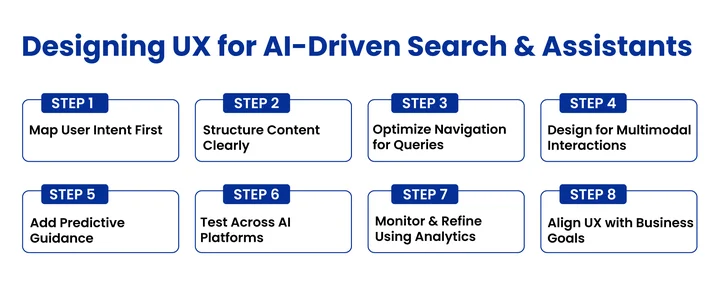
1. Start with User Intent Mapping
AI-powered search interprets queries based on intent, not just keywords. Begin by mapping what users might ask AI assistants about your product.
Practical approach:
- Identify the top tasks users perform in your product.
- Convert these tasks into natural language questions (e.g., “How do I upgrade my plan?” or “Show me eco-friendly sneakers in size 9”).
- Ensure your UX design guides the user from query to completion in the fewest possible steps.
This helps you align your UX with real conversational patterns and prevents AI from giving confusing or incomplete answers.
2. Structure Content for AI Understanding
AI relies on well-organized, hierarchical content. A clear structure allows AI assistants to parse and present information accurately.
Practical considerations:
- Use headings, subheadings, and bullet points consistently.
- Include structured data (schema) wherever possible to help AI understand context.
- Write concise, unambiguous copy that conveys intent directly.
For developers looking to connect this structured data to AI, understanding how to use LlamaIndex can help in building smarter applications that read your product even better.
This ensures that AI-driven search can deliver accurate answers while maintaining a natural flow for users.
3. Optimize Navigation for Conversational Queries
Traditional navigation works for clicks, but AI-powered search requires intent-driven pathways.
Practical tips:
- Map common AI queries to product areas and ensure the path is clear.
- Avoid overly complex menus; AI and voice assistants struggle with nested options.
- Ensure that all critical actions can be discovered through both search and AI-guided prompts.
4. Design for Multimodal Interactions
Your UX isn’t just visual anymore. Users may access your product via voice assistants, chatbots, mobile, or web.
What to do:
- Ensure buttons, menus, and instructions are interpretable by AI, not just humans.
- Check how AI reads labels, headings, and form fields in voice or chat interfaces.
- Make error states clear and conversational so AI can guide users effectively.
5. Use Predictive Assistance and Smart Suggestions
AI systems excel when UX anticipates user needs. Predictive guidance improves task completion and reduces friction.
Implementation ideas:
- Show suggested actions based on prior queries.
- Auto-complete or recommended answers in search bars.
- Highlight contextual next steps within AI-driven workflows.
This is the best practice for AI-driven search, and it improves the overall user experience.
6. Test Across AI Platforms
A UX that works for one AI assistant may fail with another. Testing across platforms is essential.
Examples:
- Voice: Siri, Alexa, Google Assistant
- Chat: ChatGPT, Bing AI, WhatsApp/Messenger bots
- Web: AI-powered site search, Google Bard integrations
This ensures your UX works consistently, regardless of how the user interacts with AI.
7. Monitor Interactions and Refine UX
AI interactions generate rich data. Use analytics to refine your UX:
- Track user queries, drop-offs, and friction points.
- Identify where AI struggles to provide correct guidance.
- Iterate UX flows based on real usage patterns to improve AI-ready UX over time.
8. Connect UX to Business Goals
Finally, designing UX for AI is a strategic decision. It requires expert AI guidance to ensure your UX strategy supports business KPIs like engagement and conversion while integrating seamlessly with your wider digital roadmap.
Ensure your UX strategy:
- Supports business KPIs like engagement, conversion, and retention.
- Prioritizes features that AI users rely on most.
- Integrates with your wider digital strategy, including content, SEO, and product design.
When UX and AI strategies align with business goals, the product feels natural to both humans and AI assistants, improving adoption and satisfaction.
Don’t Waste Months on Features That AI Assistants Can’t Even Read.
Our AI consulting helps you map out a high-ROI roadmap, ensuring every feature is designed for human engagement and AI discoverability.
How Can Your Product UX Become the Trusted Source for AI?
Being discoverable is one thing; being cited by AI assistants and generative models is another. Decision-makers and UX leaders need to understand that AI citations drive authority, trust, and visibility.
Here’s how to position your product as a go-to source:
Lead with Direct Answers
Lead sections with a short, direct answer (40–60 words). AI looks for these concise nuggets to pull into summaries or responses. This improves both user comprehension and your content’s likelihood of being surfaced by AI.
Structured Data and Schema Markup
Advanced schema types like SoftwareApplication, FAQ Page, and HowTo act as a “nutrition label” for AI. They tell AI exactly what your product does without guessing, improving both AEO and GEO signals.
Create a Map for Large Language Models
An emerging best practice is using a file like /llms.txt, which can be thought of as an AI-focused version of robots.txt.
Hosting such a file can provide a Markdown-formatted map that guides large language models (LLMs) to your product’s key features. While this approach is still advanced and not widely adopted, it can help AI systems reference your product more accurately and consistently.
Provide Original Data and Insights
AI prefers unique insights over generic advice. Incorporate anonymized internal data, charts, or tables into your content. Tables are especially valuable because AI can parse them easily and include them in citations or answer snippets.
Build AI-Ready Product UX with Clustox
As a trusted technology partner, Clustox provides reliable UI/UX design services that help your product work smoothly for users and smart assistants.
Our team focuses on:
- Creating intuitive interfaces that guide users clearly through your product.
- Mapping user intent and conversational flows to make interactions simple and natural.
- Structuring content effectively so that important information is easy to find and understand.
- Testing UX across platforms, including mobile, web, chat, and voice interfaces.
With Clustox, your product UX isn’t just functional; it feels natural, helps users complete tasks efficiently, and supports your business goals. We help ensure your product is ready for the way people discover and interact with it today.
Wrapping Up
As the AI-driven search and assistants are becoming more important, a product’s success depends on having an AI-ready UX.
It’s all about creating clear, intuitive, and conversational experiences that guide users naturally while making it easy for AI to understand your product. Working with a reliable UX design company can help ensure your product is structured, accessible, and ready for both human and AI interactions.
So, from this blog, you’ve learned that:
- AI-ready product UX helps users complete tasks efficiently and supports conversational interactions.
- Mapping user intent improves guidance for AI assistants and real users.
- Structured content and clear navigation make key information easy to find.
- Testing across devices and AI platforms ensures a consistent experience.
In short, focus on clarity, accessibility, and anticipation, and your product will not only meet modern search expectations but also become a trusted source for users and AI alike.
Frequently Asked Questions (FAQs)
2. What Is Conversational UX, And Why Does It Matter For AI?
Conversational UX is about designing your product so users can interact naturally, using questions and commands rather than just clicks. If your UX supports clear prompts, intuitive flows, and natural language patterns, AI assistants can guide your users better and improve task completion.
3. What Is The Biggest Mistake Brands Make With AI-Driven UX?
The biggest mistake is focusing only on keywords or visual design and ignoring how AI interprets your content. You need your product UX to be structured, clear, and intent-driven so AI can find, understand, and recommend your product confidently.
4. How Do You Know If Your Product UX Is Ready For AI-Driven Search?
You can check if your UX is AI-ready by testing it with AI assistants and search engines, reviewing how well your content flows, mapping user intent, and ensuring navigation is clear. If AI struggles to guide users through your product, your UX likely needs refinement.
5. How Does Mobile UX Affect AI Search And Assistant Performance?
AI-driven search and assistants are often accessed via mobile and voice. If your mobile UX is slow, cluttered, or confusing, AI may not prioritize your product. A smooth mobile experience ensures AI can guide users easily and helps your product get discovered and recommended.
Don’t Let AI Miss Your Best Features.
Let Clustox help you design an AI-ready UX that guides users naturally and ensures your product gets recognized by AI assistants.