


Have you ever used a website that felt easy and natural to navigate? That experience comes from thoughtful UI and UX design. Good design also affects business results.
That is the power of good UI/UX design. In fact, Forrester Research reports that a well-designed user interface can increase conversion rates by up to 200% (Forrester, Leaving User Experience to Chance Hurts Companies).
Many businesses struggle to keep users engaged. Confusing layouts, unclear navigation, and crowded screens often frustrate visitors and lead to early exits. When products prioritize features over real user behavior, engagement drops, and revenue follows.
UI/UX design services help solve these problems by shaping digital products around how people actually use them. Research, structure, visuals, and usability work together to create smoother experiences.
This blog explains UI/UX design services, their scope, common deliverables, and engagement models. It also shows how thoughtful design supports user satisfaction and long-term business growth.
So, let’s begin the discussion!
What are UI/UX Design Services and their Roles and Responsibilities?
UI/UX design services help create digital products that people find easy and pleasant to use. These services help businesses build websites, apps, and platforms that feel clear, accessible, and practical for real users.
Every interaction matters. Design decisions influence how users move through a product, how quickly they find what they need, and how confident they feel while using it.
Table of Contents
UI design and UX design work closely together. UI design handles the visual side of a product, such as layouts, colors, and typography. UX design shapes the structure, navigation, and overall flow.
Combined, they help create products that work well and feel consistent across every screen.
Further, let’s begin exploring how UI/UX design services operate and which roles and responsibilities each team handles.
Roles and Responsibilities of UI and UX Designers
UI and UX designers have different responsibilities, but their work connects at every stage of a product’s design.
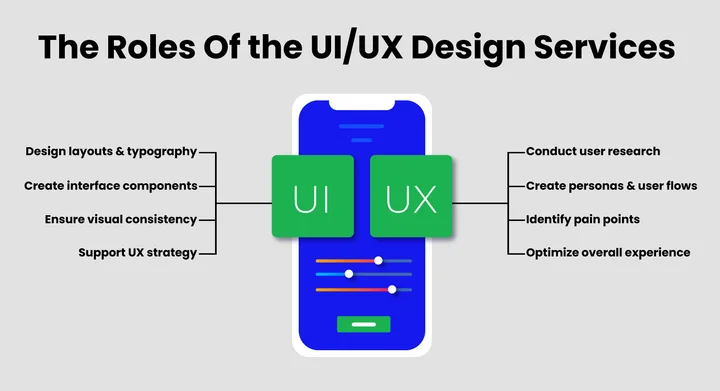
UX designers focus on how a product functions and how users navigate it. Their responsibilities often include:
- Conduct user research and gather feedback
- Create personas to represent real users.
- Plan user flows for smooth navigation.
- Identify pain points and improve the overall experience.
UI Designers are responsible for how a product looks and feels. They ensure it is appealing and easy to interact with. Their work includes:
- Designing layouts, color schemes, and typography
- Creating interface components and visual elements
- Maintaining consistency across all screens
- Supporting the UX strategy to boost user engagement
How Do UI and UX Designers Work Together?
UI and UX designers collaborate closely throughout the design process.
- UX focuses on the structure and flow
- UI applies visual clarity and consistency to that structure.
This collaboration helps users move through the product easily and stay engaged without effort. Additionally, good teamwork ensures users can navigate the product effortlessly and engage with it in a meaningful way.
Confused about what UI and UX really are?
What Is the Scope of UI/UX Design Services?
The scope of UI/UX design services covers everything needed to shape digital products that feel clear, usable, and consistent. It goes beyond visual styling and looks at how users interact with a product at every stage.
UI/UX work supports business goals by aligning user needs with product structure and interface decisions. This makes UI/UX Design for Businesses practical, measurable, and relevant across industries.
Here are the main areas included in the scope of UI/UX design services:
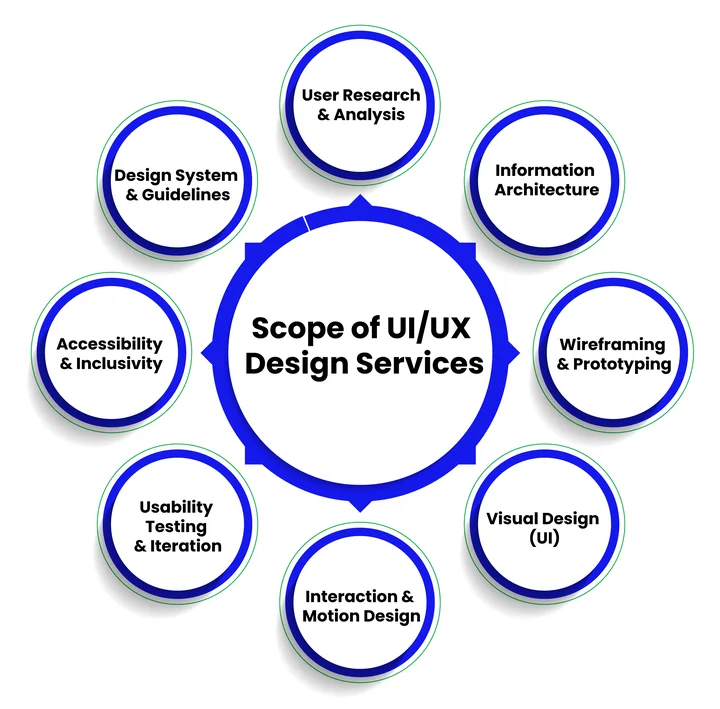
1. User Research and Analysis
Everything starts with understanding your audience. UI/UX teams conduct user research, surveys, and usability testing to uncover user needs, behaviors, and pain points. By identifying what users truly want, designers can create experiences that are intuitive and meaningful.
2. Information Architecture (IA)
Once user needs are understood, the next step is organizing information in a way that makes sense. Information architecture defines how content is structured and navigated within a product. A clear IA ensures users can find what they need quickly, reducing confusion and frustration.
3. Wireframing and Prototyping
With a solid structure in place, designers translate ideas into wireframes that outline layouts and screen arrangements. Prototypes take it a step further by allowing users and stakeholders to interact with the design before development begins.
This iterative approach saves time and helps prevent costly mistakes later on.
4. Visual Design (UI)
After the functionality is mapped out, UI designers focus on the product’s look and feel. From layouts and color schemes to typography and interactive elements, visual design ensures the interface is engaging and consistent across screens.
5. Interaction and Motion Design
Beyond static visuals, interaction design adds life to the product. Animations, transitions, and micro-interactions make the experience feel smooth and responsive, guiding users naturally without overwhelming them.
6. Usability Testing and Iteration
Design is never truly finished on the first attempt. Teams test prototypes with real users, gather feedback, and refine the product. This iterative process ensures the final design is effective, user-friendly, and aligned with business goals.
7. Accessibility and Inclusivity
A great design is one that everyone can use. UI/UX teams consider accessibility at every stage, making sure the product works for people with disabilities and supports an inclusive experience for all users.
8. Design System and Guidelines
Finally, many UI/UX services create a design system or style guide. This document standardizes components, patterns, and design principles, ensuring a consistent look and feel across all parts of a product or even multiple products.
Overall, UI/UX design services help companies create products that are not only aesthetically pleasing but also practical, easy to use, and strategically aligned.
In the next section, we’ll explore the deliverables you can expect when you work with a professional UI/UX team.
What are the Deliverables of UI/UX Design Services?
When businesses invest in UI/UX design services, the outcomes go beyond visual aesthetics. Deliverables are tangible outputs that guide the development process, improve usability, and ensure that the product meets both user needs and business goals.
These deliverables help translate research, strategy, and design decisions into actionable assets for developers and stakeholders.
To understand how these outputs fit into the overall UI/UX design process, Common UI/UX deliverables include:
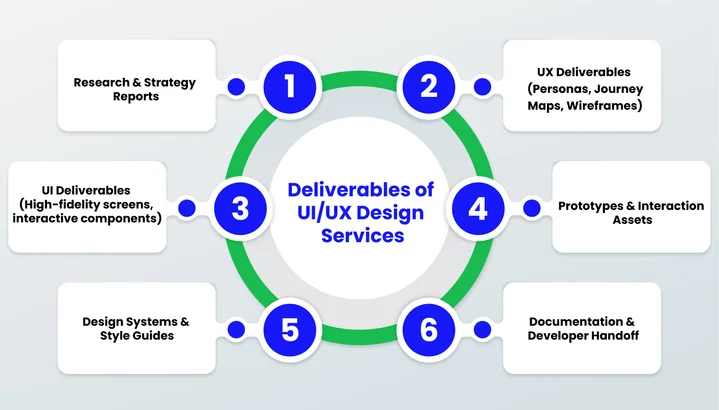
1. Research and Strategy Deliverables
This includes discovery reports, stakeholder documentation, competitive analysis, and user research findings.
These deliverables set a solid foundation for your project. They clarify business objectives, understand your audience, and define strategic goals before any design work begins.
For a healthcare app, a discovery report ensures regulatory compliance and that user expectations are met early, reducing rework later.
Pro tip: Regularly review research findings during the project to ensure design decisions stay aligned with goals.
2. UX Design Deliverables
UX deliverables include user personas, user journey maps, information architecture, sitemaps, and wireframes.
What it includes:
- User personas
- Journey maps
- Information architecture
- Sitemaps
- Wireframes
These outputs focus on structure, usability, and user behavior, helping designers create intuitive experiences.
For an eCommerce platform, a journey map can reveal why users abandon carts, allowing designers to optimize the checkout process.
Pro tip: Always validate personas and journey maps with real user data to avoid assumptions.
3. UI Design Deliverables
UI deliverables bring the product’s interface to life, ensuring it is visually appealing, brand-aligned, and engaging. This stage brings the product’s interface to life, ensuring it is visually appealing, brand-aligned, and engaging.
What it includes:
- High-fidelity screens
- Typography and color schemes
- Visual elements
- Interactive components
For Example, Fintech apps like Robinhood use detailed UI to make complex financial data easy to understand for users.
Pro tip: Maintain consistency in visual language and interactive elements across screens for a smooth user experience.
4. Prototypes and Interaction Assets
Interactive prototypes are clickable versions of a product that mimic real user interactions. They let stakeholders test navigation and workflows early, uncovering confusing steps before a single line of code is written.
Interaction assets, like animations and micro-interactions, make the experience more engaging and provide subtle feedback to users.
Pro tip: Use small feedback animations when a task is completed to delight users.
Tools like Figma, Adobe XD, or InVision make it easy to create and share prototypes, helping teams save time, reduce errors, and align on the design before development begins.
5. Design Systems and Style Guides
Design systems and style guides document UI components, design patterns, and brand guidelines. They ensure consistency across the product and streamline collaboration between designers and developers.
For instance, A product with web and mobile apps benefits from a style guide that ensures typography, colors, and buttons are identical across all screens.
Pro tip: Update the design system as the product evolves to prevent inconsistencies.
6. Documentation and Developer Handoff Files
The final deliverable includes all design specifications, assets, and documentation needed for developers to implement the product accurately. Handoff files ensure developers implement the product accurately, maintaining visual consistency and functional accuracy.
Tools like Zeplin or Figma help ensure that designs are built exactly as intended, maintaining visual consistency and functional accuracy.
Pro tip: Include a one-page summary of key design decisions to make onboarding new developers easier.
Struggling to turn your UI/UX deliverables into a product that truly works for users?
Now, let’s discuss the engagement models!
What are the UI/UX Design Engagement Models, and How to Choose the Right One?
Choosing the right UI/UX design engagement model is crucial for delivering projects on time, within budget, and at the desired quality. Engagement models define how teams collaborate, how resources are allocated, and how costs are structured.
The right model depends on project size, complexity, timeline, budget, and level of control.
Let’s explore the most common UI/UX engagement models and how to pick the best one for your project.
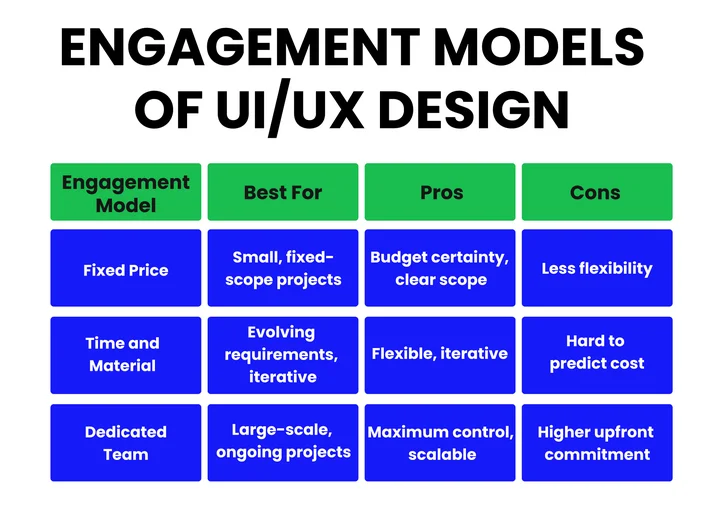
1. Fixed Price Engagement Model
In this model, the project scope, timeline, and cost are agreed upon upfront. It works well for projects with precise requirements and limited changes expected. This model provides budget certainty but offers less flexibility if requirements evolve during the project.
2. Time and Material Engagement Model
Here, the client pays for the actual time and resources spent on the project. It provides flexibility for projects with evolving requirements or ongoing updates. This model is ideal for iterative design, in which custom UI/UX design services may require adjustments based on user feedback or testing.
3. Dedicated UI/UX Design Team Model
In this approach, a whole team of designers works exclusively on the client’s project for a set period. This model is suitable for long-term or large-scale projects that require continuous design and iteration. Businesses gain maximum control, scalability, and a consistent team that is familiar with the product and brand.
How to Choose the Right UI/UX Design Engagement Model?
Selecting the right UI/UX design engagement model is critical to delivering a successful product. The engagement approach affects team collaboration, project flexibility, and resource allocation.
The following aspects help determine the most suitable model:
- Project Complexity and Size: Large or complex projects benefit from a dedicated team; smaller projects are better suited to a fixed-price model.
- Budget: Strict budgets often align with fixed-price agreements; evolving projects may perform better under time-and-material agreements.
- Flexibility for Changes: Iterative projects need models that allow adjustments—Time & Material or Dedicated Team.
- Collaboration and Control: Projects requiring close teamwork and frequent input benefit from a dedicated team.
- Timeline and Scalability: Fixed-price works for short-term projects with set deadlines; long-term initiatives benefit from a dedicated team.
Practical Recommendations for Each Model
- Small, fixed-scope projects → Fixed Price
- Projects with evolving requirements → Time & Material
- Large-scale or ongoing projects → Dedicated Team
This approach ensures efficient project execution, smooth collaboration between teams, and a product that delivers a seamless, user-friendly experience.
Each engagement model provides unique advantages, and aligning it with project goals helps achieve better outcomes and stronger user satisfaction.
How Do UI/UX Design Services Meet the Needs of Different Businesses?
UI/UX design services are not one-size-fits-all. Each type of business has unique goals, challenges, and user expectations, so design approaches must be customized to deliver effortless, intuitive, and engaging digital experiences.
Let’s explore how UI/UX design services are customized for startups, SaaS products, and enterprise applications.
1. UI/UX Design for Startups
Startups often focus on launching a Minimum Viable Product (MVP) quickly to validate ideas and attract early users through MVP development services.
UI/UX design agency services for startups prioritize core features, simplified workflows, and early user feedback. This approach helps startups save time and resources while creating products that are intuitive and easy to use from the start.
2. UI/UX Design for SaaS Products
SaaS platforms require interfaces that handle complex workflows while keeping users engaged. Product UI UX design services for SaaS focus on dashboard usability, feature discoverability, and retention strategies.
Designers create user flows that simplify interactions and reduce friction, ensuring users can achieve their goals efficiently while interacting with multiple features.
3. UI/UX Design for Enterprise Applications
Enterprise applications often involve large-scale systems with multiple user roles and complex processes. Custom UI/UX design services for enterprises focus on scalability, consistency, and accessibility.
Design systems, style guides, and structured information architecture help large teams navigate applications easily while ensuring a consistent experience across devices and platforms.
| Business Type | UI/UX Focus | Design Goals | Approach / Services |
|---|---|---|---|
| Startups | Core features, simplified workflows | Validate ideas quickly, attract early users | MVP development services, early user feedback, intuitive and easy-to-use designs |
| SaaS Products | Dashboard usability, feature discoverability | Keep users engaged, simplify complex workflows | User flows and retention strategies reduce friction across multiple features |
| Enterprise Applications | Scalability, consistency, accessibility | Support large teams, maintain consistent experience | Design systems, style guides, structured information architecture, multi-role navigation |
Overall, designing UI/UX for each type of business ensures products are intuitive, efficient, and meet both user expectations and business goals.
Frequently Asked Questions (FAQs)
2. How Can UI/UX Design Impact Your Business Revenue?
UI/UX design can significantly affect revenue by improving user engagement and conversion rates. Studies show that optimizing UI/UX can increase conversions by up to 400% on digital platforms. Key areas where it helps include:
- Simplifying navigation to reduce bounce rates
- Highlighting calls-to-action for better conversions
- Improving trust and brand perception through consistent design
3. Can you start a UI/UX Design Project without a Full Team?
Yes, you can. Many businesses begin with a small, dedicated designer or freelancer to create an MVP or prototype. However, for larger projects or ongoing development, a complete UI/UX team ensures:
- Faster iteration and testing
- Consistency across screens and platforms
- Continuous updates based on user feedback
4. How Long Does a Typical UI/UX Design Project Take?
The timeline depends on project scope, complexity, and engagement model. For example:
- Small MVP projects: 3–6 weeks
- Medium apps or SaaS products: 2–3 months
- Enterprise applications: 4–6 months or more
Using agile design methods and early prototyping can reduce development time and improve efficiency.
5. Are There UI/UX Design Strategies Specifically for Startups?
Yes. Startups need fast, lean, and user-validated designs. Key strategies include:
- Prioritizing essential features in an MVP
- Rapid prototyping and testing with real users
- Creating scalable design systems for future growth
This approach helps startups save time and cost while delivering a usable and engaging product.
6. How Do You Know If Your Current UI/UX Design Needs Improvement?
Some clear signs indicate your design may need an update:
- Users struggle to navigate or find key features
- High bounce rates or low engagement on your platform
- Negative user feedback regarding confusing or inconsistent visuals
- Frequent updates or patches to fix usability issues
Transitioning to a user-centered design approach can resolve these issues and improve overall satisfaction.
Final Takeaway
Great UI/UX design makes digital products feel easy, enjoyable, and just… right. When research, wireframes, and prototypes are created with users in mind, engagement naturally increases, and every design choice shapes how people experience your brand.
Connecting these designs with expert Product Design services turns ideas into real, usable solutions. This makes products smoother to use, easier to navigate, and ready to grow with your business.
Different businesses have different needs. Startups often begin by testing a Minimum Viable Product (MVP) to validate ideas quickly and gather early feedback. SaaS platforms require smooth workflows and feature discoverability, and enterprise applications rely on scalable, consistent designs.
Thoughtful UI/UX today ensures your product performs better tomorrow, delivering experiences users enjoy and value.
75% of users abandon products due to confusing interfaces and poor UX. Are your designs leaving users frustrated?