


Running a business in 2026 means your website or digital product often serves as the first, and sometimes only, interaction customers have with your brand.
When that experience feels confusing, slow, or frustrating, people don’t complain… they leave.
UI/UX design plays a fundamental role in shaping how users feel and engage with your product. In fact, research from Forrester shows that every $1 invested in UX can deliver a return of $100, an ROI of 9,900%.
Many business leaders face the challenge of understanding when to invest, how much to invest, and what outcomes to expect.
You might already notice warning signs: traffic that doesn’t convert, users abandoning tasks mid-journey, or competitors providing smoother and more intuitive experiences.
Customer expectations have shifted. Users now compare your product to the most polished experiences they’ve encountered anywhere online. That makes UI/UX design a strategic business decision, not just a visual update.
This blog will show you when your business should invest in UI/UX design, how that investment can affect growth and revenue, and what to expect during the design process in 2026.
The goal is to help you make confident decisions for your digital products, if you are updating an existing platform, planning a redesign, or scaling a new project.
Table of Contents
What is the Difference Between UI and UX?
In design discussions, the terms “UI” (User Interface) and “UX” (User Experience) are often used interchangeably, but they represent very different aspects of how people interact with your product. For business leaders, understanding the distinction is critical because each affects budget allocation, team structure, and outsourcing decisions differently.
Here’s a clear breakdown:
| Aspect | UI (User Interface) | UX (User Experience) |
|---|---|---|
| Definition | Visual and interactive elements that users see | Overall experience and journey of the user |
| Focus | Look, feel, and brand expression | Ease of use, efficiency, and user satisfaction |
| Examples | Buttons, colors, typography, layout, visual hierarchy | Navigation flow, task completion, usability, information architecture |
| Goal | Make the product visually appealing and consistent | Make the product intuitive, effective, and enjoyable to use |
| Business Impact | Influences marketing perception, brand credibility, and visual consistency | Directly impacts conversion rates, retention, and long-term revenue |
| Measured By | Design quality, adherence to brand standards | User engagement, task completion rates, satisfaction, and ROI |
By viewing UI and UX not just as design terms but as strategic levers, you can make informed choices about where to invest, who to hire, and when to outsource, ultimately translating design decisions into better customer experiences and measurable ROI.
8 Proven Signs Your Business Needs a UI/UX Upgrade
Investing in UI/UX design for your business can directly impact your growth, how your customers interact with your product, and your revenue.
You might be wondering when to invest in UI/UX design, and the good news is that there are clear signals that show it’s time to act.
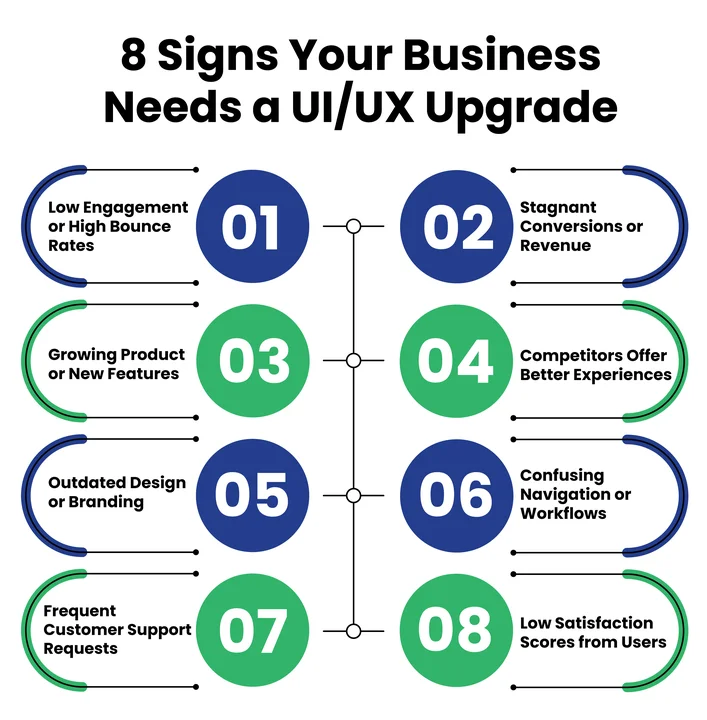
1. Your Website or App Is Underperforming
If your visitors leave your website quickly or abandon tasks in your app, it’s a sign your users are struggling. High bounce rates, low engagement, or confusing workflows highlight gaps in user-centered design and interaction design.
Investing in UI/UX design services can help you make your product easier for your customers to use and more engaging.
2. Your Conversion Rates or Revenue Are Stagnant
If traffic isn’t turning into sales, leads, or sign-ups, poor design could be holding you back. UX for business growth focuses on conversion-focused design, helping your users complete tasks efficiently and improving your overall ROI.
When your product is easier to use, you can see measurable growth from the traffic you already have.
3. Your Digital Product Is Expanding or Evolving
Adding new features, launching a mobile app, or entering new markets changes how your customers interact with your product.
Without a clear UI/UX strategy for your business, these changes can create confusion or frustration. Designing your UI/UX around your business size and stage keeps the experience intuitive.
4. Your Competitors Are Offering Smoother Experiences
Customers naturally compare experiences across brands. If competitors’ platforms feel easier or more enjoyable to use, you risk losing your audience. Making a UI/UX design investment now can help you stay competitive while improving your customer experience.
5. Outdated Visuals or Inconsistent Branding
If your website or app feels old or the design isn’t consistent, your customers may perceive your product as unprofessional. Updating the visuals helps your brand feel credible and trustworthy, which is critical when building trust and loyalty.
6. Confusing Navigation or Unclear Workflows
When your users struggle to complete tasks, it leads to frustration and drop-offs. A well-planned UI/UX design process for businesses ensures your workflows are clear, intuitive, and aligned with your customers’ expectations.
7. Frequent Customer Support Questions
If your team is constantly answering questions that better design could prevent, it’s a strong sign that your UX needs attention. Improving usability through usability testing can reduce support load and create a smoother experience for your users.
8. Low Satisfaction Scores in Surveys or Feedback
Your users’ feedback is one of the most direct ways to understand where the experience is failing. Low satisfaction scores highlight areas where UX research methods can make a real difference, helping you build a product that keeps your customers happy and coming back.
Recognizing these signs early gives you the chance to plan your UI/UX design investment strategically, improve engagement, and set your business up for long-term growth.
Did You Know? 88% of Users Never Return After One Bad Experience. Stop Losing Leads to a Confusing Navigation Menu.
How Does Investing in UI/UX Impact Your Business ROI?
When you focus on improving your UI/UX, the benefits reach far beyond just aesthetics. Thoughtful design influences how your customers interact with your product, creating results that can be measured across multiple areas of your business.
Let’s see how your UI/UX investments can impact your business:
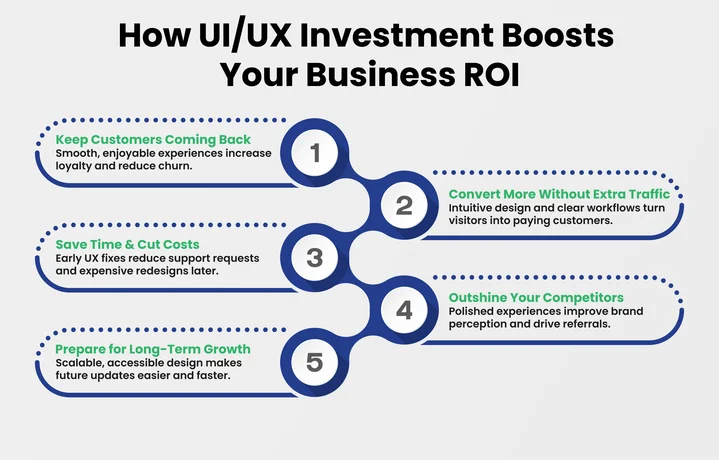
1. Retain More Customers
A product that’s easy and enjoyable to use encourages your customers to return. Even at the MVP stage, clear navigation, intuitive workflows, and thoughtful interaction design make completing tasks straightforward.
When users have positive experiences, they’re more likely to stick around, helping you reduce churn and build loyalty.
2. Increase Conversions Without Extra Traffic
Improving the user experience can turn more visitors into paying customers, leads, or subscribers. Smooth workflows and clear calls to action remove friction from critical processes, helping your users achieve their goals faster.
Using popular frontend frameworks alongside thoughtful UI/UX design ensures your product is not only intuitive but also performs efficiently across devices.
3. Save Time and Reduce Costs
Addressing usability issues during the design stage prevents costly fixes later. Intuitive interfaces and well-planned workflows reduce the number of support tickets and the time your team spends troubleshooting.
Conducting usability testing and applying UX research methods ensures potential problems are caught early, saving resources across the board.
4. Stand Out From Competitors
Customers notice the difference between products that are easy to use and those that feel confusing. A polished and intuitive experience improves perception of your brand and can give you an edge in competitive markets.
Positive experiences also encourage word-of-mouth referrals, helping you attract new customers without additional marketing spend.
5. Build a Foundation for Long-Term Growth
Good UI/UX design prepares your product for future enhancements. Applying digital product design principles and accessibility standards makes it easier to scale, adapt, and introduce new features over time.
Your investment today continues to pay off as your business grows and evolves.
By improving retention, increasing conversions, and reducing costs, a well-executed UI/UX investment directly impacts your ROI. It also positions your business for long-term, sustainable success while keeping your users engaged and satisfied.
What Are the Latest Trends in UI/UX Design for Businesses in 2026?
Keeping your digital products relevant in 2026 means understanding how users interact with technology and adjusting your design to meet their expectations. Therefore, if you follow the latest UI/UX design trends in 2026, they can help your product stay intuitive, engaging, and competitive while supporting your overall design investment.
Here are the trends your business should focus on:
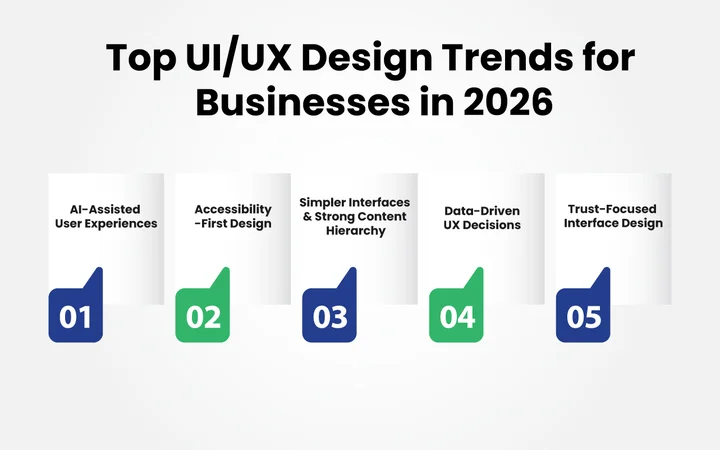
AI-Assisted User Experiences
AI is no longer a futuristic concept for business design; it’s a practical tool that supports your users without taking over the entire interface.
Today, AI can:
- Adjust content and recommendations based on how your users behave, increasing conversions and repeat purchases.
- Suggest next steps when workflows become complex, reducing drop-offs and improving task completion rates.
- Improve search results within apps and dashboards, helping users find what they need faster, increasing engagement and retention.
In 2026, AI can suggest next steps when workflows become complex. Integrating AI Agents for Businesses is a powerful way to automate these tasks while ensuring a smooth, intuitive user experience that reduces errors and improves efficiency.
Accessibility-First UI/UX Design
Accessibility is now a core part of design, not an afterthought. Businesses are creating products that work well for everyone by including:
- Screen reader support and keyboard navigation.
- High-contrast and low-vision modes.
- Clear layouts that reduce cognitive load.
Accessible products increase reach, reduce potential compliance risks, and improve overall customer satisfaction, driving loyalty and long-term revenue.
Strong Content Hierarchy and Simpler Interfaces
Clarity has become a priority. In 2026, businesses are simplifying their interfaces and reducing visual clutter.
This means:
- Fewer elements per screen
- Clear page structure and logical content flow
- Direct, easy-to-understand language
When users can quickly see what they need and understand their next step, task completion improves, conversions rise, and customer retention strengthens.
This approach is especially effective for B2B platforms, fintech tools, and content-heavy websites where efficiency leads to high revenue.
Data-Driven UX Decisions
Instead of waiting for a full redesign every few years, companies are now making small, ongoing improvements based on real user data.
This includes:
- Reviewing session recordings and heatmaps
- Tracking user behavior and bottlenecks
- Conducting regular usability testing
By basing design decisions on actual usage, businesses reduce costly design errors, optimize resources, and steadily increase engagement and conversions. Small, informed changes lead to measurable improvements in ROI and long-term growth.
Trust-Focused Interface Design
Trust is becoming a visible part of how users experience digital products. Businesses are removing confusing patterns and emphasizing transparency with:
- Clear pricing and fee disclosure
- Honest labels and consent options
- Straightforward onboarding processes
When users feel confident using your product, completion rates rise, customer churn decreases, and word-of-mouth referrals grow, which directly affects revenue and brand reputation
Don’t let your business look outdated in a world of intelligent and interactive design.
What Should Businesses Expect During a UI/UX Project?
The investment in UI/UX touches every part of your digital product, and understanding the scope of UI/UX design services helps you plan realistically and get the most value from your design investment.
To give you a clear picture, this is how a UI/UX project usually takes shape:
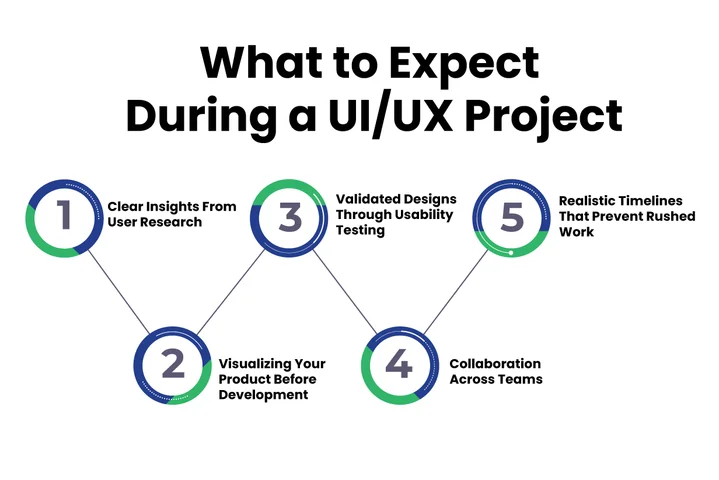
1. Research and Discovery
Before any design work begins, your team (or agency) will go further into understanding your users and business goals.
This often includes:
- Studying how your users currently interact with your product.
- Identifying pain points, drop-offs, and opportunities.
- Reviewing competitors and industry standards.
This stage ensures design decisions are based on real user behavior and business needs, reducing the risk of misaligned features or costly redesigns later.
2. Wireframing and Prototyping
Once the research is done, designers create wireframes, basic layouts showing where content and features will go. This stage helps you visualize your product structure without getting distracted by colors or fonts.
Next comes prototyping, where the wireframes become interactive mockups. You can click through the interface as if it were live, giving you a clear idea of how your users will navigate your product.
Prototyping identifies usability issues before development, preventing costly rework and ensuring a smooth implementation.
3. Usability Testing and Feedback
Even the best designers can’t predict every user’s behavior. That’s why usability testing is important. Real users interact with your prototype while your team observes:
- Confusing steps or unclear navigation
- Features that are underused or ignored
- Opportunities to improve task completion
Testing validates the product with real users, reducing the chance of failed launches and low adoption rates.
Your feedback here ensures your UI/UX design investment actually meets your users’ needs, improving satisfaction and engagement from day one.
4. Collaboration Between Teams
A successful UI/UX project is always a collaborative effort. Expect your product managers, developers, and sometimes marketing teams to:
- Provide insights on technical constraints
- Ensure workflows align with business goals
- Maintain consistent branding and messaging
This collaboration is especially important when UI/UX design moves into front-end development, where design decisions directly affect performance, usability, and responsiveness.
5. Realistic Timelines and Expectations
UI/UX projects take time, and rushing rarely delivers results. Depending on your project’s complexity:
- Wireframing and prototyping can take 2–4 weeks for smaller products.
- Usability testing and iterations can add 2–6 weeks.
- Full implementation with development may take several months.
Knowing these timelines helps you plan resources and communicate realistic milestones to stakeholders.
With a clear understanding of these steps, your business can approach a UI/UX project with confidence.
Budget Expectations for a Typical UI/UX Project
To help with planning, here are general ranges for a typical UI/UX project:
- Small business or landing pages: $10,000–$25,000
- Mid-sized apps or websites: $25,000–$75,000
- Enterprise-level platforms: $75,000–$200,000+
Knowing realistic budgets, including the cost of website designing, helps you plan resources effectively and ensures your UI/UX investment delivers measurable results.
What Are the Common UI/UX Mistakes Businesses Still Make?
Even with the best intentions, businesses often make avoidable mistakes in their UI/UX design projects. Recognizing these pitfalls can save time, money, and frustration while ensuring your users have a positive experience.
Some of the most common UI/UX mistakes businesses still make include:
Designing for Stakeholders Instead of Users
It’s tempting to design what internal teams or executives think looks good, but your customers’ needs must come first. Interfaces that prioritize opinions over real user behavior often lead to confusion, low engagement, and poor task completion.
Tip: Focus on user-centered design and rely on research and feedback to guide decisions rather than personal preference.
Skipping User Research and Testing
Assuming you know what your users want can be costly. Skipping usability testing or UX research methods often results in features that are ignored, misunderstood, or abandoned.
Tip: Test early and often. Observing real users interact with your product highlights friction points and opportunities you might never spot internally.
Chasing Design Trends
Trends can be inspiring, but adopting them blindly can backfire. Not every trend fits every product, even among the technology trends shaping digital products in 2026.
A flashy interface that doesn’t align with your business goals or customer expectations can increase confusion rather than improve the experience.
Tip: Only implement trends that support your UI/UX design strategy for business growth and improve usability.
Some teams also fall for common AI agent myths, assuming AI can replace human insight in designing experiences, which often leads to confusing workflows and lower engagement.
Overcomplicating Workflows
Adding too many steps, clicks, or options can frustrate users and reduce conversions. Complexity is often disguised as feature richness, but it can actually create friction.
Tip: Optimize interactions, simplify navigation, and focus on what helps your users achieve their goals quickly.
Ignoring Accessibility
Accessibility is a part of good design. Products that overlook accessibility standards leave potential users out and risk damaging your brand reputation.
Tip: Design for inclusivity from the start, including screen readers, keyboard navigation, high-contrast modes, and clear layouts.
By avoiding these mistakes, your business can make the most of your design investment, creating products that are not only visually appealing but also easy to use, enjoyable, and aligned with your users’ expectations.
Wrapping Up: Build Better Digital Experiences with Clustox
By now, you’ve seen how UI/UX design shapes the way your customers interact with your digital products. You’ve also learned how to spot the signs that it’s time to invest and the trends driving user expectations in 2026.
Every thoughtful design decision, improving navigation, simplifying workflows, or testing new features, adds up to an experience that keeps your users coming back.
Investing in UI/UX is a step toward stronger engagement, higher conversions, and a product that grows with your business, and with Clustox’s expertise, you can make that investment count.
How Can Clustox Help?
At Clustox, we turn ideas into digital experiences your users will love.
We provide:
- Human-Centered Design: Interfaces based on real user behavior for higher engagement.
- Cross-Platform Consistency: Responsive designs for web, mobile, and SaaS.
- Prototyping & Testing: Early validation to reduce redesign time and improve usability.
- Data-Driven Optimization: Insights and analytics to improve conversions and satisfaction.
Businesses should invest in professional UI/UX design services to turn their digital products into intuitive, engaging, and results-driven experiences that drive growth and customer satisfaction.
Frequently Asked Questions (FAQs)
2. How Does Cross-Platform UI/UX Design Affect Customer Loyalty and Retention?
Consistent experiences across web, mobile, and SaaS platforms build trust and reliability. For business leaders, this translates to higher engagement, improved retention, and long-term customer lifetime value.
3. Can UI/UX Improvements Help With SEO and Search Rankings for Websites?
Yes. Search engines reward smooth, intuitive experiences. Investing in UI/UX optimizes navigation, load speed, and mobile responsiveness, improving search rankings while also increasing conversions and user satisfaction.
4. How Can Small Businesses Benefit From UI/UX Design Services Without a Huge Budget?
Even small businesses can access the best UI/UX design services by focusing on high-impact areas like the user onboarding process or checkout flow. A smaller, targeted project can still maximize results, improving engagement, conversions, and ROI without high upfront costs.
5. Can AI Tools Fully Replace Human UI/UX Designers in 2026?
Not entirely. AI can automate repetitive tasks and suggest layouts, but human designers interpret business goals, user behavior, and brand strategy, ensuring designs drive meaningful results rather than just functional interfaces.
Why Wait for Your Competitors to Redesign First?
We provide the expert strategy and 2026-ready design framework needed to lead your industry.