


Why is it that whenever there’s a talk about DevOps, Netflix always seems to come up?
You probably have a hunch.
Netflix pulled off something most companies dream about. They built a system that kept their teams moving without tripping over their own feet. Their engineers adopted DevOps early, and that mindset shaped the way they delivered, tested, and refined features.
In 2026, the global DevOps market is projected to reach $14.9 billion. No surprise that more organizations want in. Everyone wants smoother releases and fewer surprises, but that only happens when you get the basics right.
Netflix never treated those ideas lightly. They worked through each part of the DevOps lifecycle phases with intention. They stayed committed to the fundamentals, from the steady push of continuous development to the rhythm of constant feedback and continuous monitoring.
So let’s break down the DevOps lifecycle and its primary phases, the same ones that show how Netflix scaled its microservices architecture.
What Is the DevOps Lifecycle And Its Stages?
The DevOps lifecycle is the continuous process that connects development and operations teams to deliver software quickly and reliably. It links coding, testing, deployment, and operations so teams can continuously improve features and reduce errors.
Fundamental Stages Of DevOps Lifecycle
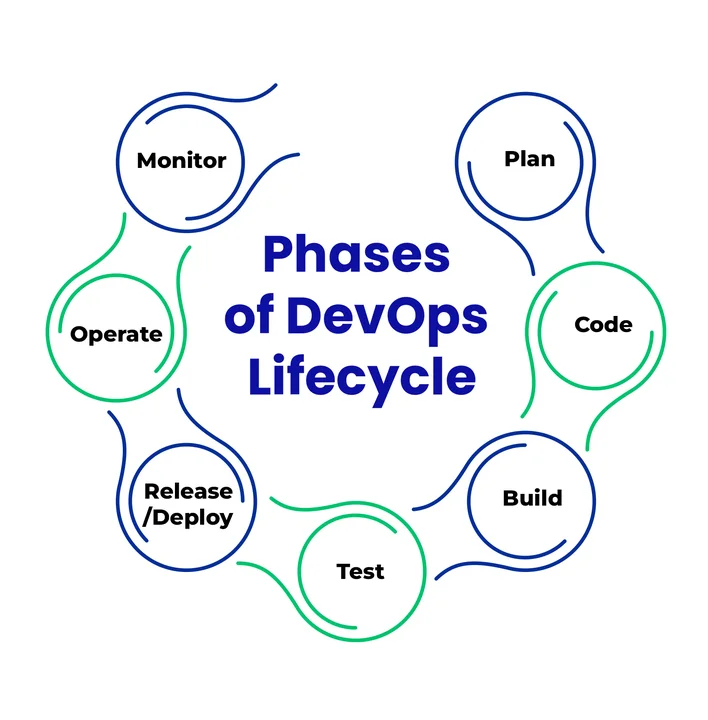
Table of Contents
- Plan: Set requirements and align work with business goals.
- Code: Write software following best practices for maintainability.
- Build: Package applications and ensure consistency for deployment.
- Test: Validate software thorough automated and manual testing.
- Release & Deploy: Deliver updates to users safely and efficiently.
- Operate: Keep applications running smoothly and proactively handle issues.
- Monitor: Track performance, gather feedback, and detect problems early.
What Are The 7 Phases of the DevOps Lifecycle?
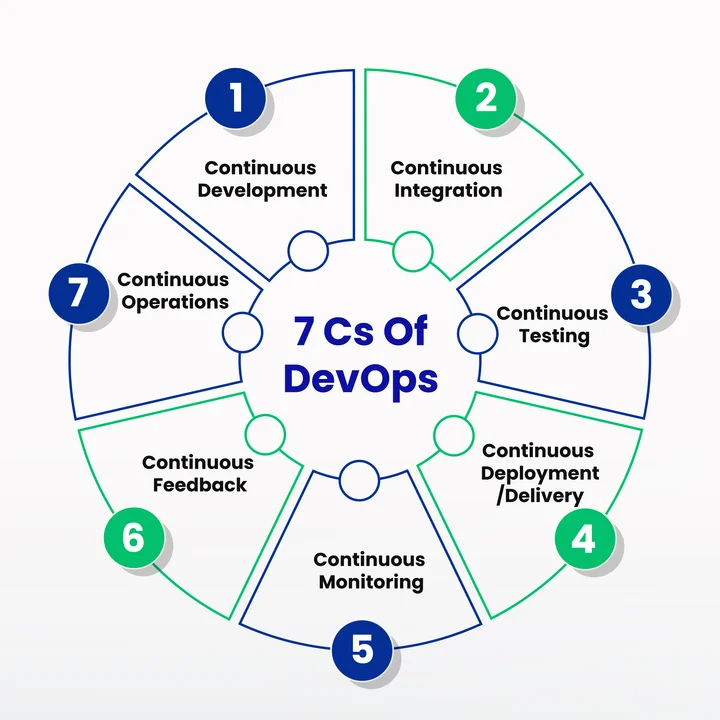
The 7 phases of the DevOps lifecycle, also called the 7Cs of DevOps, are the core principles that guide how development and operations teams work together. Each phase is essential to keeping releases smooth, reducing errors, and maintaining a consistent workflow. Understanding these principles is key to running DevOps successfully.
7 Cs Of DevOps
- Continuous Development
- Continuous Integration
- Continuous Testing
- Continuous Deployment/Delivery
- Continuous Monitoring
- Continuous Feedback
- Continuous Operations
Here’s a closer look at each of these phases of the DevOps lifecycle, along with real-world applications (keep scrolling on …)
1. Continuous Development
Continuous development is the stage that keeps software moving. It’s where ideas get translated into code, fast, without waiting for long approval cycles. Teams iterate constantly, so updates flow smoothly without piling up and causing delays.
Why Is Continuous Development Important?
This stage basically sets the pace for everything that follows. When development is continuous, teams avoid significant, risky releases. Instead, small updates are pushed regularly. It makes sure that software evolves alongside user needs, keeping both internal teams and end-users happy.
Commonly Used Tools
- Git: Tracks every code change and makes collaboration facile.
- GitLab: Combines version control with CI/CD pipelines for faster integration and deployment.
- Jira: Lets teams plan sprints, track progress, and keep everyone aligned on priorities.
- Trello/Asana: Breaks large projects into small tasks so nothing falls through the cracks.
Real-World Example: Netflix
Netflix, the global streaming giant, deploys 100 pieces of code per day with only 70 engineers.
How do they do it?
They follow DevOps lifecycle principles. They treat continuous development like a high-speed conveyor belt. Everything moves, but nothing breaks.
How Does Netflix Implement Continuous Development?
- Operate what you build: Teams fix what they create, creating a direct feedback loop.
- Full-cycle ownership: Engineers handle everything from deployment to performance monitoring.
- Automation everywhere: Builds, tests, and deployments are automated so engineers can focus on innovation.
- Microservices & containerization: Breaking applications into microservices with containerization to scale and deploy independently.
| Results For Teams | Results For Users |
|---|---|
| Faster development cycles without sacrificing quality | Faster feature releases and fewer bugs |
| Clear ownership and smoother collaboration across teams | Reliable streaming with minimal interruptions |
| Less waiting and fewer dependencies (thanks to automation) | Users experience new features quickly, while the platform stays smooth |
Ship More Often While Keeping Failures, Rollbacks, and Late-Night Fixes to a Minimum.
2. Continuous Integration
Continuous integration is like a safety net for your code. Every time a developer finishes a small piece, it is merged into a shared repository and automatically tested.
That way, problems don’t pile up silently and sabotage later releases. It keeps the software moving smoothly, letting teams build confidently without stepping on each other’s toes.
Why Is Continuous Integration Important?
This phase makes collaboration a breeze and supports faster iterations in the DevOps lifecycle. It ensures that problems are caught before they snowball.
By adopting continuous integration (CI), teams:
- Spot errors immediately.
- Reduce the risk of large-scale failures.
- Maintain a stable, deployable codebase.
Commonly Used Tools
- Jenkins: Open-source tool builds and integrates code changes for reliable testing.
- CircleCI: Provides a cloud-based CI/CD platform for fast and consistent code validation.
- Travis CI: Automates building and testing code to detect issues early in the workflow.
Real-World Example: Facebook
Facebook isn’t just a social network; it’s more like a living organism that evolves every second. With billions of users interacting daily, even a small change can have a huge ripple effect. Continuous integration ensures new features perfectly into the platform without causing chaos.
How Does Facebook Implement Continuous Integration?
They make changes small and frequent. Facebook developers push thousands of code commits daily. Every commit goes through automated testing to catch bugs before they spread. This process lets updates move fast but safely when:
- Multiple teams work on features simultaneously.
- Each commit is automatically tested for compatibility.
- Problems are flagged instantly, so fixes happen immediately.
| Impact on Engineering Teams | Impact on Users |
|---|---|
| Removes friction in development | Updates hit faster |
| Developers don’t have to second-guess code | New features appear sooner |
| Focus on building new features and refining UX | Fewer annoying bugs |
3. Continuous Testing
Continuous testing is what keeps a product from drifting off course. Every change gets tested the moment it enters the pipeline. This way, bugs don’t quietly pile up in the background.
It’s about checking the pulse of your application as it grows, making sure the rhythm stays steady, no matter how fast you’re moving.
Why Is Continuous Testing Important?
When testing runs alongside development instead of trailing behind it, teams avoid those heavy, last-minute delays. It makes minor issues easier to fix, prevents outages, and ensures software is always release-ready. It’s one of the simplest ways to protect both speed and quality at the same time.
Commonly Used Tools
- Selenium: Automates browser testing to catch visual or functional issues early.
- Docker: Creates clean, isolated test environments for reliable results.
- Nagios: Tracks performance signals and logs during test cycles.
- Kubernetes: Manages and scales container-based test setups.
- JUnit: Runs unit tests to spot logic errors right at the source.
Real-World Example: Adobe
Adobe handles massive, fast-moving products like Creative Cloud, Photoshop, and Acrobat. With millions of creative professionals relying on these tools, downtime isn’t an option. Adobe keeps things stable while pushing new features across multiple platforms.
How Does Adobe Use Continuous Testing?
They run automated testing for everything—unit tests for function, performance, and UI tests whenever new code is committed. Paired with containerized environments using tools similar to Puppet and Chef, they ensure that test environments match live settings, speed up feedback cycles, and catch regressions before they ever reach production.
| Engineering Teams | Users |
|---|---|
| Shorter feedback loops | Consistent experience across Adobe tools |
| Faster detection of bugs and performance drops | Fewer interruptions or bugs during use |
| More stable releases across desktop, mobile, and web | Reliable access to new features |
4. Continuous Deployment/Continuous Delivery
Continuous deployment/delivery is where software actually meets the user. Code that’s written, tested, and verified is deployed to the live environment.
Updates reach users quickly, letting teams respond to needs without long delays. It keeps the product fresh and the users satisfied.
Why Is Continuous Deployment Important?
This stage shortens the time between an idea and its release. Teams can steadily push improvements, catch issues early, and avoid the bottlenecks that slow innovation. Users get features faster, while teams maintain control and quality.
Commonly Used Tools
- Puppet: Keeps infrastructure in the desired state with minimal manual work.
- Ansible: Automates server configuration so deployments are consistent.
- Spinnaker: Helps deploy code continuously and safely.
- ArgoCD: Automates Kubernetes-native deployments.
Real-World Example: Shopify
Shopify powers millions of businesses, so even minor delays can ripple into lost sales. They rely on continuous deployment strategies, such as blue-green and canary releases, to update their e-commerce platform daily without disrupting service. This approach allows them to introduce new features without downtime.
How Does Shopify Handle Updates?
Automation and containerization keep releases smooth. Engineers deploy confidently, knowing any issues will catch errors early. Their CD pipelines integrate testing, monitoring, and feedback loops, so each change moves through a controlled, reliable process.
| Impact on Merchants | Impact on Customers |
|---|---|
| Features and improvements reach stores faster | Faster access to new features |
| Minimal downtime ensures uninterrupted sales | Smooth shopping experience |
| Bugs are caught quickly, keeping customers happy | Fewer issues during checkout or browsing |
Tired Of Delays, Failed Deployments, And Constant Firefighting?
5. Continuous Monitoring
Continuous monitoring is all about keeping an eye on your applications, infrastructure, and user experience in real-time. It makes sure minor issues don’t turn into outages or slow performance. That constantly scans your systems, so your team can act before anything disrupts the flow.
Why Is Continuous Monitoring Important?
It provides visibility into system health. Teams get immediate insights into outages or slow performance. Tracking server health, application behavior, and user interactions helps teams respond quickly, minimizing downtime. Continuous monitoring is the safety net that keeps operations running without surprises.
Commonly Used Tools
- Splunk: Collects logs and metrics to spot issues.
- ELK Stack: Visualizes app and server data for quick problem detection.
- New Relic: Tracks app performance with real-time diagnostics.
Real-World Example: Uber
Uber handles millions of rides every day, which means downtime or slow services can have massive impacts. Even a few seconds of delay can frustrate users. Continuous monitoring is vital to keeping their platform running smoothly and their users happy. When their systems are constantly analyzed, teams are alerted to potential problems immediately, ensuring reliability across the platform.
How Does Uber Implement Continuous Monitoring?
Uber uses dashboards to monitor microservices, server health, and payment processing in real time. Automated alerts notify teams instantly when an issue arises, enabling them to act without delay.
They also use scripts and self-healing processes to resolve specific problems automatically. Using AWS container orchestration tools ensures that services remain reliable across all environments. This layered approach builds resilience and prevents minor issues from affecting the user experience.
| Impact on Operations Teams | Impact on Users |
|---|---|
| Quickly identify and resolve incidents | Experience uninterrupted app functionality |
| Scale infrastructure more smoothly and manageably | Enjoy reliable tracking and platform trust |
| Maintain consistent performance across all services | Face fewer disruptions during rides |
| Use predictive monitoring to prevent bottlenecks | Benefit from smoother overall operations |
6. Continuous Feedback
Continuous feedback bridges the gap between teams and end users. It’s much more than just collecting data. It’s about observing how people interact with the product, spotting pain points, and making changes in real-time. This step ensures that the product meets real needs, closing the loop between development and user experience.
Why Is Continuous Feedback Important?
Without continuous feedback, features risk being built in isolation. By listening to users early and often, teams can avoid wasted effort and improve customer satisfaction. It aligns product planning and development with what actually matters. Continuous feedback supports continuous integration, and continuous deployment, ensuring every stage aligns with real user needs.
Commonly Used Tools
- Pendo: Tracks user behavior and provides actionable insights.
- Hotjar: Visualizes user navigation with heatmaps and session recordings.Pendo
- Qentelli TED: Monitors performance and flags bugs across the pipeline.
Real-World Example: Etsy
Etsy uses continuous feedback to stay close to its millions of buyers and sellers. Rather than relying on assumptions, they monitor user behavior and respond in real time. This allows the team to adjust features, improve workflows, and prioritize what actually matters to users.
How Does Etsy Implement Continuous Feedback?
Etsy runs A/B tests, collects analytics, and uses feature flags to test changes gradually. Engineers, designers, and product managers use these insights to guide decisions. Feedback loops are embedded in day-to-day work, ensuring every improvement is backed by data and user experience.
| Impact on Teams | Impact on Users |
|---|---|
| Earlier detection of bugs and performance issues | Consistent, intuitive, and reliable experience |
| Faster iteration cycles and fewer delays | Features that meet real user needs, not guesses |
7. Continuous Operations
When a service goes down, users notice immediately. Every pause or glitch impacts trust and reliability.
Continuous operations ensure that your systems keep running smoothly, updates roll out without interruptions, and users barely notice the work happening behind the scenes. It’s where reliability meets agility, and where all the effort from development, testing, and deployment pays off.
Why Is Continuous Operations Important?
Smooth operations mean happier users and less firefighting for teams. When infrastructure is continuously monitored and managed, incidents are caught early, fixes are applied quickly, and downtime is minimized.
Teams can focus on improving features rather than constantly reacting to failures. This stage ties together all previous DevOps practices, ensuring business continuity and unified experiences.
Commonly Used Tools
- PagerDuty: Automates incident response.
- Terraform: Supports infrastructure as code (IaC) in DevOps.
- Grafana: Makes metrics easy to read and patterns easy to spot.
- Prometheus: Tracks system performance and uptime in real time.
- Datadog: Centralizes monitoring of apps, services, and infrastructure.
Real-World Example: Spotify
Millions of people stream music and podcasts on Spotify daily. Even minor downtime can frustrate users or interrupt playlists. Spotify handles this by combining proactive monitoring, automated incident response, and scalable infrastructure.
Containerization (a deployment allowing updates independent of scaling of microservices). Whereas configuration management in DevOps ensures systems are consistent across environments.
| Impact on Teams | Impact on Users |
|---|---|
| Less manual intervention | New features roll out smoothly without disruption |
| Problems are detected and fixed faster | Minimal interruptions, maintaining user trust |
| Clear ownership and accountability for uptime | Continuous, reliable streaming experience |
Final Thoughts
Thinking of all the essential stages of the DevOps lifecycle and seeing how different industries’ juggernauts put them into practice, you start to understand what Jez Humble meant when she said:
“DevOps is not a goal, but a never-ending process of continual improvement.”
Continuous testing, better collaborations, and tighter feedback loops only work when they’re treated as part of a living system that keeps evolving.
If your software releases still feel risky, updates take too long, or errors keep slipping into production, it’s time to rethink your approach.
You need to connect, automate, and streamline every part of the lifecycle.
But technology doesn’t stop for anyone. It’s worth taking a closer look at how AI in DevOps is reshaping automation, predicting failures, and making the systems smarter.
Remember, the teams that stay curious and keep refining their systems are the ones who end up shipping faster without losing control.
Frequently Asked Questions (FAQs)
2. What Steps Can Organizations Take to Make Feedback Loops More Actionable?
Collecting feedback is easy, but turning it into real improvements is the challenge. Integrating insights directly into development and deployment, supported by DevOps monitoring tools, lets teams prioritize fixes that matter most to users. This approach keeps continuous operations smooth while improving overall reliability and user satisfaction.
3. How Do Companies Avoid Tool Overload While Maintaining Efficiency?
It’s easy to pile on tools, but too many platforms can slow down teams. Focusing on a reliable DevOps platform (GitLab, GitHub, Jenkins) subscription or consulting a DevOps implementation company helps standardize workflows. The goal is to support automation, testing, and deployment efficiently, without creating extra friction in daily operations.
Want To Stop DevOps Consultants Without Overpaying?
Our DevOps Cost Consulting guide shows you:
- Pricing structures
- Budget strategies
- Hidden expenses
- Expected ROI
And more…