

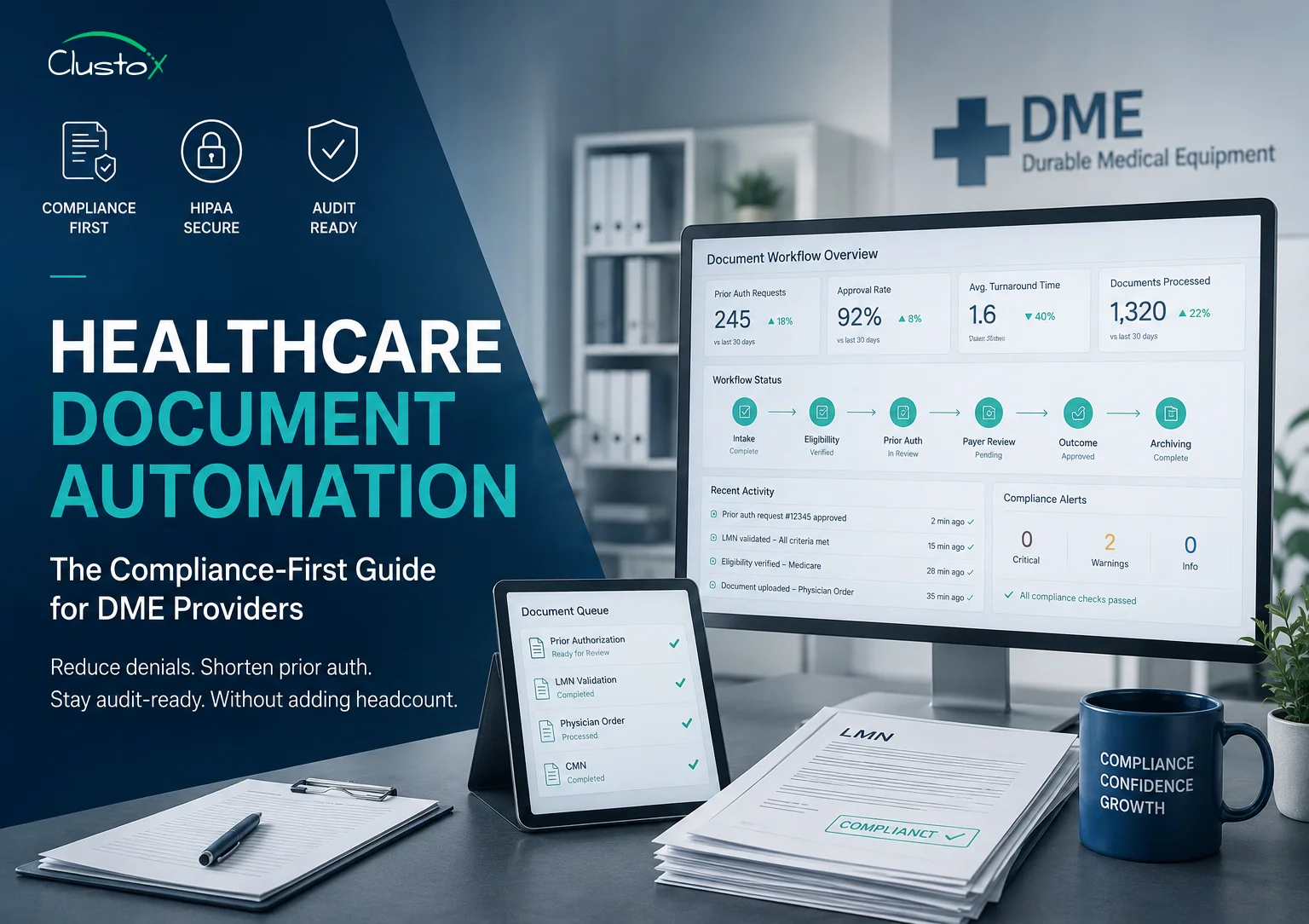
What you will find in this guide
Healthcare document automation in DME means using software to handle prior authorization requests, eligibility checks, letter of medical necessity (LMN) validation, and audit-ready documentation without manual re-entry. Done correctly, it helps standardize documentation workflows, improve audit readiness, and reduce manual administrative work while supporting HIPAA-compliant record handling.”
Documentation is where most DME revenue cycles quietly break. Prior authorization requests can remain delayed when documentation is incomplete or difficult to retrieve. During audits, billing and operations teams may spend significant time locating records across multiple systems. None of this is a billing problem. It is a document problem.
Healthcare document automation addresses exactly this. It is not a vague promise about AI. It is a specific set of workflows: intake, verification, compliance checks, and record storage, handled by software instead of staff. For DME providers operating under CMS rules, Medicare requirements, and ACHC or BOC accreditation standards, the stakes are higher than in most healthcare settings. Your documentation is your defense.
This guide walks you through what document automation actually covers in a DME context, which workflows it targets, what compliance requirements you need to satisfy, and how to evaluate whether a solution is genuinely ready for your operation.
What Does Healthcare Document Automation Mean for DME Providers?
Healthcare document automation is the use of software to move clinical and administrative documents through defined workflows without manual handling at each step. In a DME context, that means systems that can receive an order, extract the relevant clinical details, check them against payer requirements, route for signature or review, and archive the final record.
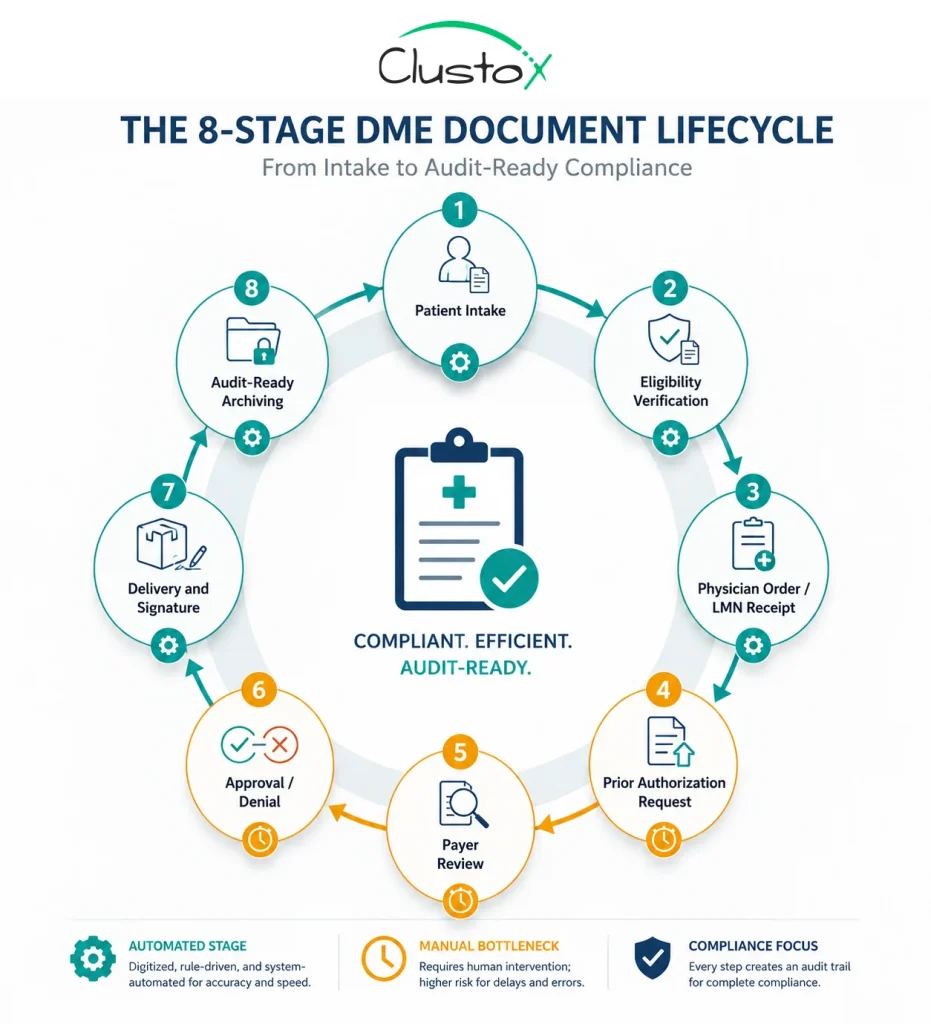
The distinction worth making is between document management and document automation. Document management stores files. Automation acts on them. It applies rules, checks for compliance gaps, triggers next steps, and creates an auditable trail.
Table of Contents
For your operation, the documents in scope typically include:
- Prior authorization requests and supporting clinical notes
- Standard Written Orders (SWOs), physician orders, and supporting medical records
- Eligibility and benefits verification records
- Payer-specific medical necessity documentation and utilization review forms
- Delivery confirmation and patient signature documents
- Denial letters and appeal documentation
- HIPAA-compliant patient intake and consent forms
Each of these documents has a compliance requirement attached to it. CMS defines documentation requirements for DMEPOS claims through Standard Written Orders (SWOs), medical-necessity documentation, and supporting clinical records.
Which DME Workflows Produce the Most Documentation Risk?
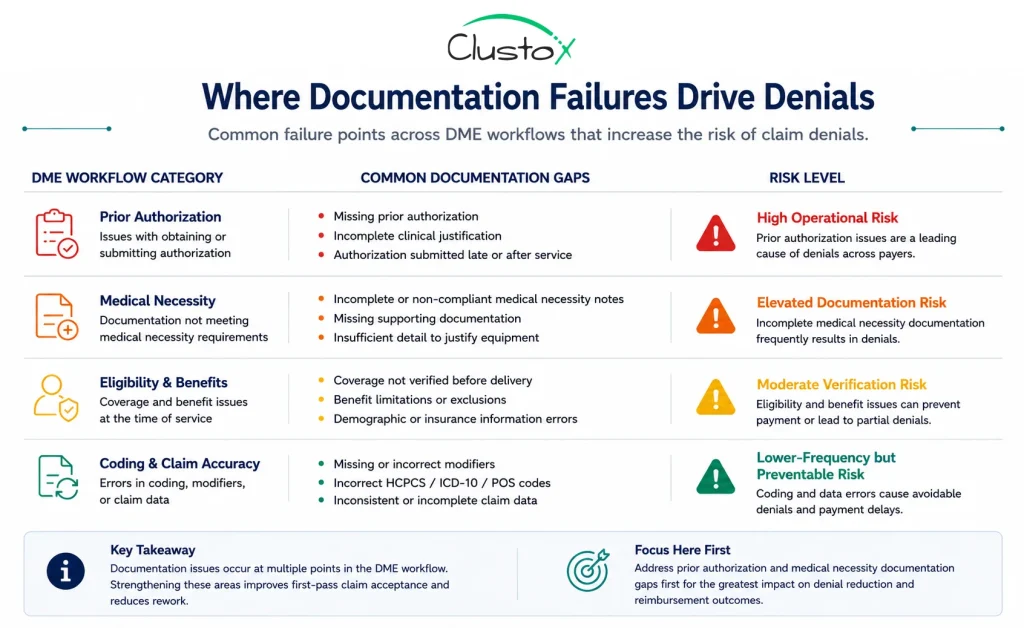
Not every document in your workflow carries the same compliance weight. Some create revenue risk. Others create audit risk. Understanding which is which helps you prioritize where automation matters most.
Prior authorization
Prior auth is the highest-volume, highest-stakes documentation workflow in DME. CMS requires prior authorization for selected DMEPOS categories, including certain power mobility devices, lower limb prosthetics, pressure-reducing support surfaces, and specific orthotic devices.
Automation here targets two things: completeness checking before submission and status tracking after. A system that flags missing clinical elements before the PA goes to the payer is worth more than one that simply tracks where the request sits.
LMN and physician order validation
Documentation supporting medical necessity must align with payer and Medicare requirements, including appropriate physician orders, supporting clinical records, and timely signatures where applicable. Missing or inconsistent documentation can increase denial risk and delay order processing. Automation systems help standardize validation workflows by checking incoming records against predefined documentation rules before staff review.
Eligibility and benefits verification
Eligibility verification is often treated as a billing step, but the documentation it produces matters for compliance. Incomplete eligibility verification records can create operational and reimbursement challenges during payer reviews and audits. Automated verification creates a timestamped record of what was checked and when.
Denial management and appeals
Every denial generates a paper trail. The appeal requires the original documentation, the denial reason, and a clinical argument. If your original records are incomplete, the appeal fails. Automation that maintains a clean original record makes appeals faster and more successful.
What Compliance Requirements Should Your Document Automation System Satisfy?
This is where many technology evaluations go wrong. A vendor demonstrates a clean dashboard and a fast workflow, but compliance requirements often receive less scrutiny than usability features. Before adopting any healthcare document automation platform, DME organizations should verify whether the system supports the regulatory, security, and documentation standards that govern patient records and reimbursement workflows.
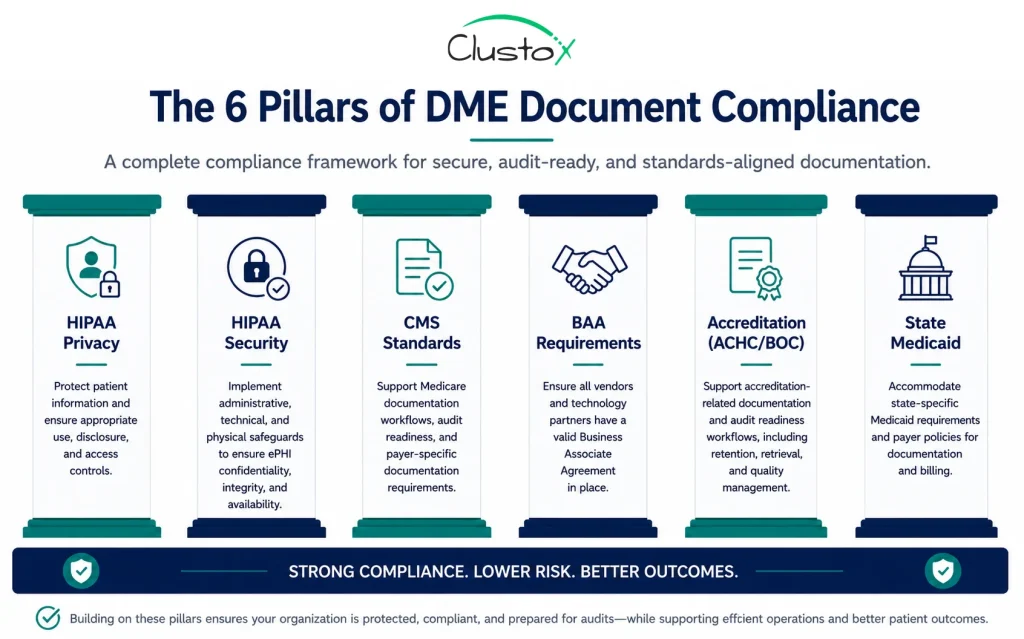
HIPAA Privacy and Security Rules
Any system that stores, processes, or transmits protected health information (PHI) must comply with HIPAA requirements. For document automation, that typically includes:
- Encryption of PHI at rest and in transit
- Role-based access controls and user permissions
- Audit logs showing document access and activity history
- Secure authentication and access management
- A signed Business Associate Agreement (BAA) with the vendor
A Business Associate Agreement is essential whenever a vendor handles PHI on behalf of a covered entity.
CMS documentation standards
CMS documentation requirements for DMEPOS claims vary by product category and payer workflow. Depending on the equipment type, suppliers may need supporting physician orders, Standard Written Orders (SWOs), medical-necessity documentation, prior authorization records, and related clinical documentation.
Your automation system should support configurable workflows that validate documentation requirements based on HCPCS codes, payer rules, and internal compliance policies rather than relying on a generic checklist.
ACHC and BOC accreditation requirements
If your organization holds ACHC or BOC accreditation, documentation practices may be reviewed as part of operational and compliance oversight. Policies related to document retention, retrieval processes, access management, and workflow consistency can all affect accreditation readiness.
Your automation platform should support the documentation controls and audit visibility required by your accrediting organization.
State-level Medicaid requirements
Because Medicaid programs are administered at the state level, documentation and prior authorization requirements can vary across jurisdictions. Organizations operating in multiple states may need workflows that support different payer forms, submission rules, and retention requirements.
When evaluating an automation platform, verify that it can accommodate the payer and Medicaid workflows relevant to your service areas.
| Compliance Requirement | What Your Document System Should Support |
|---|---|
| HIPAA Privacy Rule | Role-based access controls and minimum-necessary access to PHI |
| HIPAA Security Rule | Encryption, audit logging, authentication controls, and secure data handling |
| CMS documentation requirements | Configurable workflows for payer-specific and product-category documentation |
| Business Associate Agreement (BAA) | Signed vendor agreement for any PHI-related processing |
| Accreditation readiness | Documentation traceability, retention workflows, and retrieval consistency |
| State Medicaid requirements | State-specific prior authorization and documentation workflows |
How Does Prior Authorization Automation Actually Work in Practice?
Prior authorization is specific enough to deserve its own explanation. The manual process typically looks like this: a referral arrives, staff pull the clinical notes, check the payer’s PA requirements, compile the submission package, fax or portal-submit it, and then track status manually. That cycle takes three to ten days for many providers and is heavily dependent on staff availability.
An automated prior auth workflow replaces the manual steps with a defined process:
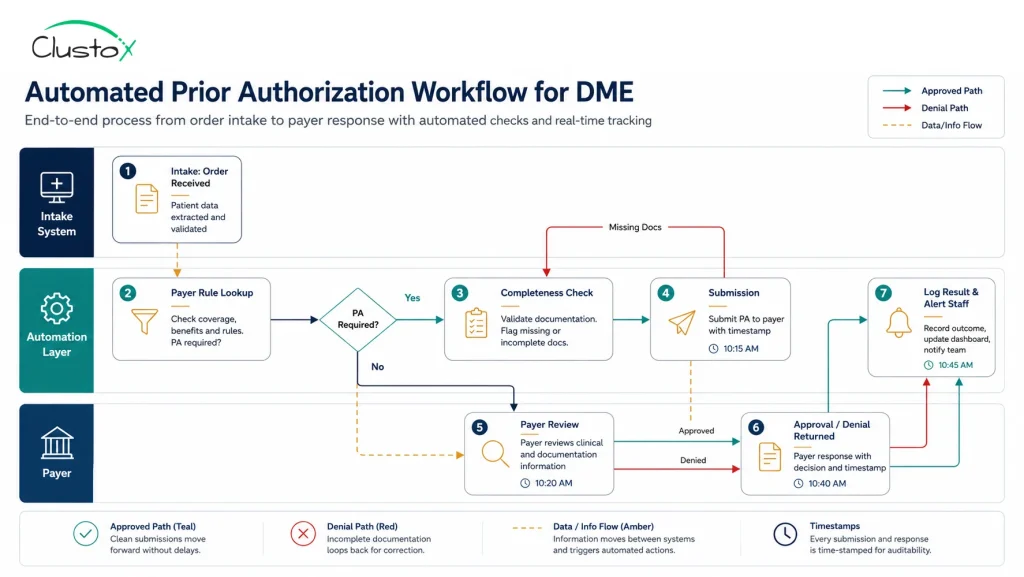
- Order receipt and data extraction. The system captures the incoming order and extracts key fields: diagnosis codes, HCPCS codes, ordering physician, and patient demographics.
- Payer rule lookup. The system checks the patient’s payer against a current rule set to determine whether prior auth is required and what documentation must accompany the request.
- Completeness check. Before submission, the system flags any missing clinical documentation. If the LMN lacks a required element, staff are alerted to obtain it before the request goes out.
- Submission. The request is submitted through the payer’s preferred channel, with a timestamp and submission record stored in the patient’s file.
- Status tracking and escalation. The system monitors response timelines and escalates overdue requests to staff. Approvals and denials are logged automatically.
The key compliance benefit is the audit trail. Every step is documented with timestamps. If a payer or auditor questions a prior auth, you have a complete record of what was submitted, when, and what the response was.
Common DME platforms with prior auth workflow capabilities include Brightree, NikoHealth, and TIMS. The degree of automation varies by platform and by how the system is configured for your payer mix.
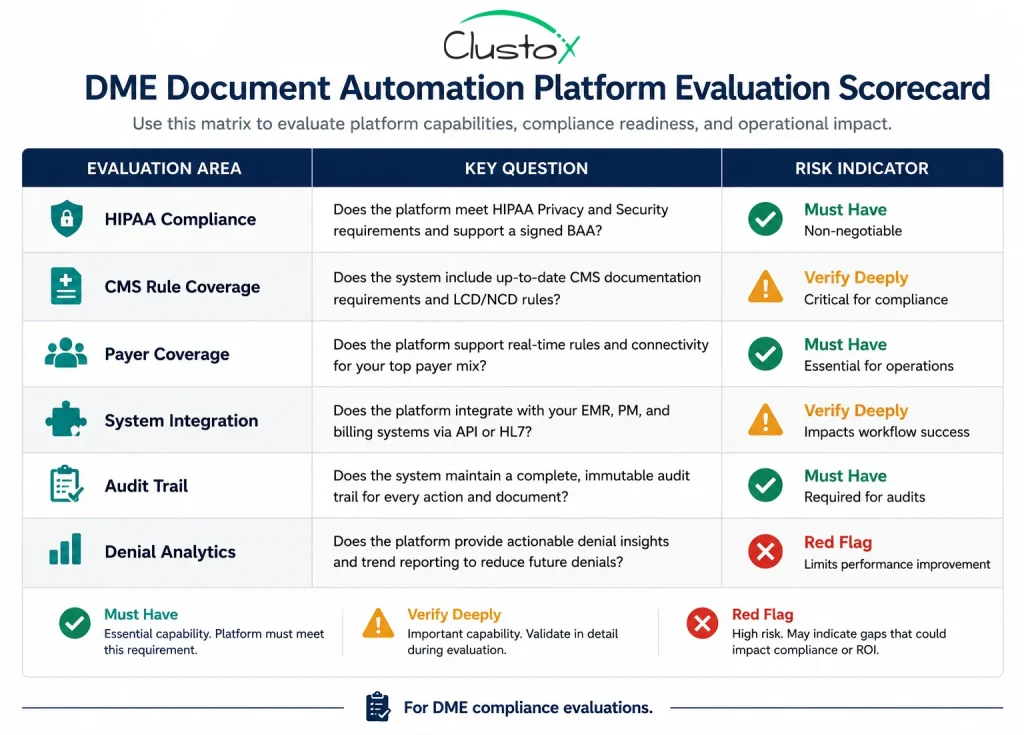
What Should You Look for When Evaluating a Document Automation Platform?
There are a lot of platforms making broad claims about automation. In a DME context, the questions that separate genuine capability from marketing language are specific.
| Evaluation Area | What to ask | Red flag |
|---|---|---|
| HIPAA compliance | Can you provide your BAA and your most recent security assessment? | Vendor hesitates or says BAA is not standard |
| CMS rule coverage | How do you handle HCPCS-specific documentation requirements? | Generic checklist with no product category logic |
| Payer coverage | Which payers are in your PA rule library, and how often is it updated? | Rules are static or require manual updates by your team |
| Integration | Does it integrate with Brightree/NikoHealth/TIMS/your current system? | API not available; integration requires custom work without a roadmap |
| Audit trail | Show me an audit log for a sample document over its full lifecycle. | Logs exist but are not easily exportable or searchable |
| Denial analytics | Can I see denial reason analysis by payer, product category, and period? | Reporting is limited to claim counts; no root cause visibility |
One question worth asking explicitly: does the vendor have DME-specific experience, or are they a general healthcare document platform? The rules governing DME documentation are distinct enough that generic platforms often require significant configuration to apply them correctly.
How Does Document Automation Reduce Claim Denials in DME?
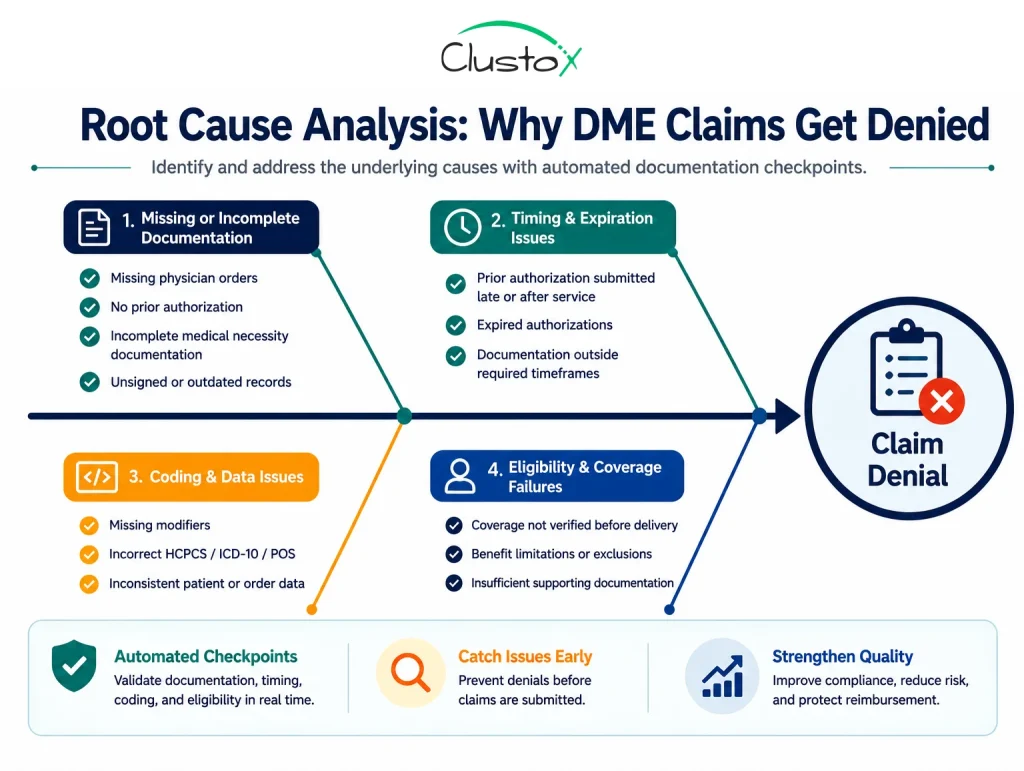
Claim denials in DME trace back to documentation failures more often than to coding errors. A claim with the correct HCPCS code but a missing modifier, an LMN without a required clinical element, or a prior auth that was submitted after the service date all produce denials that feel like billing problems but are actually documentation problems.
Document automation reduces denials through three mechanisms.
Pre-submission validation
The system checks every document against a defined rule set before anything is submitted to a payer. Missing elements trigger a task for staff to resolve before the claim or PA goes out. This moves the error to a point where it can be fixed without cost.
Consistent rule application
Manual processes are inconsistent. A experienced biller applies rules differently than someone newer to the role. Automation applies the same rule set every time, regardless of who is handling the workflow or how busy the team is.
Denial root cause visibility
Good automation platforms capture denial reason codes and link them back to the specific documentation element that was missing or incorrect. Over time, this creates a data set that shows you where your process breaks down repeatedly. You can fix a systemic issue instead of treating each denial as a one-off.
What Does a Compliant Document Retention Policy Look Like for DME?
Document retention is an area where many DME providers face compliance risk without realizing it. Medicare documentation requirements, HIPAA obligations, state Medicaid rules, payer policies, and accreditation expectations may all affect how long records must be retained and how quickly they must be retrievable during audits or reviews.
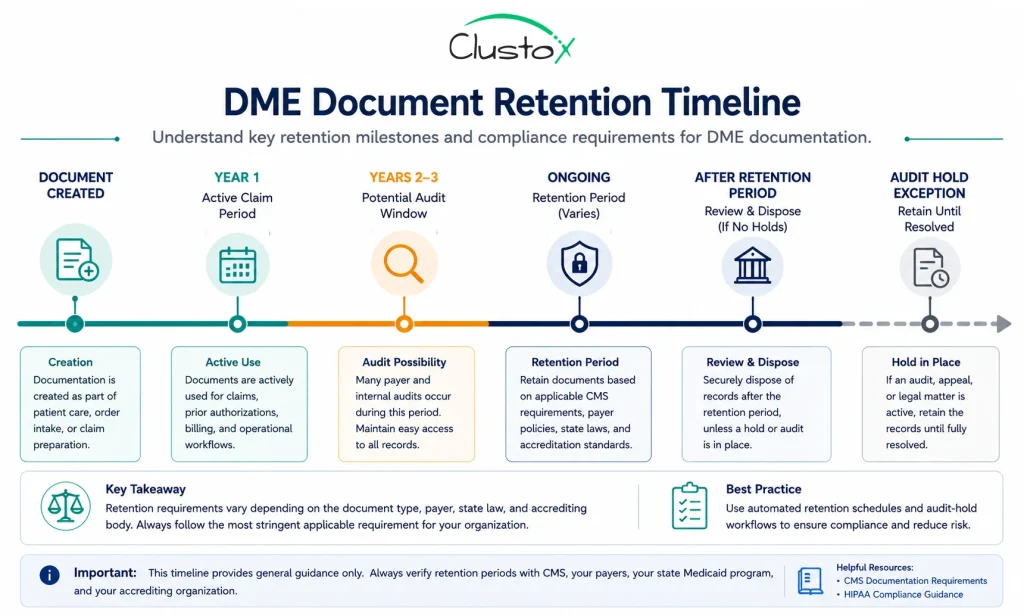
The general framework to work from:
| Document Type | Retention Considerations |
|---|---|
| Medicare claim documentation | Medicare suppliers should retain documentation supporting claims in accordance with CMS requirements and applicable audit obligations. |
| HIPAA compliance documentation | HIPAA requires covered entities and business associates to retain certain policies, procedures, and compliance documentation for six years. |
| Medical records and clinical documentation | Retention periods may vary based on state law, payer requirements, and organizational policies. |
| Prior authorization records | Prior authorization documentation should generally be retained alongside the related claim and supporting documentation. |
| Delivery confirmations and signature records | Delivery and proof-of-service records should remain accessible for audit and reimbursement review purposes. |
| Accreditation-related documentation | Retention expectations may vary by accrediting organization and documentation category. |
HIPAA requires covered entities and business associates to retain certain HIPAA-related policies, procedures, and compliance documentation for six years. However, medical-record retention requirements may vary based on state law, payer contracts, accreditation standards, and organizational policy requirements.
Your document automation system should support configurable retention schedules, controlled archival workflows, audit-ready retrieval processes, and documented exception handling for records subject to ongoing audits, investigations, or legal holds.
How Do You Implement Document Automation Without Disrupting Active Operations?
This is the question that slows most implementation decisions down. You cannot pause your billing operation to rebuild your documentation process. The risk of a disrupted workflow during implementation is real, and vendors who minimize it are not being honest with you.
A practical implementation approach for DME providers has three phases:
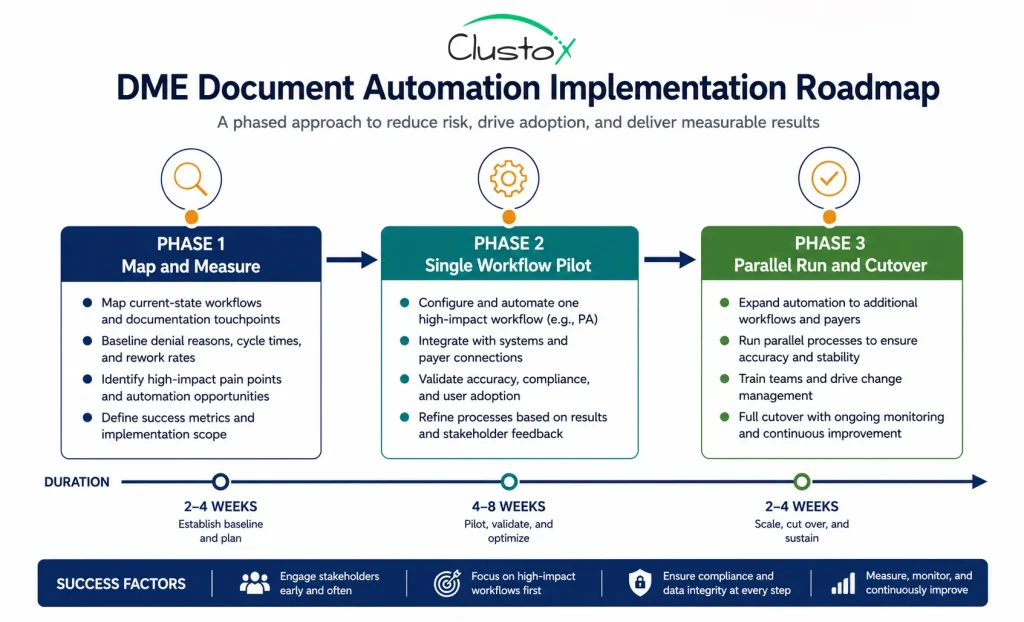
Phase 1: Map and measure before you automate
Before any software is deployed, document your current workflows in enough detail to identify where manual steps introduce error or delay. Measure your current prior auth turnaround time, your denial rate by reason code, and your average time to retrieve documents for an audit. These are your baseline numbers. You cannot evaluate whether automation is working without them.
Phase 2: Start with a single, high-volume workflow
Trying to automate everything at once is the most common implementation failure. Pick one workflow, usually prior authorization or LMN validation, and build the process correctly before expanding. A well-implemented single workflow will demonstrate the value and build staff confidence faster than a broad rollout that breaks multiple processes simultaneously.
Phase 3: Parallel run before full cutover
Run your automated workflow alongside your manual process for a defined period, typically two to four weeks. Compare outputs. The parallel run will surface configuration gaps that did not appear in testing. It also gives your team time to develop confidence in the new process before the manual fallback is removed.
Implementation note
The leading cause of failed document automation implementations in DME is insufficient payer rule configuration at go-live. The system goes live with a general rule set, produces incomplete prior auth packages, and staff lose confidence in the tool. Budget time for payer-specific rule configuration and testing before you go live.
How Does Agentic AI Change What Document Automation Can Do for DME?
Standard document automation applies rules. An if-then logic: if the LMN is missing field X, flag it. That is useful, but it is bounded by what you configure explicitly.
Agentic AI systems extend this by handling tasks that require judgment and multi-step execution. In a DME documentation context, that means an AI agent that can read an incoming clinical note, identify the relevant diagnosis codes and clinical criteria, cross-reference them against the applicable LCD (Local Coverage Determination) for that product category, and generate a prior auth draft for staff review.
This is materially different from rule-based automation. It does not replace the compliance check. It handles the interpretation work that currently requires experienced staff.
The practical applications in DME include:
- LMN gap analysis: the system reads the physician’s note and identifies missing clinical elements before the LMN is even requested
- PA draft generation: a structured prior auth request is assembled from the clinical documentation, reducing the time staff spend on data entry
- Denial appeal drafting: the system reviews the denial reason, the original documentation, and the applicable payer policy, then drafts the appeal argument
- Audit response preparation: when an ADR (Additional Documentation Request) arrives, the system identifies and compiles the relevant records
The compliance requirement does not change. A human with appropriate authority must review and approve any submission. What changes is the preparation time. Tasks that take 30 to 45 minutes manually take three to five minutes with an AI-assisted workflow.
Conclusion
Healthcare document automation in DME is not about replacing your compliance team or your billing staff. It is about removing the manual, error-prone steps that sit between a complete document and a paid claim.
The providers who implement this well start with a clear baseline: they know their denial rate, their prior auth turnaround time, and where their documentation gaps live. They choose platforms that are genuinely configured for DME, not adapted from a general healthcare template. They implement in phases rather than all at once. And they treat compliance as the design constraint, not an afterthought.
The CMS rules, HIPAA requirements, and accreditation standards your operation operates under are not going away. Document automation does not reduce your compliance obligations. It makes meeting them consistently easier, and it creates the audit-ready records that protect you when a payer or regulator asks questions.
If your documentation process is creating denials, consuming staff hours, or leaving you uncertain about your audit readiness, that is the problem worth solving.
Ready to Fix Your Documentation Workflow?
Most DME providers we talk to are losing 10 to 20 hours per week to manual document handling. Our team maps your exact workflow, identifies where denials originate, and shows you what an automated process looks like for your operation.
Frequently Asked Questions (FAQs)
Does a document automation vendor need to sign a BAA?
Yes. Any vendor whose system processes, stores, or transmits protected health information is a business associate under HIPAA. A signed BAA is required before the system can handle patient documents. Do not proceed with any vendor who cannot provide one.
Can document automation handle multiple payer rule sets?
It depends on the platform. Better platforms maintain a library of payer-specific prior auth and documentation rules that is updated regularly. Generic platforms may require you to configure those rules manually. Ask the vendor specifically which payers are in their rule library and how often it is updated.
What are the most common reasons document automation implementations fail in DME?
The most common causes are insufficient payer rule configuration before go-live, trying to automate too many workflows simultaneously, not establishing baseline metrics before implementation, and poor staff training on exception handling when automation flags an issue.
Does document automation change how CMS audits work?
No. CMS audit processes and Additional Documentation Request (ADR) requirements are unchanged. What automation does is make responding to an ADR faster and more reliable, because your records are complete and retrievable rather than scattered across paper files or inconsistently named digital folders.
How long does it take to implement prior authorization automation in a DME operation?
A realistic timeline from baseline mapping to stable live operation is eight to sixteen weeks, depending on the complexity of your payer mix and the state of your current documentation process. Providers who try to compress this timeline typically encounter configuration problems that take longer to fix than the time they tried to save.
What is an LMN, and why does it matter for document automation?
A letter of medical necessity is a clinical document from a prescribing physician that justifies the medical need for a piece of durable medical equipment. CMS requires specific clinical elements in an LMN to support Medicare coverage for most covered items. Automation that validates LMN completeness before submission is one of the highest-value compliance checkpoints in a DME workflow.
Can agentic AI tools be used for DME documentation without violating HIPAA?
Yes, if the system is properly configured and the vendor has signed a BAA. The same HIPAA requirements that apply to any PHI-handling system apply to AI tools. The AI component does not create a HIPAA exception. Ensure your vendor can demonstrate HIPAA compliance, provide a BAA, and explain how PHI is handled within their AI processing pipeline.
Disclaimer
This article is intended for DME providers, operations leaders, and technology decision-makers. It is not medical advice and does not constitute guidance on patient care, equipment selection, or clinical decisions. Regulatory references (CMS, HIPAA, and accreditation standards) are accurate as of the review date; regulations change frequently, and providers should consult primary sources or qualified counsel for current requirements.