


There’s nothing worse than a video call that keeps freezing, cutting out, or lagging right when you need it most.
We’ve all been there… mid-conversation, trying to make an important point, and suddenly the connection fails. Team meetings, client calls, or catching up with friends can all go sideways when your video call glitches, making everything feel off.
The good news is you don’t have to settle for calls that constantly glitch. WebRTC allows real-time video and audio, sending everything straight between your users’ devices without extra downloads or setups.
That means faster, clearer calls that feel natural, exactly what your users will appreciate every time they connect.
In this blog, we’ll cover everything you need to know about WebRTC app development: the essential features, tools, and APIs; step-by-step guidance; and tips to keep your app running smoothly.
By the end, you’ll have a clear roadmap for creating a video-calling experience your users will actually enjoy in 2026.
What is WebRTC?
If you’ve ever wondered how apps like Google Meet or Messenger let you jump on a video call without downloading anything, WebRTC (Web Real-Time Communication) is the secret behind it.
WebRTC makes video and audio flow directly between devices in real time, much like how modern streaming platforms manage live video. Understanding real-time video streaming architecture can give you a clearer picture of how to keep your calls smooth and reliable.
Table of Contents
Common Examples of WebRTC Apps
Here are some apps you probably use every day that rely on WebRTC to keep video calls running smoothly:
- Google Meet: Jump on a video call straight from your browser.
- Discord: Voice and video chat for gamers and communities.
- Facebook Messenger: Make video calls without leaving the app.
- Slack: Quick team video calls right inside your workspace.
- Zoom (Web Version): Browser calls often use WebRTC for smooth connections.
These examples show just how versatile WebRTC is, handling everything from casual chats to real-time video streaming. It’s the technology that helps you build a video calling app your users can count on.
What Are the Core Features of a WebRTC Video Calling App?
For a video calling app to really click with users, smooth video and audio are just the start. A solid WebRTC video app also needs to feel steady, quick to respond, and simple enough that anyone can jump in without thinking twice.
When you focus on the right WebRTC app features early on, you set the foundation for calls that feel reliable across both mobile and web.
The following are the essential features that make your app reliable:
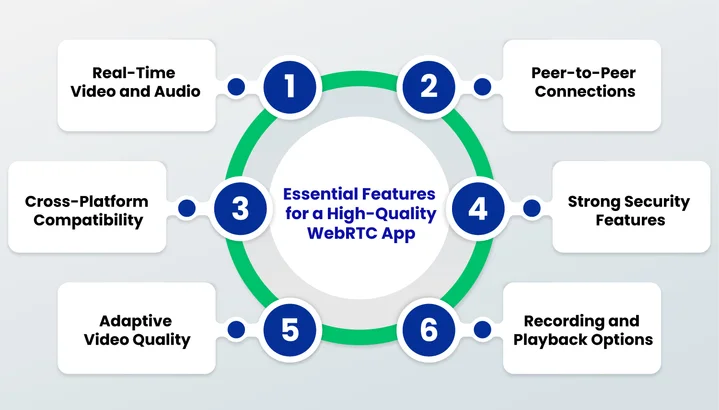
1. Real-Time Video and Audio
Instant video and audio are what make a video chat app feel natural. Calls that lag or have out-of-sync sound frustrate users quickly, so focusing on reliable real-time communication keeps your app professional and dependable.
2. Peer-to-Peer Connections
One of the biggest advantages of WebRTC is its peer-to-peer architecture. This allows audio, video, and data to travel directly between users’ devices, reducing latency and improving call quality. Peer-to-peer connections help your communication stay fast and efficient, even when handling multiple participants.
3. Cross-Platform Compatibility
Your users jump between devices all the time. Supporting iOS, Android, and web ensures your video calling app works for everyone.
A cross-platform video chat app means users can switch from their phone to their computer mid-call without interruptions, keeping the experience smooth and flexible.
4. Strong Security Features
Privacy is a must for work meetings, online classes, or personal chats. Integrating WebRTC app security features protects users and builds trust in your app.
Essential security measures include:
- Encryption: Keeps calls and data private from outside access.
- Secure Token Authentication: Ensures only authorized users can join calls.
- Safe Data Transfer: Protects any files or messages shared during calls.
A secure app encourages users to stick with your platform without worrying about their calls being exposed.
5. Adaptive Video Quality
Internet connections aren’t always perfect, and your app needs to handle that.
WebRTC allows video calls to adjust resolution and bandwidth automatically so the call stays clear, even if the network fluctuates. Users notice when calls remain smooth, which makes your app feel reliable no matter the situation.
6. Recording and Playback Options
Recording calls can be a huge bonus for business meetings, webinars, or online classes.
Adding recording and playback features to your app gives users the flexibility to revisit important moments without complicating the call experience. It’s a feature that adds value and makes your app more useful for everyday needs.
With these features in place, it’s time to check out the tools and APIs that actually bring your app to life.
Which WebRTC APIs and Tools Do You Need to Build Your App?
After you know which features your video calling app needs, the next step is picking the tools and APIs that make it all work. It’s like building a house; features are the rooms, but APIs and development tools are the foundation and wiring that make everything function.
Let’s look at the main tools that help your WebRTC video chat app come to life:
WebRTC SDKs
Software Development Kits (SDKs) can speed up your video app development by handling a lot of the heavy lifting. They let you focus on the app experience while taking care of tricky things like signaling, peer-to-peer connections, and cross-platform support.
Some commonly used WebRTC SDKs include:
- Twilio Video: Great for quick integration and multi-platform support.
- Agora: Known for real-time video streaming with low latency.
- Daily.co: Simple, lightweight, and easy to add to web or mobile apps.
- Vonage (formerly TokBox): Offers APIs for large-scale video calls.
Using an SDK is a smart way to get a high-quality WebRTC video calling app up and running without building every part from scratch.
APIs for Video, Audio, and Signaling
APIs are the heart of any real-time communication app.
It’s time for a quick overview of the essentials:
- getUserMedia: Gives your app access to the user’s camera and microphone. Users stay in control, which is great for privacy.
- RTCPeerConnection: Handles the peer-to-peer connections so audio and video can flow directly between users.
- RTCDataChannel: Lets you send data like chat messages or files alongside the video stream.
- Signaling APIs: These manage the initial handshake between users so connections can be established quickly and smoothly.
Combining these APIs correctly lets your WebRTC app run smoothly on both web and mobile platforms.
With SDKs and APIs in hand, you’ll want to pick the right combination based on your goals:
- Are you aiming for a simple one-on-one chat or a multi-party conference?
- Do you want a mobile-first app or something that works across all devices?
- How much control do you need over video quality, network management, and custom features?
Answering these questions helps you pick the best WebRTC tools for your project without wasting time on unnecessary complexity.
Never Lose a User to Frozen Video Again. With a reliable app development approach from Clustox, your video chat apps stay smooth, fast, and uninterrupted.
Next, we’ll walk through how to actually build your WebRTC app, step by step, so you can see how all these pieces fit together.
Step-by-Step Guide: Building Your WebRTC App
Getting your WebRTC video chat app from an idea to a working app might seem tricky, but breaking it down into clear steps makes it much simpler. It’s somehow like assembling a recipe: follow each step, and it all comes together smoothly.
Follow along as it all comes together smoothly.
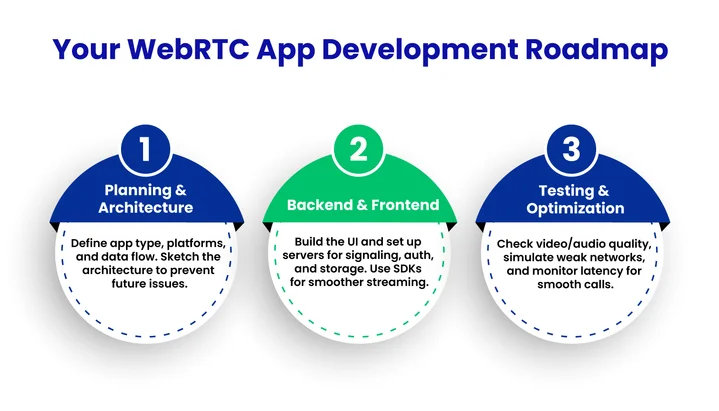
Step 1. Planning and Architecture
Before writing a single line of code, figure out how your app will work:
- What type of calls will you support: one-on-one, group, or both?
- Which devices and platforms should your app run on?
- How will data, video, and audio flow between users?
Sketching out a simple architecture helps you avoid headaches later and ensures your video conferencing app development stays on track.
Step 2. Backend and Frontend Implementation
Now it’s time to bring your app to life:
- Frontend: Build the interface users interact with, including buttons, video windows, and chat features.
- Backend: Set up servers for signaling, authentication, and optional storage if you’re recording calls.
Using popular WebRTC SDKs here can save a lot of work and make handling real-time video streaming easier across web and mobile.
If you want your WebRTC app to run smoothly on both iOS and Android, it’s a good idea to get guidance from expert mobile app developers who know how to build reliable, high-performance apps.
Step 3. Testing and Performance Optimization
Even small hiccups can ruin a video call experience, so testing is critical:
- Check video and audio quality on different devices.
- Simulate slow or unstable networks to see how your app reacts.
- Monitor latency and frame drops to keep calls smooth.
This step ensures your WebRTC app feels natural and responsive, no matter how your users connect.
After development, it’s important to review the estimated costs and considerations.
What Is the Estimated Cost of a WebRTC Video Calling App?
When planning infrastructure and bandwidth requirements, teams should also think beyond initial development and focus on optimizing cloud costs for video-heavy applications, especially as real-time usage and concurrent calls increase.
To make it easier, we can break app development into three common scenarios:
Basic WebRTC App
A simple WebRTC video chat app for one-on-one calls usually costs around $15,000–$35,000. This covers mobile and web support, a basic backend, and standard testing. It’s perfect if you want a clean, functional app without too many extra features.
For many startups or first-time projects, building an MVP (Minimum Viable Product) is a smart choice. It allows you to test your idea, gather user feedback, and validate the concept before investing in a full-featured platform.
Advanced WebRTC App
If you want features like group calls, adaptive video quality, or call recording, expect costs in the $35,000–$70,000 range. This setup makes your real-time communication app more flexible and enjoyable for multiple participants.
Full-Scale Cross-Platform App
For apps with analytics, multi-device support, chat, file sharing, and extra integrations, costs start around $70,000–$120,000+. This range covers both mobile and web, giving your users a complete real-time experience.
With these estimates in mind, you can plan your development strategy and pick the right approach for your users’ needs.
Spending Thousands on Development Means Nothing if Your Calls Freeze Under Pressure.
What Are The Best Practices for Optimizing WebRTC App Performance?
Even with the right features and APIs, your app can only shine if it runs smoothly. Lag, glitches, or poor video quality can frustrate users, no matter how many features you pack in. To make sure your video calling app delivers clear, responsive calls, a few smart practices can make a big difference.
Following these practical strategies can make a big difference:
- Keep calls fast by using direct peer-to-peer connections between users’ devices to reduce lag.
- Let the video adjust automatically when the network is weak so calls stay clear without interruptions.
- Watch metrics like jitter, packet loss, and frame rate to spot and fix quality issues quickly.
- Use codecs like VP8, VP9, or H.264 to make video streaming smoother and more efficient.
- Make sure your app works well on both mobile and web so users can switch devices easily.
- Plan for larger group calls with selective forwarding units (SFUs) to handle multiple participants smoothly.
- Manage bandwidth dynamically to adapt to changing network conditions and keep calls steady.
Applying these tips helps your app stay fast, clear, and dependable, exactly what every user wants from a video call.
Bringing It All Together
We’ve covered everything you need to know about WebRTC app development, from understanding real-time communication and peer-to-peer connections to picking the right features, APIs, and tools.
Considering costs, performance best practices, and cross-platform support helps you plan an app that’s genuinely enjoyable for users.
As 2026 approaches, AI-driven improvements are becoming more common; future apps can automatically improve video quality, reduce noise, and make calls even more engaging across devices.
Now it’s all about putting the pieces together. Focus on smooth video and audio, secure connections, and smart performance strategies, and you’ll have an app that can deliver engaging, high-quality experiences across devices.
With a reliable app development approach, your WebRTC calls stay smooth and uninterrupted, giving users a seamless experience every time.
Take the next step and start building a WebRTC app that your users will want to return to again and again!
Frequently Asked Questions (FAQs)
What Role Does ML Play in Adaptive Bandwidth and Video Quality in WebRTC?
Machine learning helps your WebRTC app adjust video resolution and bitrate in real time based on your users’ network conditions. It predicts fluctuations and optimizes streaming to reduce lag or pixelation. This keeps your calls smooth and ensures a better experience for everyone.
How Secure Are AI-Assisted WebRTC Video Calls Compared to Traditional Calls?
AI-assisted WebRTC calls are generally as secure as standard calls because encryption and token-based authentication are still applied. AI mainly improves video quality or bandwidth, not your app’s security layer. With proper implementation, your users’ privacy stays protected while performance improves.
Can WebRTC Integrate With Virtual or Augmented Reality Experiences?
AI-assisted WebRTC calls are generally as secure as standard calls because encryption and token-based authentication are still applied. AI mainly improves video quality or bandwidth, not your app’s security layer. With proper implementation, your users’ privacy stays protected while performance improves.
What Future Trends Are Shaping WebRTC Apps in 2026 and Beyond?
Trends to watch in WebRTC app development include:
- AI-driven video optimization.
- Smarter bandwidth management.
- Multi-party conferencing improvements.
- Integration with AR/VR experiences.
- Cloud-based media processing.
These developments will make your WebRTC apps faster, more interactive, and increasingly intelligent.
From AI-Powered Quality Boosts to Low-Latency Architecture, 2026 Video Chat Apps Demand More.